Participant
November 19, 2021
Question

Blurry UI Fonts in Photoshop when it is the active window (Mac OS)
  • November 19, 2021
  • 5 replies
  • 1522 views


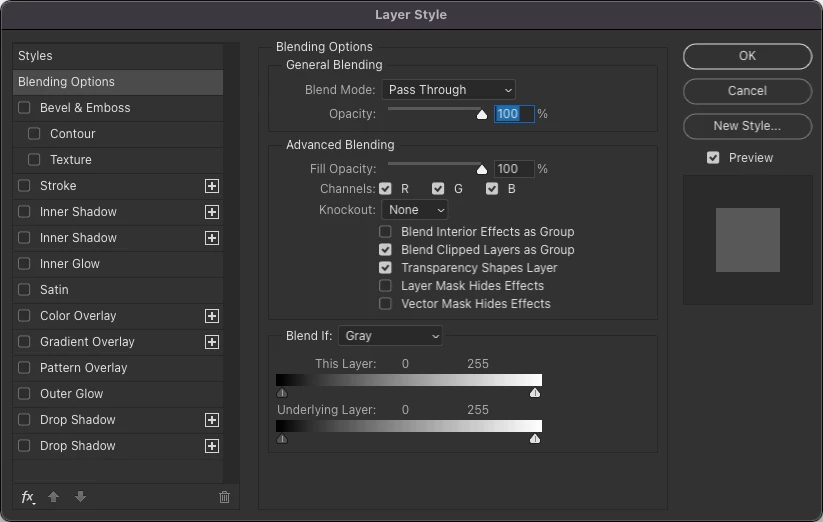
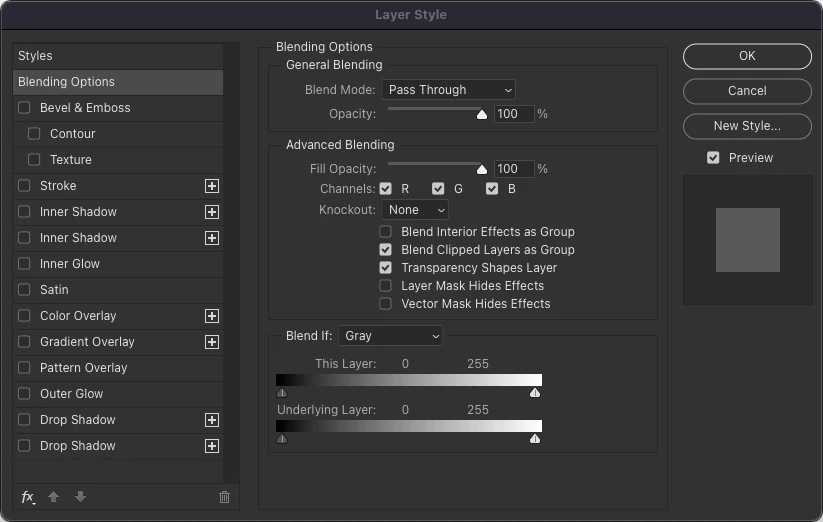
I'm finding that some UI fonts in Photoshop are blurry. Weirdly, when Photoshop is not the active window (ie. I click a finder window) the fonts become sharp (Screenshot #1). Once I click back into Photoshop, they blur again (Screenshot #2). It's driving me crazy and I would appreciate a fix.


Photoshop:

23.0.1

UI Font Size: Medium

Scale UI To Font: DISABLED


Mac:

macOS Monterey 12.0.1

3.5 GHz 6-Core Intel Xeon E5

16 GB 1866 MHz DDR3

AMD FirePro D500 3 GB


This topic has been closed for replies.

5 replies

Jeff Arola
Community Expert
Community Expert
April 1, 2023

2012 MacBook Pro running macOS Monterey 12.6.3 with Photoshop 2023 (ps ver 24.3)

1280 x 800 built in display at default resolution


The way the forum displays the videos, if you really want to see clearly, the video(s) need to be

downloaded and played rather than looking at it in the forum.


Jeff Arola
Community Expert
Community Expert
April 1, 2023

Short video clip demonstrating having a partly blurry dialog open in photoshop then clicking on

an open finder window and the blurry dialog becomes sharp.


2022 Mac Studio M1 Processor, macOS Ventura 13.3 running Photoshop 2023 (ps ver 24.3)

external 1920 x 1200 resolution screen


Jeff Arola
Community Expert
Community Expert
March 23, 2023

After the most recent photoshop updates of Photoshop 2023 (ps ver 24.3) and Photoshop 2022 (ps ver 23.5.5) a variety of dialogs are part blurry, part sharp in both versions on all the six Macs i've tested so far ranging from a 2012 MacBook Pro running macOS Monterey 12.6.3 to a 2022 Mac Studio running macOS Ventura 13.2.1.


Reset the Photoshop Preferences on three of the systems, but made no difference.


Here are but a few examples from a 2022 Mac Studio running Photoshop 24.3 on macOS ventura 13.2.1


Jeff Arola
Community Expert
Community Expert
March 29, 2023

After some further "testing", here are the results of hooking up an external lower resolution screen to a 2017 Retina 21.5 iMac


Default iMac Retina display screen with 4096 x 2304 resolution

sharp screen and dialogs


External 1920 x 1200 resolution display

less sharp screen to be expected, however, the dialogs definitely have blurry areas


Jeff Arola
Community Expert
Community Expert
April 1, 2023

Hey all,


The team has come back with this, hope it helps:


"Some of the screen modes apple supports are not actually 2:1, but they have the app render at 2x then they sample down to the actual screen res, which is going to soften the image. Photoshop cannot detect this situation nor even if it could do anything about it (we inquired a few years ago due to other posts of customer image looking blurry at 100% when in fact it was just the OS)."


Cory,


I've been using the same resolution  screens 1920 x 1200 for over tens years and never saw this on all the Macs i used during that time period and now all of a sudden in the last few years users are starting to see this?

I never even noticed this until the 24.3 Photoshop update, but obviously it's been around for awhile for other users.


This doesn't occur or least we've never seen it on any of the Macs with Mojave 10.14 or older mac operating systems. I've tried other screens set to their default resolutions like 1200 x 1080. 1600 x 1050 and 1200 x 800 on a total of six different Macs all of different years, Intel and M1 processors, varied ram, etc and they all exhibit the blurry parts of some Photoshop dialogs. I can actually see the blurriness on some of the Macs using their own built in Retina displays set at the Default for Display settings, but it's much more extreme on lower resolution non retina screens.


Something has changed somewhere, like in macOS and Photoshop is relying on some code that doesn't work anymore. It's just weird that if like the op posted, Photoshop is open with one of the blurry dialogs displayed and one clicks on an open finder window or the desktop, the blurry dialog all of a sudden becomes sharp?


Also, no Photoshop Elements versions exhibit this behavior.

Participant
November 22, 2021

Hey Jeffrey, thanks so much for the response. Both displays (27" Thunderbolt Display & 27" LED Cinema Display) are set to "Default for Display".

Legend
November 20, 2021

@Ryan21843531ont5 I wasn't able to reproduce. Wondering if there's a combination with the OS monitor scaling? What's your dialog settings look like at the OS level?