Participant
October 29, 2023
Answered

Box that now appears on layer masks

  • October 29, 2023
  • 2 replies
  • 677 views

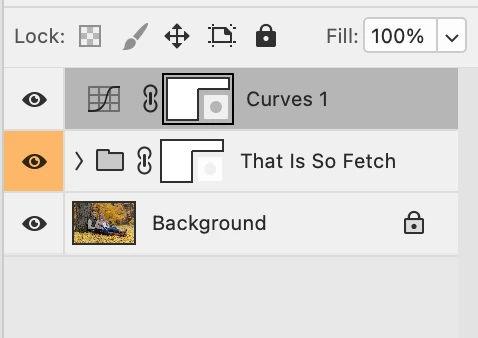
Can anyone advise what the little box is that now appears in the lower righthand corner of layer masks and how to remove it if possible?

This topic has been closed for replies.
Correct answer Trevor.Dennis

Lots of threads about this.  Check the bottom of this thread

https://community.adobe.com/t5/photoshop-ecosystem-discussions/layer-mask-thumbnail-only-shows-mask-icon/m-p/13998302

2 replies

gener7
Community Expert
Community Expert
October 29, 2023

Those little boxes indicate whether your mask is Pixel (left) or Vector (right)


No option for removing them that I know about, so adjust the layer thumbnail size to Large.


Edit: From what I'm reading in Trevor's post, Adobe will add the option to remove the badges in a future release, 25.2


Trevor.Dennis
Community Expert
Trevor.DennisCommunity ExpertCorrect answer
Community Expert
October 29, 2023
Participant
October 29, 2023

Thank you Trevor.Dennis! I sure hope the add the feature to turn it off in the production version a.s.a.p. I absolutely hate it!