Exit
  • Global community
    • Language:
      • Deutsch
      • English
      • Español
      • Français
      • Português
  • 日本語コミュニティ
  • 한국 커뮤니티
0

Bridge 2020 opening Photoshop 2019

Engaged ,
Mar 25, 2020 Mar 25, 2020

I'm working on a PC with the latest version of widows 10 and all Adobe updates done.

I've uninstalled Bridge 2019 to ensure this somehow wasn't interferring. Double clicking images in Bridge 2020 opens Photoshop 1919 unless Photoshop 2020 is already open. If Photoshop 2020 is open then images double clicked in Bridge 2020 will open where I want them to open in Photoshop 2020.


I'm reluctant to unstall Photoshop 2019 because there are occasions when I need a two versions of Photoshop open (abeit I understand this isn't normally advised)

Thank you

1.4K
Translate
Report
Community guidelines
Be kind and respectful, give credit to the original source of content, and search for duplicates before posting. Learn more
community guidelines

correct answers 1 Correct answer

Community Expert , Mar 25, 2020 Mar 25, 2020

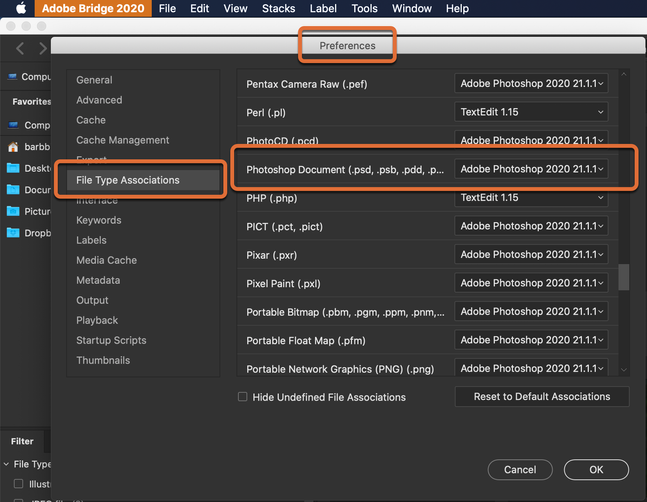
Check the File Type Associations in Preferences > File Type Associations. What is listed for Photoshop Document?


~Barb


ps.png

Translate
Adobe
Community Expert ,
Mar 25, 2020 Mar 25, 2020

Check the File Type Associations in Preferences > File Type Associations. What is listed for Photoshop Document?


~Barb


ps.png

Translate
Report
Community guidelines
Be kind and respectful, give credit to the original source of content, and search for duplicates before posting. Learn more
community guidelines
Engaged ,
Mar 26, 2020 Mar 26, 2020

Thank you Barb! Yes, I think this is the issue for sure. All of my Bridge 2020 file type associations are set to Photoshop 2019. What do I have to do? Navigate to Photoshop.exe in the Photoshop 2020 for each and every file association? I tried "reset to default associations" but that changed nothing.


Thanks so much 🙂

Translate
Report
Community guidelines
Be kind and respectful, give credit to the original source of content, and search for duplicates before posting. Learn more
community guidelines
Community Expert ,
Mar 26, 2020 Mar 26, 2020

Yes. They should have updated automatically (mine did), but if not you can fix the ones you need to manually.


~Barb

Translate
Report
Community guidelines
Be kind and respectful, give credit to the original source of content, and search for duplicates before posting. Learn more
community guidelines
Engaged ,
Mar 26, 2020 Mar 26, 2020

Thanks Barb...mine didn't so I'll update manually. I wasn't aware of this preferrence to good to know.


g

Translate
Report
Community guidelines
Be kind and respectful, give credit to the original source of content, and search for duplicates before posting. Learn more
community guidelines
Contributor ,
Mar 24, 2021 Mar 24, 2021
LATEST

Mine are all blank and it doesn't allow me to select Photoshop. Only browse a folder on my computer. Does not seem right.


PLEASE EXPLAIN IN DETAIL HOW TO DO THIS. I AM SO UPSET RIGHT NOW!!!

Translate
Report
Community guidelines
Be kind and respectful, give credit to the original source of content, and search for duplicates before posting. Learn more
community guidelines