
Participant
May 7, 2021
Question

Brownish hue and interface

  • May 7, 2021
  • 1 reply
  • 818 views

I have over some time had problems with my photoshop interface and colour picker. the problem is that the whole interface is brownish and I'm not able to get the right colours.

I have totally reset all settings to default and even updated the newer versions to try and fix it, but no luck.
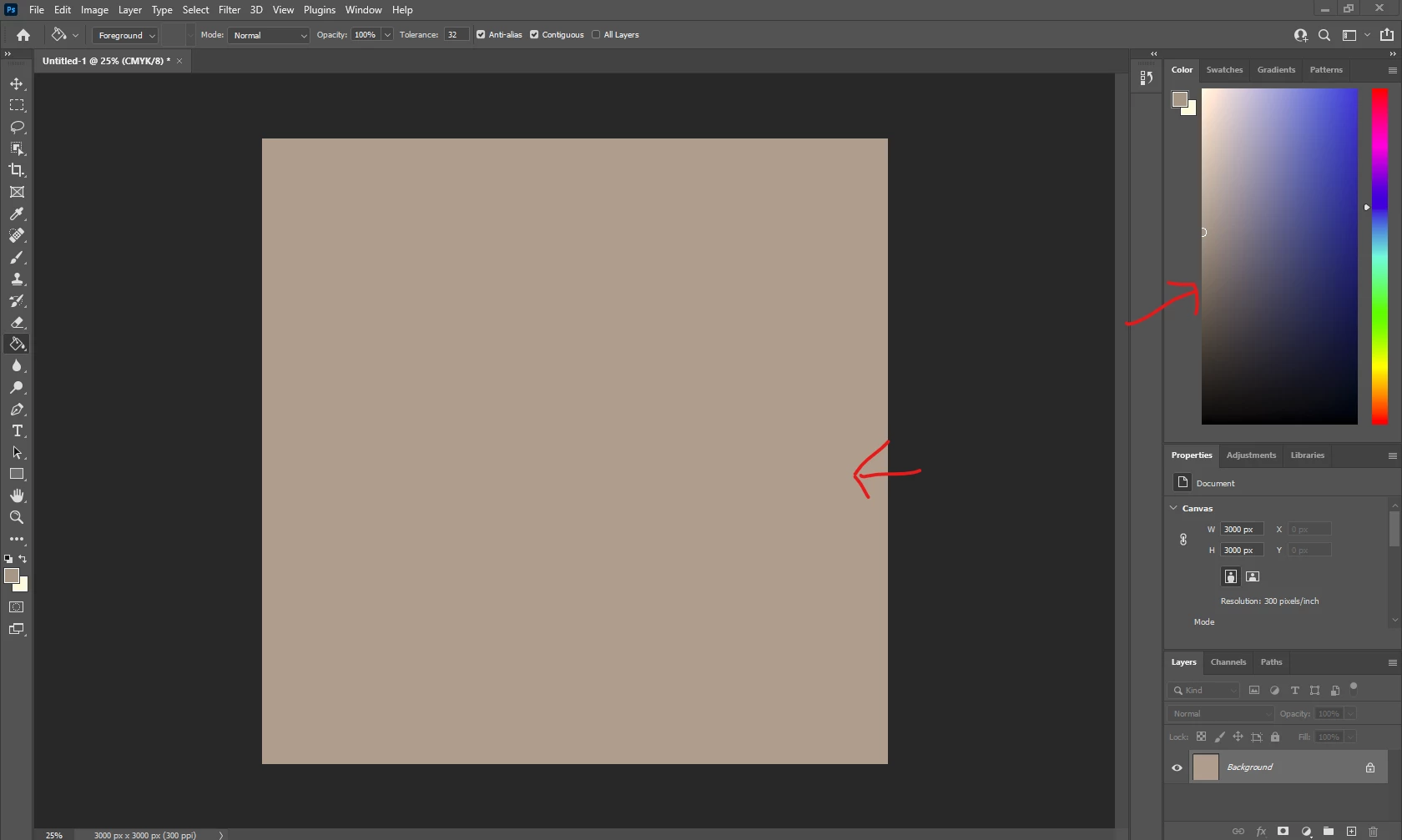
 

i would appreciate it if anyone are able to help me in this situation.

This topic has been closed for replies.

1 reply

Per Berntsen
Community Expert
Community Expert
May 8, 2021

You have a defective monitor profile, probably delivered by a Windows update, which is known to install low quality profiles from monitor manufacturers. These profiles are often defective out of the box.

Photoshop and other color managed applications use the monitor profile to be able to display correct colors.

The colors are converted from the document profile to the monitor profile.

Applications like the Photos app are not color managed, and are unaffected by a bad profile.


To fix the problem, set the monitor profile to sRGB (use Adobe RGB if you have a wide gamut monitor).

This may not be entirely accurate, so for best results you should calibrate the monitor with a hardware calibrator.

This will also create and install a custom monitor profile, that describes your monitor accurately.


With Photoshop closed, press the Windows key + R, type colorcpl in the box and press Enter.

Add the sRGB profile, then set it as default.