Rhyannon
Known Participant
August 26, 2023
Answered

Brush and Eraser tool

  • August 26, 2023
  • 2 replies
  • 468 views

Hi,

I have the subscription ps, so its up to date. I am on a mac computer , not a lap top.  I was switching a brush size and shape in the tool and soon as I click off it to actually paint with the brush it jumps down to the eraser tool.  I am not sure what I am doing wrong or why it is doing it. Any help is appreciated. Thank you
This topic has been closed for replies.
Correct answer jane-e

@Rhyannon 


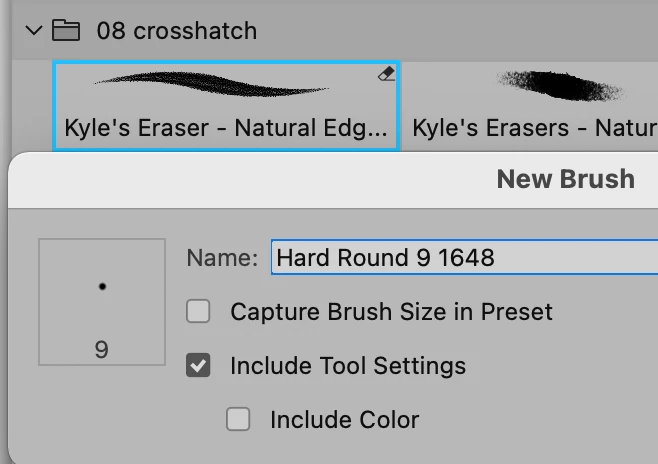
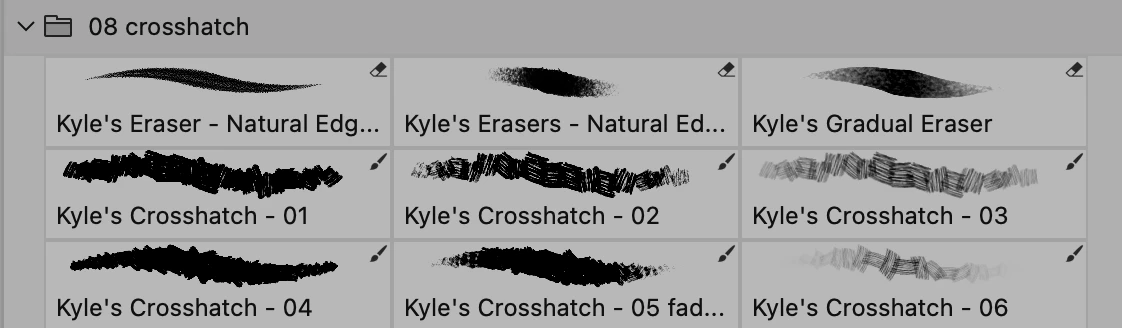
Some brushes were created (by their creator) to work with a specific tool. If this was done, you will see the tool in the upper right of the preset.


To override the preset tool for one-off use, hold down Command and click the tool. It will use your current tool.


To create a similar new brush not assigned to a tool, right-click the  brush in the Brushes panel and uncheck "Include Tool Settings. Give the Brush a new name.


Jane


2 replies

Rhyannon
RhyannonAuthor
Known Participant
August 26, 2023

thank you Jane. I seem to be able to use it now

jane-e
Community Expert
Community Expert
August 26, 2023

You're welcome @Rhyannon 


Jane

jane-e
Community Expert
jane-eCommunity ExpertCorrect answer
Community Expert
August 26, 2023

@Rhyannon 


Some brushes were created (by their creator) to work with a specific tool. If this was done, you will see the tool in the upper right of the preset.


To override the preset tool for one-off use, hold down Command and click the tool. It will use your current tool.


To create a similar new brush not assigned to a tool, right-click the  brush in the Brushes panel and uncheck "Include Tool Settings. Give the Brush a new name.


Jane