 Adobe Community

- Home
- Photoshop ecosystem
- Discussions
- Re: BRUSH BLENDING MODE PROBLEM - PHOTOSHOP CC / W...
- Re: BRUSH BLENDING MODE PROBLEM - PHOTOSHOP CC / W...
BRUSH BLENDING MODE PROBLEM - PHOTOSHOP CC / WINDOWS 10

Copy link to clipboard
Copied
Hello,
I am facing a big issue with the brush blending modes.
The blending modes simply stop working correctly. Multiply won't multiply etc.
I have uninstalled all of my Adobe software, the CC application and reinstalled everything again.
This time I didn't install the latest versions but the version 21.1.0 as Adobe's technician recommended me yesterday.
I have a Windows 10, version 2004 and a 30 bit display and I have tried to solve this by enabling and disabling the 30 bit display in Preferences Performance box whick makes no difference.
I have tried to solve the issue by enabling the "Legacy Compositing" in the Preference Performance box but there is no effect either.
I am using Wacom Intuos Pro M tablet and I have disabled the Windows Ink option.Also I have tried to solve the problem by creating the "famous" PSUserConfig.txt file that has
# Use WinTab
UseSystemStylus 0
written on it and there is no change at all.
I am having this issue constantly ! Sometimes resetting preferences help for few minutes but then it just gets WORSE !Brushes stars to act very strange ways.
I really hope to find help to this since I haven't found anything similar from the forum.
Thanks in advance,


Explore related tutorials & articles
 19
Replies
19
19
Replies
19




Copy link to clipboard
Copied
Can you show a screenshot with two layers each filled with 50% grey and the upper set to blend mode multiply (please include the layers panel as well as the image area.
Dave

Copy link to clipboard
Copied
»I really hope to find help to this since I haven't found anything similar from the forum.«
Similar to what? Your description does not seem very meaningful without screenshots (including the pertinent Panels like Layers and Options) that illustrate what happens or fails to happen.
Copy link to clipboard
Copied
dear dave, dear c.pfaffenbichler,
thanks for your quick replies.
sorry for not including a sreencapture.
the problem doesn't concern the layer blending modes but the brush blending mode options.
i forgot to mention that i have also updated my graphics card (GeForce GTX 1080) and verified that there is plenty of space in my scratch disk (D:)
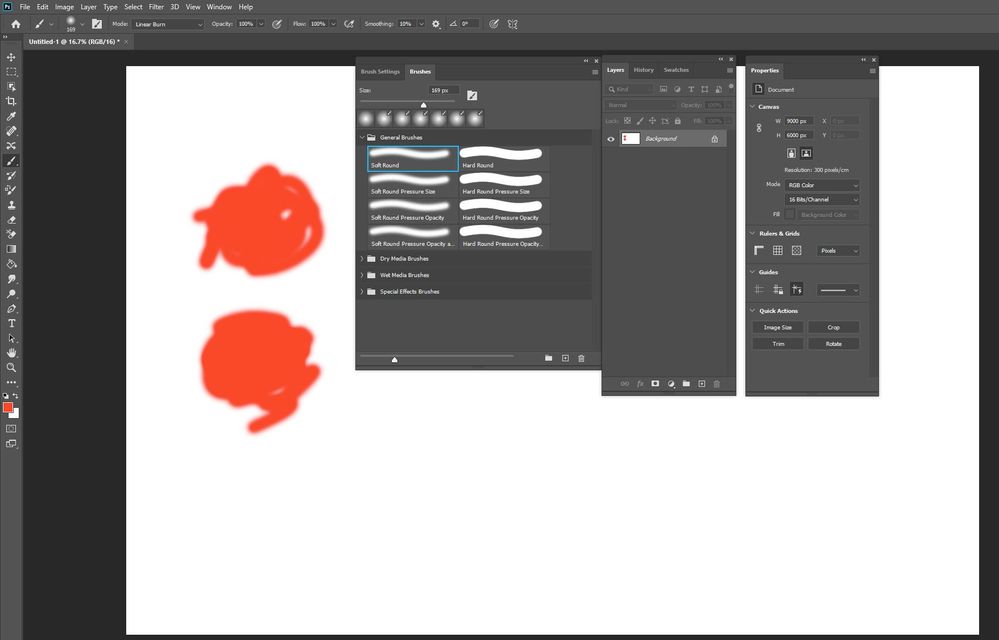
please find the screencapture here attached, i took it after resetting my preferences and the brush settings.
it is very simple : basic plain white layer with default round brush that doesn't respond to the blending modes :
the colour should normally burn gradually to black when using color or linear burn with the brush...
the issue occurs both with my mouse and my Wacom tablet.
i am wondering if i should uninstall my keyboard and wacom just to be sure...
thanks for your consideration
Copy link to clipboard
Copied
PS. Also I am wondering if there are hidden files from my earlier Photoshop versions somewhere that could cause this...?
Copy link to clipboard
Copied
Hi
I'm puzzled by your screenshot, as I cannot see how you built up the strokes.
Colour Burn with a brush colour on a White background will remain white. Maths is 1-(1-Background)/Brush so on white that results in 1 - (1-1/Brush) = 1-0 = 1 i.e. white.
Linear Burn will indeed darken to black but only with repeated strokes. A single stroke over the same place will not darken. Maths is Brush + Background - 1, so on a white background the first stroke lays the brush colour Brush +1 -1 = Brush , the second darkens it Brush + etc.
Dave
Copy link to clipboard
Copied
Hi Dave,
Sorry, this brush stroke is indeed built with linear burn tool with the colour red in 100% opacity and 100% flow ,and it should darken after each stroke.
I have built the strokes on top on each other but the colour does not darken from the base colour.
Simply tried to go over the base colour with colour burn as well and there is no effect.
....
Copy link to clipboard
Copied
So the first sample is done only using the linear burn tool - no effect.
The second sample below is done first with the linear burn and then with colour burn on top - no effect.
This applies to all the other blending modes too :if I draw in top of a stroke that has been done with the normal mode
Copy link to clipboard
Copied
I cannot reproduce the issue.
But your screenshot does not clearly show whether and how often you have placed new strokes atop each other.
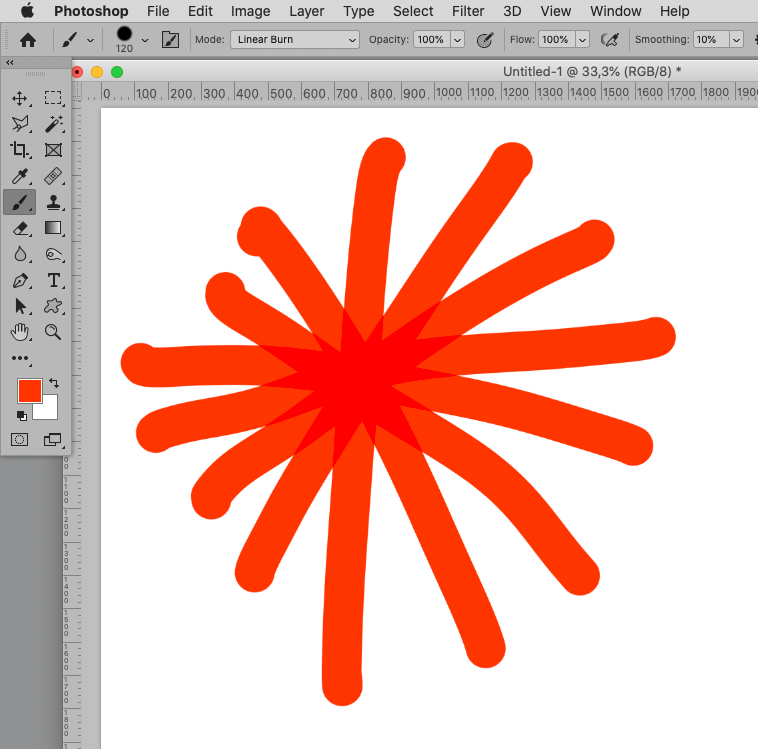
Could you do something like this?
Copy link to clipboard
Copied
hi c. pfaffenbichler
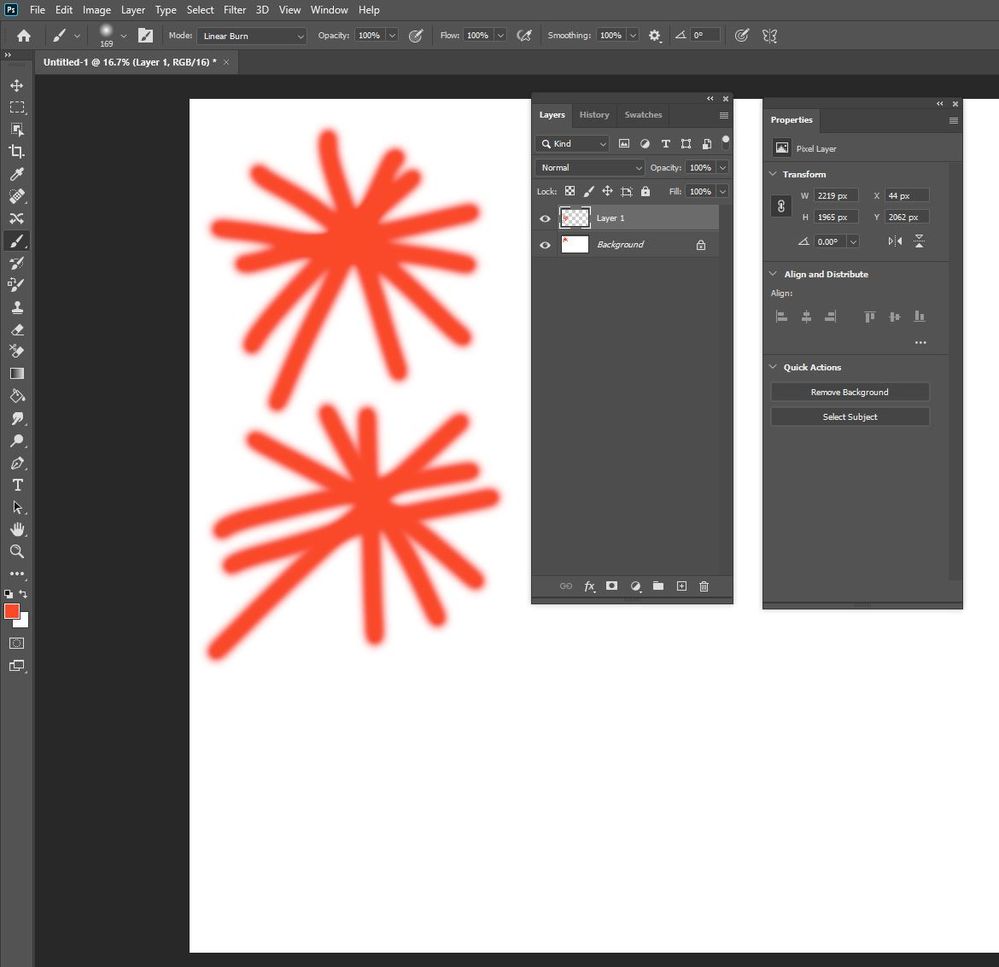
here is a new image. the first sample is done with my pen tablet and the second below on a layer above with my mouse.
could this be a RAM related problem or Graphics Card or Photoshop bug ?
Copy link to clipboard
Copied
PS mixer brush seems to be working well, the problem occurs only with normal brush with blending modes...
Copy link to clipboard
Copied
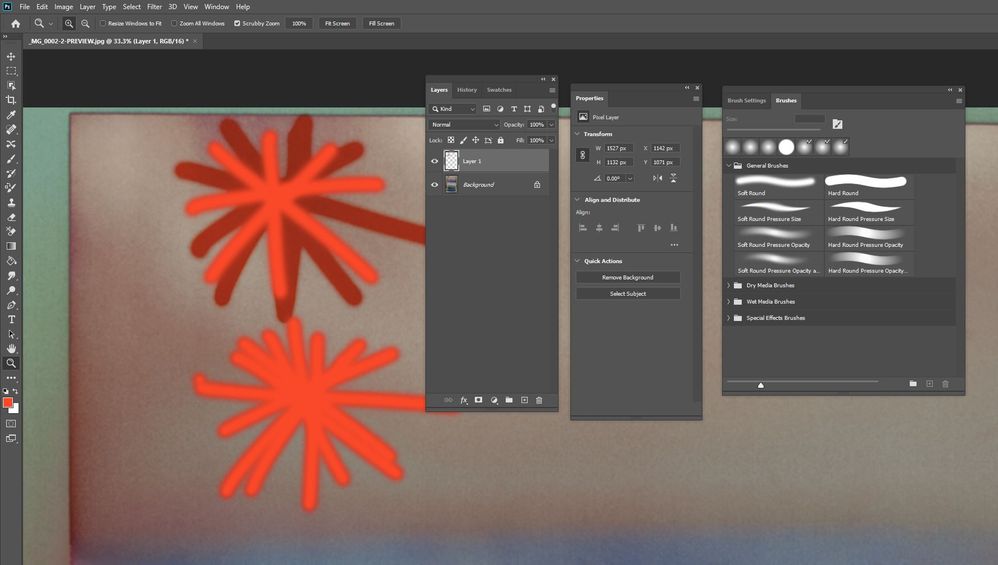
And here I have drawn the same figure on top of a photo.
First I drew the figure with normal mode and then on top with linear burn.
The linear burn marks are only visble beneath the normal mode marks.
The second figure below is on a separate layer above the original photo.
First I drew the figure with normal mode and then with linear burn.
The marks look both the same and there is no effect at all.
Copy link to clipboard
Copied
»The second figure below is on a separate layer above the original photo.
First I drew the figure with normal mode and then with linear burn.
The marks look both the same and there is no effect at all.«
Just to make sure: That the Brush’s Blend Mode does not apply to the underlying image’s content is expected when the Layer has the Blend Mode Normal.
Copy link to clipboard
Copied
Yes sure I get what you mean, I just simply wanted to demonstrate the problem in a different way : lines that go over each other with linear burn without having effect on the photo beneath.
Copy link to clipboard
Copied
Brush spacing was 25% with all the images. Now I changed it to 1% and there is no effect, still the same thing going on
Copy link to clipboard
Copied
Hi again,
The problem is solved, I simply didn't have enough space on my drive that I use both for the images and for the scratch disk. As soon as I made more space, Photoshop started to function correctly.
I would like to know how much would I approximately need space in order that PS would run perfectly when I use different kinds of brushes and varied brush strokes and since
- scratch disk and the images in process are on the same drive (D:)
- the size of one image is around 9 - 10 GB
-i mage has several layers and adjustment layers
- Photoshop uses 70% of the available RAM
?
Thanks a lot in advace,
Copy link to clipboard
Copied
Well, I did not expect that …
Scratch needs depend on the Performance settings and the number and site of opened images … basically it’s a »more is better«-situation, though, and ideally the primary Scracth Disk should not be used for anything else.
https://helpx.adobe.com/photoshop/kb/optimize-photoshop-cc-performance.html
Copy link to clipboard
Copied
Hi again,
Despite cleaning and backing up my files from the drive that I also use for the scratch disk, the blending modes stopped working again whilst working...
Is there anything related to the brush settings that could cause this ?
I hope to be able to resolve this soon...
Copy link to clipboard
Copied
Hi,
Just for info, I resolved the problem weeks ago by carefully uninstalling and re-installing my tablet.
Now all the blending modes work normally.
Copy link to clipboard
Copied
What is the Brush’s Spacing?


 AdChoices