Participant
June 14, 2020
Question

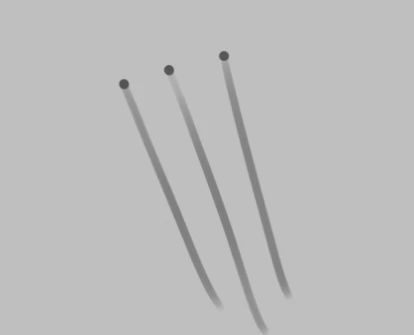
Brush Bug? Stroke leaves dots?

  • June 14, 2020
  • 8 replies
  • 5500 views

Brush stroke ending with a dot instead of tapering at the end. pen pressure sensitivity is normal on other software (clip studio paint), my driver is up to date, and Photoshop is also fully updated. My Opacity is at 100%, flow is at 76%. If I try to lower the flow (the next image is at 9%), the problem still persists, but the dot at the first point of contact is now at that level of flow. 


Anyone else having this issue?

This topic has been closed for replies.

8 replies

Participant
December 25, 2020

Select brush tool, u get options at top, go to brush panel. it will open up a panel, there is a line spacing option, reduce it to 1%..  

Mike_Gondek10189183
Community Expert
Community Expert
September 23, 2020

Does this happen with a mouse. You may have to change the tip/nib on your wacom pen.

Participant
September 22, 2020

I was having the same issue. Go to your Wacom settings > Options and uncheck Tip Up Assist, click OK. Fixed it for me.

Participating Frequently
October 2, 2020

Also worked for me thank you.

Participant
September 16, 2020

I also have a similar problem.

Participant
September 16, 2020

How did you solve this problem?

Participant
July 26, 2020

Any luck on this issue? I haven't been able to resolve mine after reinstalling the drivers and all Photoshop updates. This issue seems to be only happening on my iMac across different programs, but not on my Surface Pro

mglush
Community Expert
Community Expert
June 30, 2020

I believe that this is the build up of the flow at the end of your stroke. What happens when you turn the flow up to 100%?

Are you working with a Wacom tablet? You can adjust the settings in Brush Dynamics to make the brush taper off. Try turning up the Flow to 100% and let us know if that works?

Michelle

June 30, 2020

You can try solving this by changing your mouse setting. If you go to settings>mouse, and reduce the double click speed to slow it will remove the dots.  This works becuase sometimes there is a random double click that causes the dots.

I run on a mac and this worked for me. 

ohkatiewells
Participant
January 20, 2021

This worked for me!