Participating Frequently
November 27, 2021
Answered

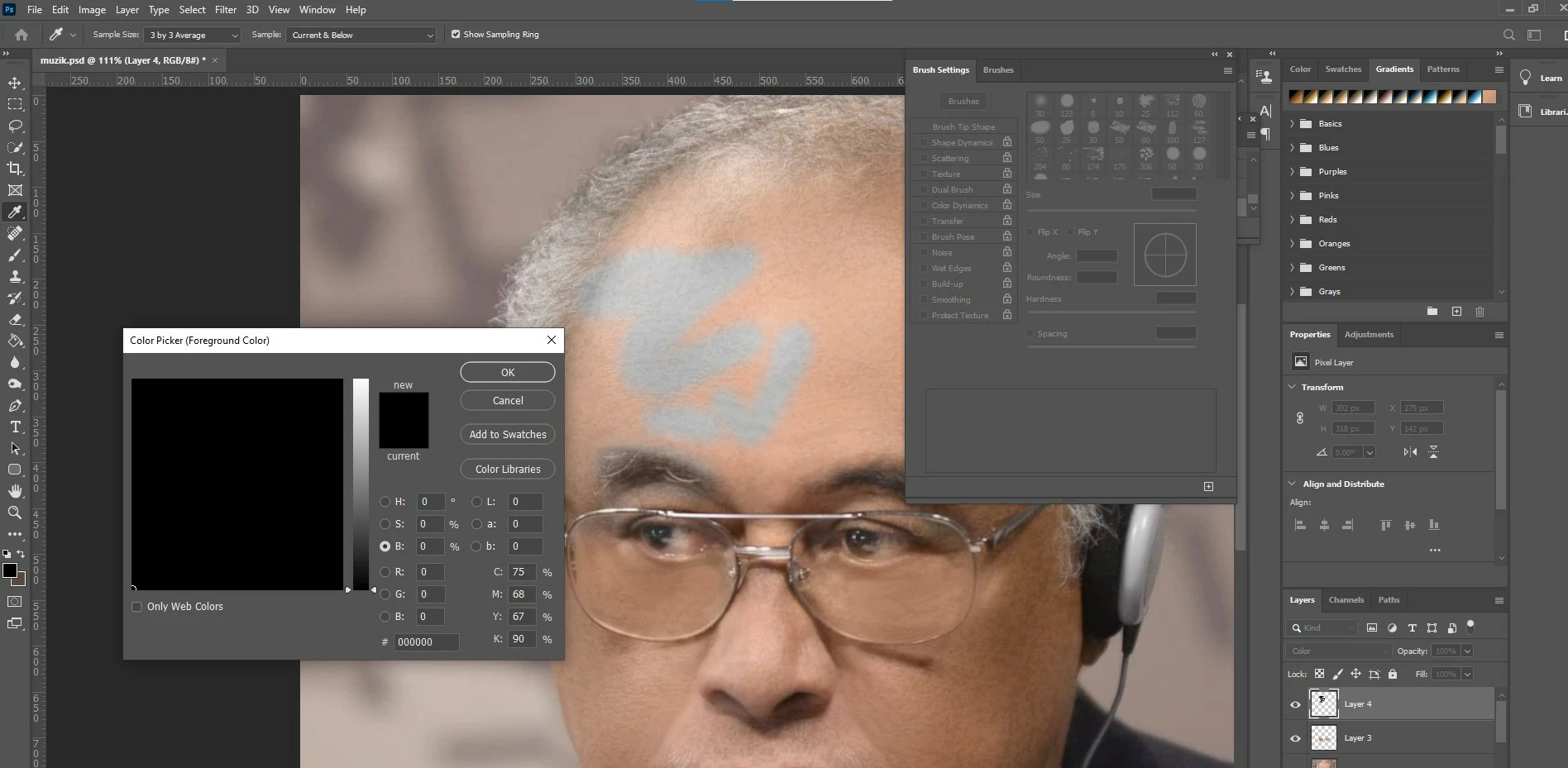
Brush cant paint black on color layer, paints blue gray insted. Please, help!

  • November 27, 2021
  • 4 replies
  • 2327 views

Hi!

Please, for some reason I can't paint black on color layer, brush paints blue grey

Tried everything, cant find an answer... Please, help!

Thank you!

This topic has been closed for replies.
Correct answer D Fosse

Mark, you're chasing a red herring. Color blend mode never worked that way and cannot work that way. What you're showing in your screenshot is the only possible result.


You need to try some of the other blend modes. Maybe one of them, like Overlay or Soft Light, will get you closer to what you want, perhaps in combination with "Blend If" and/or reduced opacity.

4 replies

jane-e
Community Expert
Community Expert
November 28, 2021

@Mark219668232f0c wrote:

Tried everything, cant find an answer... 


Can you tell us:

  • What else you have tried when you say "everything"
  • What you are trying to accomplish, as we may be able to suggest another method to accomplish your goal

Jane

Participating Frequently
November 28, 2021

Resettin the tools, restarting the program.

I remember that I could paint with black on a color layer before but something is wrong now...

I want to paint eyebrows in black

D Fosse
Community Expert
D FosseCommunity ExpertCorrect answer
Community Expert
November 28, 2021

Mark, you're chasing a red herring. Color blend mode never worked that way and cannot work that way. What you're showing in your screenshot is the only possible result.


You need to try some of the other blend modes. Maybe one of them, like Overlay or Soft Light, will get you closer to what you want, perhaps in combination with "Blend If" and/or reduced opacity.

Chuck Uebele
Community Expert
Community Expert
November 28, 2021

As Jane mentioned, your layer's blend mode is set to color, so all it's going to do is make a gray based on the underlying layer. You need to either duplicate the layer, once your done, and change the layer to multiply, then adjust the opacity, or maybe add a curves layer and use your black layer as a basis for a mask, but reversed, using white.

Participating Frequently
November 28, 2021

But paiting black worked before on a color layer.. Its not working now for some reason. Or am I wrong?

Chuck Uebele
Community Expert
Community Expert
November 28, 2021

It's working as intended. The black will be darker, if the underlying colors are darker. Color blend mode just changes the color, not the luminosity. So going over a fairly light skin tone is going to produce a lighter gray than over dark eye brows. Basically, that you're doing is just desaturating the colors below, not darkening them.

josephlavine
Community Expert
Community Expert
November 27, 2021

You'll need to see which of the Blending Modes work best. I'd suggest Hue or Color, but these will blend with the underlying skin tone.

What is your goal?

warmly/j

Participating Frequently
November 28, 2021

yes, im working in the color mode, it worked fine before, meaning black color was black. Now its grey. I want to paint with color with texture still visible. Both color and hue modes don't work, it paints in grey for some reason. Thank you for your answer!

Participating Frequently
November 27, 2021

brush mode is set to normal. tried changing it, doesn't help...

jane-e
Community Expert
Community Expert
November 27, 2021

@Mark219668232f0c wrote:

brush mode is set to normal.


Can you try changing the Layer mode from Color to Normal?


Jane


Participating Frequently
November 27, 2021

Thank you for your answer, Jane!

It paints black, but then I lose the texture. I want to paint with color with texture still visible.