
Participant
July 29, 2018
Question

Brush Management after Update

  • July 29, 2018
  • 2 replies
  • 899 views

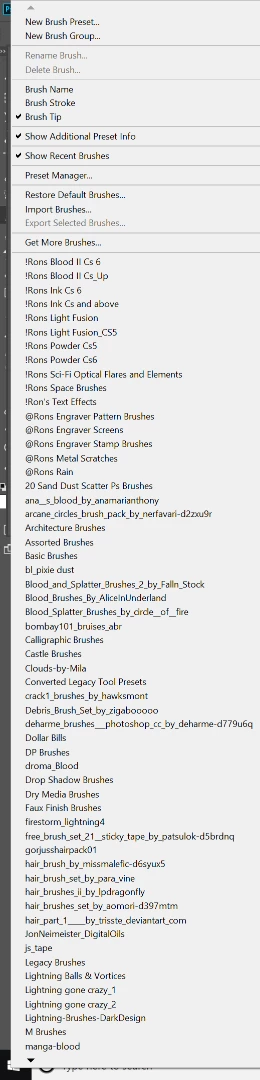
I just updated to 19.1.5. Prior to this, my brush preset would list out all my brushes from left to right. Now, there are arrows and a single list. This is a pretty annoying change, I have a lot of brushes and I'd rather see them all listed out in one place (that's why I have a 4k monitor).

This is what it looks like now. I've played with my preferences and such. Anyone know how to get my brushes to list without the scroll arrows?

Thanks.
This topic has been closed for replies.

2 replies

Kukurykus
Legend
July 29, 2018

A theard with the same problem you have:Displayed Brushes Folders

Trevor.Dennis
Community Expert
Community Expert
July 29, 2018

Yep, I have asked the same question, as have two other people that I can think of.  It annoys the heck out of me.

The fastest way I find to scroll is to use the up and down arrow key.  This also lets you roll round to the top of the list when you reach the bottom.  This is as opposed to using the scroll arrows at the top and bottom of the list, which come to a dead stop with no option but to go back the way you came.  Goodness knows why it has changed, because it is damn frustrating — especially as we used to be able to see the full list in multiple columns.

Go to the feedback site, and make you ire known there.  Photoshop Development team members will at least get to see it (no staff members will see it here) and if enough people make a fuss, they might just fix it.

I see you have your brush sets with their original names.  I like to rename the .abr files so they appear with meaningful names in alphabetical order. This page gives you file locations.  Leave enough of the original name to identify the source.  I did wonder if you'd done something similar yourself, as I am not familiar with !Rons and @Rons brush sets, but Google tells me they can be downloaded.  You have a lot of them — are they good?

You also have several hair brushes.  We can't see your sets starting with S so I am wondering if you have the Skin & Hair brushes by Castrowchew?  I use them almost exclusively for hair.

The feedback site is at

Photoshop Family Customer Community

runninghead_design
Inspiring
July 29, 2018

I have a similar problem so it seemed like I'd best add it to this (recent) thread rather than start a new one.

I'd just like help organising my Tool and Brushes after updating to PS CC2018.

I used to create a load of Brushes and then save them as Tools to get all the settings saved.

Recent versions of Photoshop allow all those brushes to capture the same settings as available in a Tool so you don't need the Tools anymore (I think that's right).

This has left me with a hell of a mess to sort out- a hundred brushes and a hundred, similar, Tools to match!

Helpfully we can now convert Tools to Brushes (yey!), which will make this a little easier at least.

Does anyone know of a good workflow, or a video tutorial, that might walk me through the process of reorganising my Tools and Brushes in an efficient and organised manner?

Thanks.

roberth64909144​ those punctuation characters in your brush names- do they cause any issues for your Photoshop?

Participant
July 29, 2018

Hi there,

No, they do not cause any issues.

Thank you guys for the responses. I had a hard time searching for this (couldn't think of good keywords).

I'll hit the feedback.