
Participant
January 22, 2017
Answered

Brush shape dynamics not working Windows 10 tablet PC

  • January 22, 2017
  • 1 reply
  • 4881 views

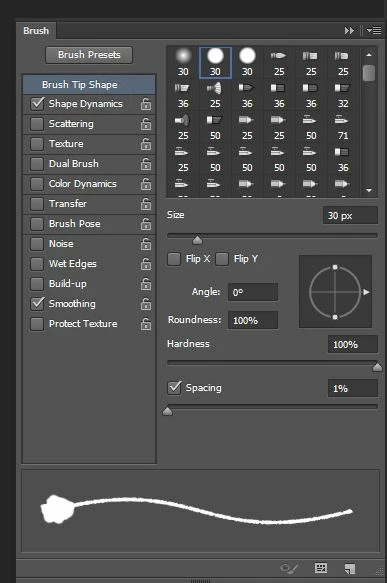
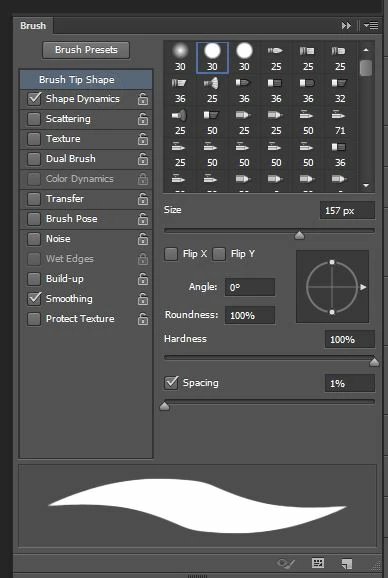
I am running Photoshop CS6 on my asus eee ep121 tablet pc (Windows 10 os). I have a problem with shape dynamics not working for my brush tool only, the eraser is ironically completely fine. I tried updating to the latest wacom tablet pc drivers and it's still broken. I'm including screen shots of my brushes panel and eraser panel so you can see the difference of how the preview brush looks.The first image is when I have the brush tool selected. The second image is for the eraser. When shape dynamics is checked for the brush tool, the brush becomes distorted ,while it appears and works normal for the eraser tool. I've searched all over google and can't find anything that seems to be this exact issue. Please help, this issue is really crippling my ability to use photoshop.
This topic has been closed for replies.
Correct answer Trevor.Dennis

I hate suggesting resetting Preferences right off the bat, but when things get that weird!

What do you see after restarting Photoshop, and drawing a couple of lines with the mouse before touching the pen to tablet (assuming brush is set to Pressure affects size)?  You should see a parallel stroke in the Preview until the computer knows that a pen is being used.

How about stroking a path with Simulate Pressure checked?  Is that working?  Does it affect the preview?

Now make some strokes with the Pen.  If preview breaks again, try stroking the path again.  If the path works it is coming back to the tablet or its driver.

One other possibility...  Are you using BrushBox?  That is affecting my brush presets panel if I don't open the BrushBox panel.

1 reply

Trevor.Dennis
Community Expert
Trevor.DennisCommunity ExpertCorrect answer
Community Expert
January 22, 2017

I hate suggesting resetting Preferences right off the bat, but when things get that weird!

What do you see after restarting Photoshop, and drawing a couple of lines with the mouse before touching the pen to tablet (assuming brush is set to Pressure affects size)?  You should see a parallel stroke in the Preview until the computer knows that a pen is being used.

How about stroking a path with Simulate Pressure checked?  Is that working?  Does it affect the preview?

Now make some strokes with the Pen.  If preview breaks again, try stroking the path again.  If the path works it is coming back to the tablet or its driver.

One other possibility...  Are you using BrushBox?  That is affecting my brush presets panel if I don't open the BrushBox panel.

Participant
September 25, 2018

Oh happy day! I even tried removing Preferences (both) before and it didn't work. I tried it again today, thanks to your prompting, and IT WORKED! I'm back in business! A drawing is so much more alive when the brush actually works like a brush. Thank you!