
kerryg94233614
Participant
November 26, 2016
Answered

Brush Size - control/option in Mac not functioning

  • November 26, 2016
  • 2 replies
  • 4637 views

Up until a couple of days ago I was able to change the size and hardness of my brush tool using the control/option keys on my Mac.  Suddenly it stopped working.  Now when I press control/option I get a colour pop-up.  I can still control the size of the brush with my bracket keys.  This problem may be associated with learning to use layer masks because the problem began around the same time I started working with them.  Perhaps I inadvertently clicked something but I'm stumped.  Everything else seems to work fine but I'd really like that function back.  Any help would be greatly appreciated.
This topic has been closed for replies.
Correct answer gener7

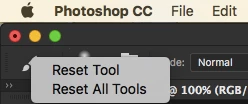
First you can try resetting the Brush Tool by right or ctrl-clicking its icon in the Option bar.

If that fails...

and if you don't have any custom shortcut keys set up, go to Edit > Keyboard Shortcuts. Hold down your Option key, and the Cancel button will change to Reset. Click on that to bring your shortcuts to defaults.

2 replies

gener7
Community Expert
gener7Community ExpertCorrect answer
Community Expert
November 27, 2016

First you can try resetting the Brush Tool by right or ctrl-clicking its icon in the Option bar.

If that fails...

and if you don't have any custom shortcut keys set up, go to Edit > Keyboard Shortcuts. Hold down your Option key, and the Cancel button will change to Reset. Click on that to bring your shortcuts to defaults.

Participant
December 20, 2017

Hi

I have the same problem. PS CC 2018 - 19.00 Release

OS X 10.13.2

I can't change hardness of brush tool. As if the shift key does not work.

Is there who has experienced a similar problem?

Any help would be greatly appreciated.

Regards

kerryg94233614
Participant
November 27, 2016

Is there no one who has experienced a similar problem?

postrophe
Inspiring
November 27, 2016

Hi

Please, Supply pertinent information for quicker answers.

The more information you supply about your situation, the better equipped other community members will be to answer. Consider including the following in your question:

Adobe product and version number.

Operating system and version number.

Screenshots of the problem

Computer hardware, such as CPU, GPU, amount of RAM.

Pierre