KeithTheChicken
Inspiring
September 29, 2018
Answered

Brush strokes jagged, not smooth, even with smoothing enabled. Unsure how to fix

  • September 29, 2018
  • 2 replies
  • 27041 views

Hi All,

I've run into an issue with Photoshop cc when painting or drawing. No matter which brush I use, these jagged bumps stick out of my smooth lines, most notably when drawing diagonally. It looks as though small squares are being printed behind the line, causing these sharp outcrops to appear. Zooming in or out helps a bit, but the image become very pixelated even on high res canvases. Does anyone know what this issue is or how to fix it?

Thanks
    Correct answer Trevor.Dennis

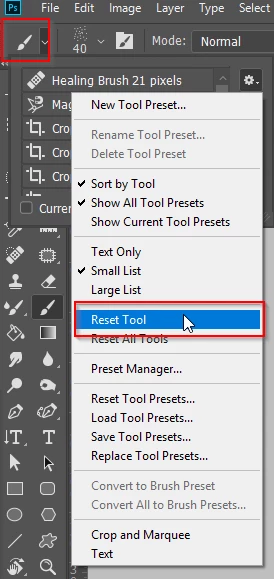
    If the brush tool really is misbehaving, try resetting it (top left corner)

    2 replies

    Participant
    September 3, 2024

    I've have this problem as well and over time have just accepted it as part of the program.  You can see in this screenshot if I drag the brush one time or click, hold shift, and click again, I get the bumpy edge like a series of circles overlapping instead of a smooth edge.  When the flow percentage is set lower you see that it is a series of circles. Usually I just go back and forth over it several times to smooth the edge, and that's fine, but it would be nice if it were smooth the first time.  I reset the tool, toggled all of the smoothing options individually and in combination, and changed performance settings to see if that would help, but there was no change.  

    Mac Studio, Sonoma 14.6.1

    Participant
    September 3, 2024

    Okay, so I talked to my coworker and he showed me that it's a matter of going in the Brush Settings Panel and changing the spacing slider percentage

    Trevor.Dennis
    Community Expert
    Community Expert
    September 29, 2018

    Do you have the pencil tool selected?

    What is the blend mode of the brush (in the Options bar) and the layer's blend mode?

    What is the brush spacing?

    Trevor.Dennis
    Community Expert
    Trevor.DennisCommunity ExpertCorrect answer
    Community Expert
    September 29, 2018

    If the brush tool really is misbehaving, try resetting it (top left corner)

    ryvened88061959
    Participant
    March 24, 2019

    woah, thanks. this actually worked