
Participant
July 9, 2023
Question

Brush tool painting wrong color

  • July 9, 2023
  • 1 reply
  • 1324 views

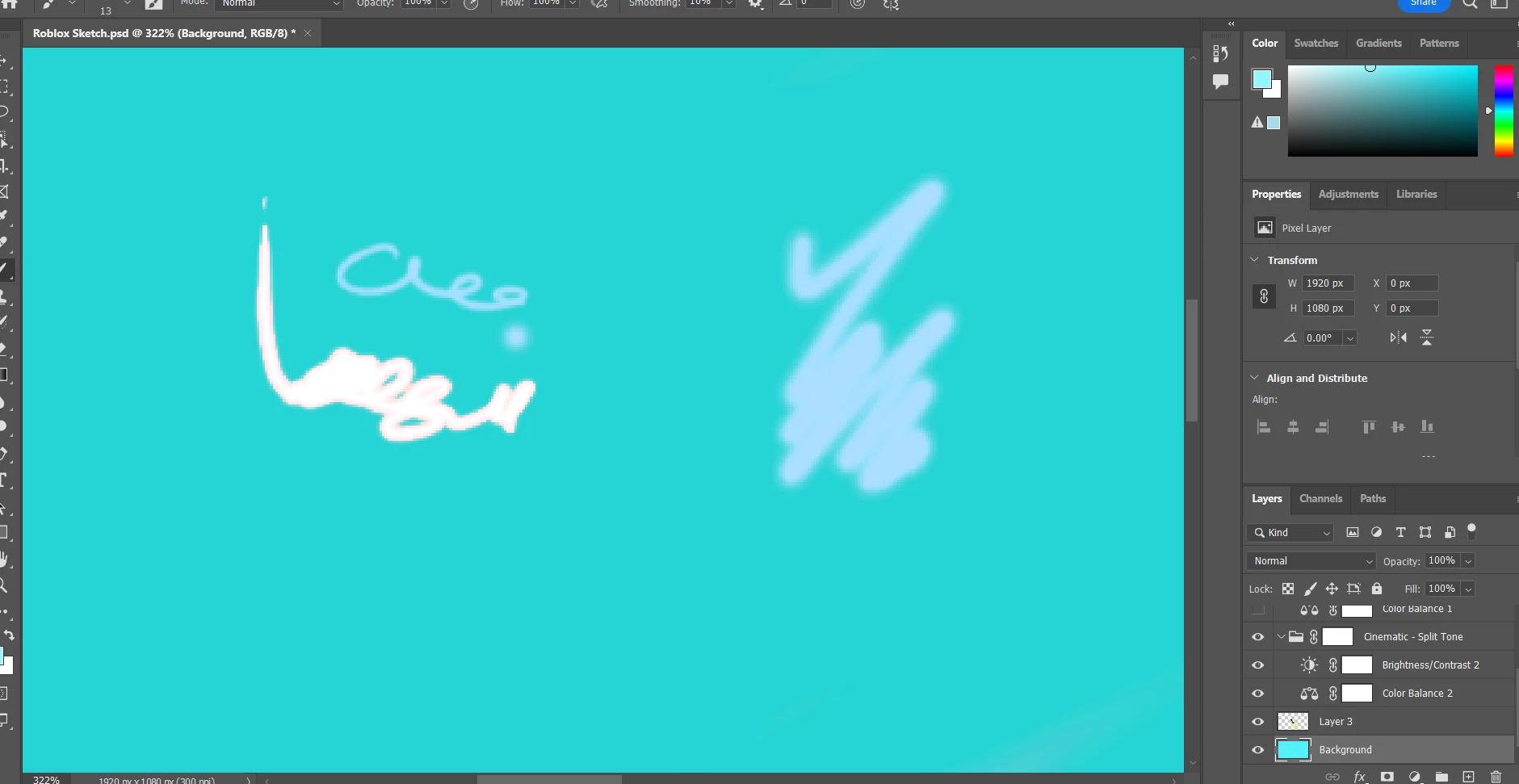
Whenever I select a color then try to use the brush tool, it paints a completely different color. The blue color is warmer than I select. The white isn't even white, it has this red outline. Sometimes the white shows up as almost completely pink as well. As a side note, I don't understand why there is a warning sign under the color panel in the top right.

I have tried reseting the brush tool and I've reset all prefrences in photoshop.
This topic has been closed for replies.

1 reply

Michael Bullo
Community Expert
Community Expert
July 9, 2023

Based on the highlighting within the Layers panel you appear to be painting on the Background layer. You also have adjustment layers above that which alter characteristics such as colour and tone.


As a test, create a new layer at the top of your layer stack and try painting on that. I suspect you will see the colour you expect.


In the future also keep an eye on the Blending Mode for the brush which can be seen running along the top of Photoshop. Yours is currently set to Normal which is the default and what you generally want.