April 3, 2019
Answered

Brush/tool presets-can the opacity and flow characteristics be saved as presets?

  • April 3, 2019
  • 1 reply
  • 1672 views

That is the question. I'm trying to put together some brush presets, and I'm not having much luck saving opacity and flow in presets or AS presets. Is there a way to do it? My brushes are all one shape-round-and I can save different sizes of soft and hard brushes. But not different opacities. It would help if I could.
    This topic has been closed for replies.
    Correct answer Bojan Živković11378569

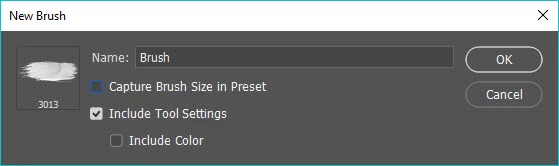
    Do you have Include Tool Settings ticked when saving preset. I am assuming you are using latest and greatest version on which I am checking.

    1 reply

    Bojan Živković11378569
    Community Expert
    Community Expert
    April 3, 2019

    Do you have Include Tool Settings ticked when saving preset. I am assuming you are using latest and greatest version on which I am checking.

    April 3, 2019

    No, I don't. I left it off so that I can use the setting for eraser as well as brush. I'll try it again with that checked. OK. I see. It does save different settings. Thank you for the tip. Since I don't think of Flow and Opacity as tools, I wouldn't have thought Include Tool Settings would make a difference.

    April 3, 2019

    That did it. Your tip enabled me to get exactly the arrangement I've been struggling to get for months. Thanks again.