
thelivingtrashcan
Participant
January 29, 2022
Question

Brushes disappeared overnight (are they recoverable?)

  • January 29, 2022
  • 1 reply
  • 210 views

I normally use Photoshop with Kyle's megapack brush set, but when I opened up my computer today, all the brushes were gone except for the default folders. This has happened to me once before (about a year back or so), difference being that this time around I had reorganized the megapack into more accessible folders. 


I'm wondering if there's any chance of recovering the brushes - I know that I'm supposed to save them to the brush presets folder (which they are currently not in) - because for some reason I'm still able to use the lost brushes in my brush history (circled in red):
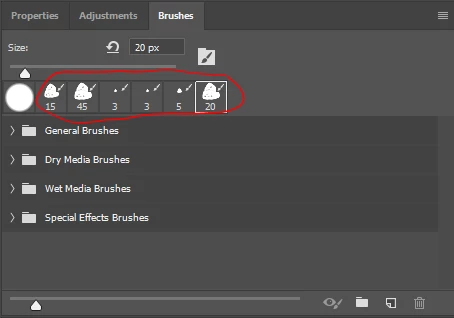
Does this mean it's possible somehow to recover the brushes with the folders intact without having to reimport them?


(also, why is this happening to begin with anyways?)

(reposted to discussions subforum since this appears to be the better place for it)

OS: windows 

version: CC 2019

This topic has been closed for replies.

1 reply

Trevor.Dennis
Community Expert
Community Expert
January 30, 2022

I take it you have checked the unloaded brush groups?  

You are showing the Brushes panel, but my preferred route is to right click inside the document window with the brush selected, and click on the little cog icon in the top right corner.


With Windows, the brush .abr groups live at this location:


C:\Users\[Your User Name] \AppData\Roaming\Adobe\Adobe Photoshop 2021\Presets\Brushes


When you update the presets should be moved automatically from the previous version.  That didn't always happen up to a few versions back, but it has not failed for me for several years now.  


Note: You need to make Hidden Data viewable to access the App data folders.


thelivingtrashcan
Participant
January 30, 2022

Thank you for the reply!


I moved the .abr file to the Presets folder and selected it from the dropdown menu here (was I supposed to do that?):

It didn't seem to restore my folders from before, just reimport it anew. Is there any way to somehow save the subfolders I create?