
Known Participant
July 10, 2020
Answered

Brushes for Smudge Tool

  • July 10, 2020
  • 1 reply
  • 6712 views

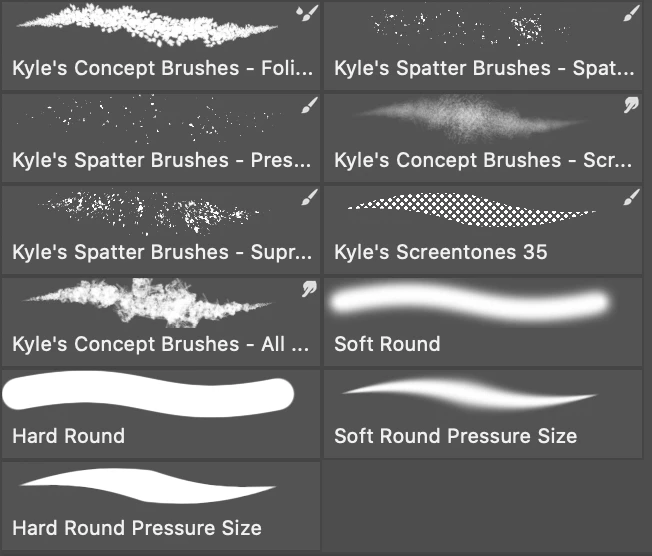
I just discovered Kyle's brushes and they're terrific!  I am mostly interested at the moment in brushes I can use with the smudge tool for blending.  Does anyone know which brushes specically target the smudge tool?


Thanks - Richard
Correct answer Marja de Klerk

You can see it in the right upper corner of the Brushes, there's a smudge tool icon 


1 reply

Marja de Klerk
Marja de KlerkCorrect answer
Inspiring
July 10, 2020

You can see it in the right upper corner of the Brushes, there's a smudge tool icon 


Richard___G
Inspiring
July 10, 2020

Awsesome tip! - Thanks so much!


I've also discovered that if you have the smudge tool selected and then go to the brush settings panel, any brush you select can be used to smudge!  The results are often pretty awful, but this is great fun to play with.

Richard
Richard___G
Inspiring
July 22, 2020

Hi Richard,


I was excited to try your tip of selecting the smudge tool and then picking any brush from the brush settings panel, but it didn't work for me. Every time I chose a non-smudge-designated brush, it would automatically switch to the paintbrush tool instead. I'm on a Windows 10 laptop, maybe that has something to do with it? Thanks for any insight you might have!


Marjorie


Hi Margorie,

Once you've selected the smudge tool, go to the BRUSH SETTINGS panel, not the BRUSHES panel.  From the settings panel you can shoose any brush and it will work.  Be sure to check and reduce the brush size to something you can see on the screen (many age huge), then you'll see them work. Some are really crazy.

Best, Richard

Richard