
Participant
December 3, 2017
Answered

Brushes permanently assigning themselves

  • December 3, 2017
  • 1 reply
  • 2381 views

I just made my first two brush tips in Photoshop CC...one has assigned itself permanently to the brush tool and one has assigned itself permanently to the eraser tool. No amount of clicking other brushes will change this and I don't know what I did wrong. I never even used the new brush in the eraser tool, but it won't go back to my normal round brush no matter what I try. Even after deleting my new brushes, the eraser tried to stay assigned to one of them. I don't know what went wrong, help?
This topic has been closed for replies.
Correct answer davescm

Hi

You can choose to have brushes saved with associated tools and settings or not.

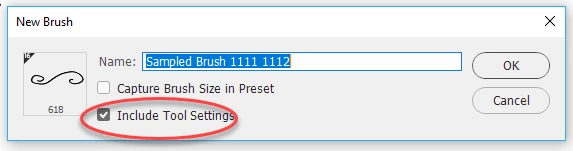
To do this in the Brushes Panel menu Choose - New Brush Preset and either check or uncheck "Include Tool Settings"

Note : If you define a brush from Edit - Define Brush you will not get that options and the brush will be created without the tool settings , and no choice to include them.

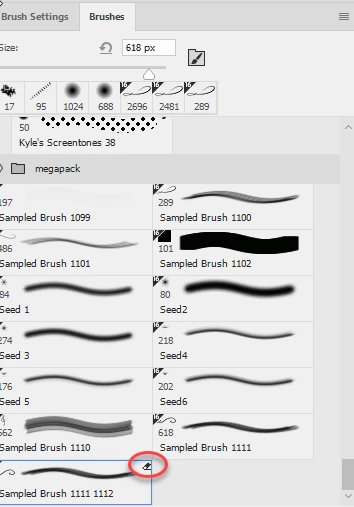
If you turn on "Show additional info in the brushes panel options you will see which brushes have associated settings by the small icon at the top right.

Dave

1 reply

Participant
December 3, 2017

Also, I have attempted to wipe tool settings, restart, reopen canvas, etc...nothing has changed

davescm
Community Expert
davescmCommunity ExpertCorrect answer
Community Expert
December 3, 2017

Hi

You can choose to have brushes saved with associated tools and settings or not.

To do this in the Brushes Panel menu Choose - New Brush Preset and either check or uncheck "Include Tool Settings"

Note : If you define a brush from Edit - Define Brush you will not get that options and the brush will be created without the tool settings , and no choice to include them.

If you turn on "Show additional info in the brushes panel options you will see which brushes have associated settings by the small icon at the top right.

Dave

c.pfaffenbichler
Community Expert
Community Expert
December 4, 2017

Is there some way to turn off the tool assignment settings if the brush is from a brush pack with tool settings already in place? I picked up a few brushes and some are assigned only to blur tool...can that be amended?


You can create a new Brush Preset with »Include Tool Settings« unchecked.