Participating Frequently
June 8, 2018
Answered

Bug: Batch action overwrites same file repeatedly

  • June 8, 2018
  • 2 replies
  • 6467 views

Hi,

I'm a longtime Photoshop user and have used Batch actions extensively over the years. I'm running into an issue where my batch actions are just overwriting the same file over and over again, even though I have the "Override Action 'Open' Commands" and "Override Action 'Save As' Commands" options checked.

What I'm automating:

A folder of PDF files that need to be saved as TIFFs

My action:

  1. Open PDF with the following settings: 3000px width, RGB color mode, bounding box crop
  2. Save with the following settings: TIFF, no layers, LZW compression, transparency

Batch settings:

  • Select my convert to TIFF action
  • Source: Folder of PDFs
  • Override Action "Open" Commands checked
  • Destination: Folder to hold processed files
  • Override Action "Save As" Commands

Anyone else run into this bug or find a way around it?

(I'm running the latest Photoshop CC release, 19.1.4, on macOS Sierra 10.12.6)
This topic has been closed for replies.
Correct answer Jeff Arola

Thanks for doing all those tests, JJMack. I do need my open action step in order to specify color mode, crop and pixel dimensions when opening the source PDFs, but the override open actions checkbox setting does work properly, allowing it to work through a whole folder of files. (I can see each file opening while the batch is running, so I can confirm it is cycling through the folder.) It seems it's just the override save actions that's not working.

I've used this exact process before when batching, I think I'm just running into a weird bug that is causing the override save action command to not be properly enabled.


It might be that in the Open step the Name of the pdf is recorded so every pdf opened will have the same name thus when batch saving, the document is over written over and over.

In the Batch dialog see if adding a Serial number(s) or Letter(s) under file naming works.

Batch processing pdf files in photoshop can very much be a pain.

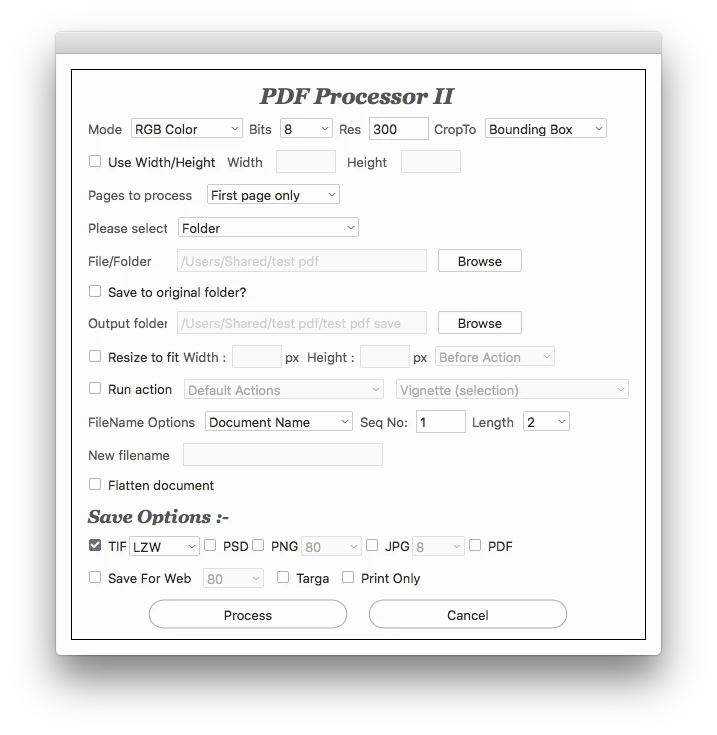
Suggest you try the PDF Processor II script from here:

GitHub - Paul-Riggott/PS-Scripts: Photoshop Scripts

2 replies

Stephen Marsh
Community Expert
Community Expert
June 8, 2018

Although not a direct answer, you could always try the Image Processor and Image Processor Pro scripts, which can play actions.

Participating Frequently
June 11, 2018

Yeah, I tried Image Processor, but it flattens TIFFs down and I loose the transparency.

Stephen Marsh
Community Expert
Community Expert
June 13, 2018

However Image Processor Pro does not have this limitation and can save layered TIFF files (not to mention that Image Processor could be edited to save layered files too).

JJMack
Community Expert
Community Expert
June 8, 2018

You need to expand all the steps in your Batched Action to see whet is recorded in your Save As step.   Batch can override the save as folder location. However it will not override a file name recorded in an Action's Save As step.   Normally when you record a save as step in an action you want to batch you do not change the name offered by Photoshop when recording the save as step you just accept Photoshop default.  That action step will have no name recorded in it.  When the step is played the name will be defaulted to the current documents name.

For example this SaveAsJpeg the desternation Desktop folder can be overridden by batching the Action and override the destop save location.  The Current Document Name will be saved into batch desternation folder. Note: there is no File Name Recorded in the Action's Save step.  Just As: Jpeg, Quality:10, Matte:none  and  In: Location is recorded.

JJMack
Participating Frequently
June 8, 2018

Thanks for the suggestion, JJMack​ – however, I checked and I do not have a filename recorded in my Save step, just like in your example (screenshot below).

JJMack
Community Expert
Community Expert
June 8, 2018

It look like you might always opening the same file and saving the same file. I have never tried overriding open steps.  I normal just point Batch to folders of source images and let the batch process open the files in that folder and process them through the Action. Expand the Open Step see if that step has the file name in it the you are always saving.

What is that open step for it would add an addition open document in Photoshop in addition to the document batch opened from you source PSD folder. That additional document would be save as  your tiff.  Did you insert a Menu Item File Open or record an Open step which most likely would record the filename you opened in the Open step. It looks like you may be opening a file by name. Yout Opem step has settings recorded > note My First Action that has the incerted menu iten File Open has no > in front of the step it would normally be an interactive step that could be overridden by Batch

JJMack