
Participating Frequently
October 19, 2018
Question

Buggy Monotone in Photoshop 2019

  • October 19, 2018
  • 1 reply
  • 351 views

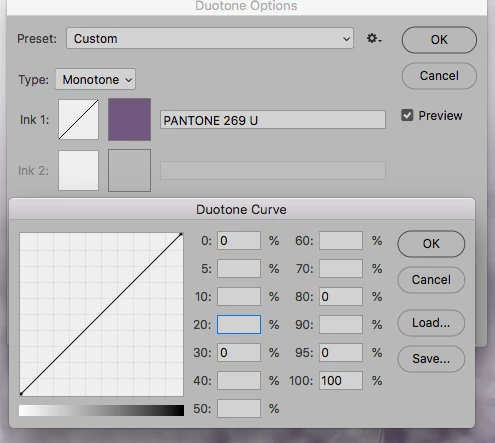
I am trying to use the monotone/duotone options in Photoshop 2019. I choose my color and click on the curve to adjust the values. If I decide I don't want a certain value in the box, I delete it, but instead of staying as an empty box it will place a 0 (zero). When you click OK, this causes the curve to go completely wonky. This did not happen in previous versions. Anyone else having this issue? The attached is just to show the zeros in the boxes (box 30, 80, and 95) where they should be empty.
This topic has been closed for replies.

1 reply

davescm
Community Expert
Community Expert
October 19, 2018

Hi

I can replicate that, but also have a workaround. Bit of a pain but if you use backspace to clear the box and immediately hit the OK button it will delete the entry. It means you have to delete them one at a time re-opening the dialogue box for each - but at least you can work.

You can raise a bug report here, where it will be seen by developers:

Photoshop Family Customer Community

Dave

Participating Frequently
October 19, 2018

Thank you for the tip, but that didn't seem to work for me. The only thing I found to work was to go from "Custom" to "Default" and then pick my color again and re-customize the curve. Which obviously is not helping my work flow any more than it did before.