
Question
Bulk artboard renamer in photoshop
So I have a platform where I click "send to photoshop" and the artboards are created automaticaly based on what clients asked for.
And in order to deliver what the clients asked I am using templates created before. Naming is very important, so what I do is to drag the templates in the new document created by the platform and rename every each template from the new document just created.
What I am looking is to this with a script, and I have created this code below but I get an error.
// Get active document and artboards
var docRef = app.activeDocument;
var artboards = docRef.artboards;

// Check if there are multiple artboards in the document
if (artboards.length > 1) {
  // Loop through each artboard
  for (var i = 0; i < artboards.length; i++) {
    var currentArtboard = artboards[i];
    var currentArtboardWidth = currentArtboard.artboardRect[2] - currentArtboard.artboardRect[0];
    var currentArtboardHeight = currentArtboard.artboardRect[1] - currentArtboard.artboardRect[3];

    // Loop through each artboard again to find artboards with same size
    for (var j = i + 1; j < artboards.length; j++) {
      var nextArtboard = artboards[j];
      var nextArtboardWidth = nextArtboard.artboardRect[2] - nextArtboard.artboardRect[0];
      var nextArtboardHeight = nextArtboard.artboardRect[1] - nextArtboard.artboardRect[3];

      // If artboards have same size, rename them
      if (currentArtboardWidth == nextArtboardWidth && currentArtboardHeight == nextArtboardHeight) {
        var nextArtboardName = nextArtboard.name;
        nextArtboard.name = currentArtboard.name;
        currentArtboard.name = nextArtboardName;
      }
    }
  }
} else if (artboards.length === 1) {
  alert("There is only one artboard in the document.");
} else {
  alert("There are no artboards in the document.");
}
And the error is this:
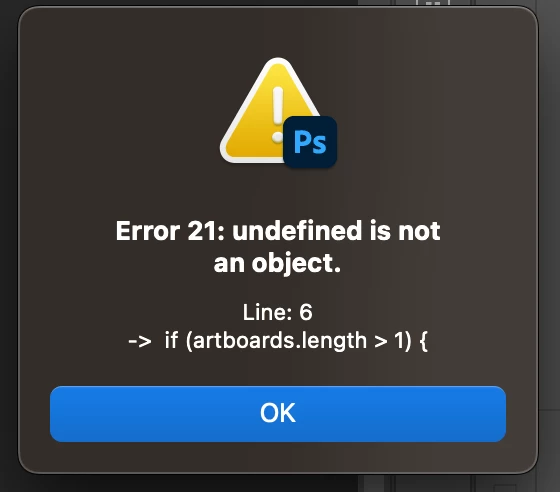
What I am doing wrong?
Thanks!
 AdChoices