
Bullseye Healing Brush Tool
Hi,
Just received my new iMac with High Sierra and loaded Photoshop 2018. The healing brush tool then looked like this though. A bullseye.
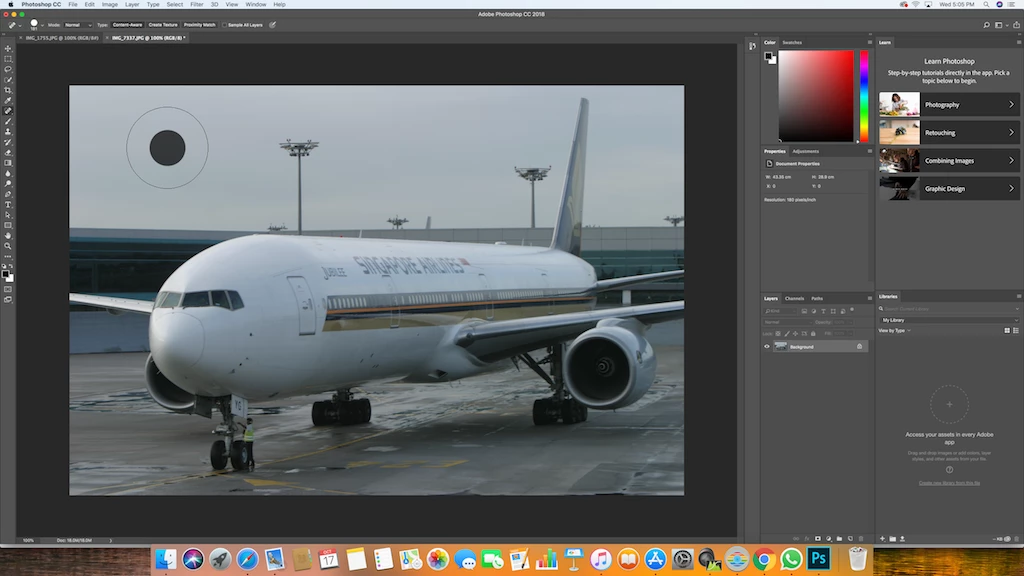
Upgraded to PS 2019 with the same result. Read through the forums and could find no solution. Contacted Adobe twice. The first time I was told the problem was PS 2019 and to reload 2018 but there was no change. The second the tech spent over 2 hours trying to correct the problem, including multiple reloads of PS, without success. He then took a log file and said it was being passed to senior techs and engineers and I'd hear from them within 24-48 hours with a solution. I've heard nothing except that my case will be closed unless I reply to their latest generated email.
I have checked preferences, brush tools, healing tool options and reset just about everything without success. Have I created a new tool?
I use equalize to correct for dust spots, marks etc which means I cannot see the corrected area. I need to know that the entire circle is being corrected as before rather than try and guess the area the bullseye is covering. Can anyone please help?
Many thanks in advance.
Kevin
 AdChoices