Exit
  • Global community
    • Language:
      • Deutsch
      • English
      • Español
      • Français
      • Português
  • 日本語コミュニティ
  • 한국 커뮤니티
0

Calculating width height in script

Community Beginner ,
Jan 12, 2014 Jan 12, 2014

hi i want script for comparing all layers of psd with photo with its width and height ie one psd background is opened script will read the value of that psd's layer whether it is portrait

or landscape by any way say by its width and height if height is greater than width than its portrait vice versa and then it compare with photo by opening it in sequences or firstly it will read the value of photo than compare with layer.if it got same in place of landscape, same and in place of portait same then it will run action if not than it will open new psd.and with compare same photo

TOPICS
Actions and scripting
4.2K
Translate
Report
Community guidelines
Be kind and respectful, give credit to the original source of content, and search for duplicates before posting. Learn more
community guidelines

correct answers 1 Correct answer

Community Expert , Feb 17, 2014 Feb 17, 2014

You do not need a new script.  All you need to do is create a PSD template adhering to my four rules. They are very simple.

The Four Rules:

  1. Size the photo collage templates for the print size you want - width, height and print DPI resolution.
  2. Photo collage templates must have a Photoshop background layer. The contents of this layer can be anything.
  3. Photo collage templates must have alpha channels named "Image 1", "Image 2", ... "Image n".
  4. Photo collage templates layers above the background layers mus
...
Translate
Adobe
Community Expert ,
Jan 20, 2014 Jan 20, 2014

The following should allow you to insert whatever you want in the for-clause.

Currently there is an alert (of width, height, index and name)

Edit: Sorry, I posted before I had finished the sentence … anyway, instead of the alert you could use the width- and height-numbers to determine portrait/landscape and insert the appropriate steps there.

// 2014, use it at your own risk;

#target photoshop

if (app.documents.length > 0) {

var myDocument = app.activeDocument;

main ();

};

////////////////////////////////////

function main () {

// get number of layers;

var ref = new ActionReference();

ref.putEnumerated( charIDToTypeID("Dcmn"), charIDToTypeID("Ordn"), charIDToTypeID("Trgt") );

var applicationDesc = executeActionGet(ref);

var theNumber = applicationDesc.getInteger(stringIDToTypeID("numberOfLayers"));

//////

for (var m = 0; m <= theNumber; m++) {

try {

var ref = new ActionReference();

//ref.putEnumerated( charIDToTypeID("Lyr "), charIDToTypeID("Ordn"), charIDToTypeID("Trgt") );

ref.putIndex( charIDToTypeID( "Lyr " ), m);

var layerDesc = executeActionGet(ref);

var layerSet = layerDesc.getEnumerationValue(stringIDToTypeID("layerSection"));

// if not layer group collect values;

if (layerSet != 2652 && layerSet != 2638) {

var theName = layerDesc.getString(stringIDToTypeID('name'));

var boundsDesc = layerDesc.getObjectValue(stringIDToTypeID('bounds'));

var theWidth = boundsDesc.getUnitDoubleValue(stringIDToTypeID('width'));

var theHeight = boundsDesc.getUnitDoubleValue(stringIDToTypeID('height'));

alert ("width: "+theWidth+", height: "+theHeight+", index: "+m+", name: "+theName);

selectLayerByIndex(m,false);

};

}

catch (e) {};

};

};

// by mike hale, via paul riggott;

// http://forums.adobe.com/message/1944754#1944754

function selectLayerByIndex(index,add){

add = undefined ? add = false:add

var ref = new ActionReference();

    ref.putIndex(charIDToTypeID("Lyr "), index);

    var desc = new ActionDescriptor();

    desc.putReference(charIDToTypeID("null"), ref );

       if(add) desc.putEnumerated( stringIDToTypeID( "selectionModifier" ), stringIDToTypeID( "selectionModifierType" ), stringIDToTypeID( "addToSelection" ) );

      desc.putBoolean( charIDToTypeID( "MkVs" ), false );

   try{

    executeAction(charIDToTypeID("slct"), desc, DialogModes.NO );

}catch(e){

alert(e.message);

}

};

Translate
Report
Community guidelines
Be kind and respectful, give credit to the original source of content, and search for duplicates before posting. Learn more
community guidelines
Community Beginner ,
Jan 20, 2014 Jan 20, 2014

Thank u Very much for this .

it is helpfull for me but still i need some modification on it becauz i m zero in script so pls help me the problem is that i need it should count only to color fill layer or  if not possible than it should count only to layer , not to bkgrd layer or locked layer more ever it should store that  to determine whether it is landscape or portrait . that data of all the layer is stored in it then it will open an image from folder (if the layer is seven than it will open 1st 7 layer ie it will also count the layer if 7 it will open 7 or if it will  8 than open 8, than it will compare with that color fill layer or with that layer stored  the porpose to compare is that in the place of portrait the opened photo is portrait for eg  say layer 1=a, Layer 2=b Layer 3=c,  a is portrait, b is landscape, C is portrat and opened photo is 1st is Portrat 2nd is landscape 3rd is portrait, then olny it will run action and open another psd and next photo after that other wise it will close that psd which contains colorfill layer and open another psd say 2nd and compare it.  with photos. ) pls pls pls modify it for me thanku so much....

Translate
Report
Community guidelines
Be kind and respectful, give credit to the original source of content, and search for duplicates before posting. Learn more
community guidelines
Community Expert ,
Jan 24, 2014 Jan 24, 2014

Quite frankly your explanation seems too convoluted to me.

Ruling out the background layer is fairly easy

// 2014, use it at your own risk;

#target photoshop

if (app.documents.length > 0) {

var myDocument = app.activeDocument;

main ();

};

////////////////////////////////////

function main () {

// get number of layers;

var ref = new ActionReference();

ref.putEnumerated( charIDToTypeID("Dcmn"), charIDToTypeID("Ordn"), charIDToTypeID("Trgt") );

var applicationDesc = executeActionGet(ref);

var theNumber = applicationDesc.getInteger(stringIDToTypeID("numberOfLayers"));

//////

for (var m = 0; m <= theNumber; m++) {

try {

var ref = new ActionReference();

//ref.putEnumerated( charIDToTypeID("Lyr "), charIDToTypeID("Ordn"), charIDToTypeID("Trgt") );

ref.putIndex( charIDToTypeID( "Lyr " ), m);

var layerDesc = executeActionGet(ref);

var layerSet = typeIDToStringID(layerDesc.getEnumerationValue(stringIDToTypeID("layerSection")));

var isBackground = layerDesc.getBoolean(stringIDToTypeID("background"));

// if not layer group collect values;

if (layerSet != "layerSectionEnd" && layerSet != "layerSectionStart" && isBackground != true) {

var theName = layerDesc.getString(stringIDToTypeID('name'));

var boundsDesc = layerDesc.getObjectValue(stringIDToTypeID('bounds'));

var theWidth = boundsDesc.getUnitDoubleValue(stringIDToTypeID('width'));

var theHeight = boundsDesc.getUnitDoubleValue(stringIDToTypeID('height'));

alert ("width: "+theWidth+", height: "+theHeight+", index: "+m+", name: "+theName);

selectLayerByIndex(m,false);

};

}

catch (e) {};

};

};

// by mike hale, via paul riggott;

// http://forums.adobe.com/message/1944754#1944754

function selectLayerByIndex(index,add){

add = undefined ? add = false:add

var ref = new ActionReference();

    ref.putIndex(charIDToTypeID("Lyr "), index);

    var desc = new ActionDescriptor();

    desc.putReference(charIDToTypeID("null"), ref );

       if(add) desc.putEnumerated( stringIDToTypeID( "selectionModifier" ), stringIDToTypeID( "selectionModifierType" ), stringIDToTypeID( "addToSelection" ) );

      desc.putBoolean( charIDToTypeID( "MkVs" ), false );

   try{

    executeAction(charIDToTypeID("slct"), desc, DialogModes.NO );

}catch(e){

alert(e.message);

}

};

Ruling out locked layers is certainly possible, but you can try to figure that out yourself.

Storing the results is also possible; you can create an Array, instead of »alert« push the width/height relation to the array and subsequently process the array or create a file from it.

Translate
Report
Community guidelines
Be kind and respectful, give credit to the original source of content, and search for duplicates before posting. Learn more
community guidelines
Community Beginner ,
Jan 28, 2014 Jan 28, 2014

thanks again as i didn't know anything about javascript it is difficult to edit this script for me it upto this it is helpful the thing only missing is that it should store the value of length and width so that it will compare with the opened image it should store value seprately of each layer. the eg in layer 1 layer2 so on.

The porpose for this is

step 1     open  a   psd file (say 001) (from a specified folder which have more than 100 psd )  a psd which contains 7-8 layers .

step 2     count the layer in psd file.   say 8

step 3     open the image from a specified folder (ask for folder to browse) should open  8 image (according to count if layer is 8 then 8 so on)

step 4     than it should  store the value of L & W of first layer  .( the porpose for this is to know whether the layer and image is potrait or landscape)

step 5     than it will store the value of 1st open image  ( the porpose for this is to know whether the layer and image is potrait or landscape)

step 6     if both are  potrait then run Action 1 and similarily compare 2nd layer if true run action 2 3rd layer if true run action 3 and so on.    if one is potrait and another is landscape then close all . if 1st is true any one is false than close all donot save.

step 7     open another psd   (say 002)  this time psd will be next.  and image will from 1st.

step 8    it will got  all image similar to layer and  it will run action1-n

step 9    if all is true it will save that psd in new folder as a 001

step 10   then open next psd  and image next to that  (opened image it will opened only when it will saved psd ).

step 11  again follow step 2 ( may be looping needed).

step  12  if all is true then it will save psd in that which is made (step 9) but as a (named) 002.

if it is not sufficient to understand than pls send me ur email address in my email I will send u some images with example  ( my email is  imsunil1978@gmail.com)

thanks alot for giving me response  . 

Translate
Report
Community guidelines
Be kind and respectful, give credit to the original source of content, and search for duplicates before posting. Learn more
community guidelines
Community Expert ,
Jan 29, 2014 Jan 29, 2014

Your explanation is not clear to me with regard to the realtion of the Layers in the one file and the individual images in the folder.

What do you mean with »store the value of L & W of first layer«?

I understand that L and W stand for length and width but why and how to you want to store the data?

Creating the variables stores the values anyway until they are redefined in the for-clause and, like I already mentioned, you could also store them all in an Array.

I doubt that you will be able to achieve what you are after until you better acquaint yourself with Scripting basics.

Translate
Report
Community guidelines
Be kind and respectful, give credit to the original source of content, and search for duplicates before posting. Learn more
community guidelines
Community Beginner ,
Feb 11, 2014 Feb 11, 2014

Sir  c. pfaffenbichler  pls see i have loaded image for refrence and also i hve written step for that.

Translate
Report
Community guidelines
Be kind and respectful, give credit to the original source of content, and search for duplicates before posting. Learn more
community guidelines
Community Expert ,
Jan 29, 2014 Jan 29, 2014

I think part of the problem may be that you do not fully understand that Photoshop is a document editor and can save documents in image files. You may have knowldge about your PSD files that you have not shared. In which case all possibilities would need to be programmed in.  Some image file formats do not support all Photoshop features.  Only PSB, PSD and  Tiff can be used to store all things Photoshop.  A layer document has a Canvas size and layers  that can be any size except the a special optional  layer know as Photoshop background layer.  The can only be one background layer which is the bottom layer and it is always canvas size for the background layer does not support transparency. It transparency is always lock and is 100% opaque. The background layer is always canvas size adding or removing canvas changes the background lay sizes other layer sizes do not change.  There are many types of layers.   Layers can be any size however the documents canvas size acts as a clipping mask.  Any pixels not over the canvas area are masked off however they do exists. Its even possible that a layer may exist that has pixels but none are over the canvas area. Layer bounds can have large negative values and very large positive values. The document canvas upper left corner is position 0,0  and the bottom right is width,height.  Layer the same size could [-width,-height 0,0]  and  [width,height 2Xwidth,2Xheight] only two pixels would be over the canvas. Layer bounds can have any aspect ratio and size however layer can have any shape.

You may have PSD files that  you have created to have a particular structure known to you.  You may know that there are no layers that have pixels that are  not over the canvas etc.

JJMack
Translate
Report
Community guidelines
Be kind and respectful, give credit to the original source of content, and search for duplicates before posting. Learn more
community guidelines
Community Beginner ,
Feb 09, 2014 Feb 09, 2014

psd 001.jpgimage 2.jpg

psd 001n.jpg

These are to image in which 1st image is psd file PSD 1  and in second image all the opened image which i want to replace automatically in psd.

i want script which will open this psd file 1st and it will count image layer eg in image 1 there are 6 layer so it will open six layer it will ask to browse

folder,

we will define folder than it will open 1st 6 image.

after that script will compare 1st photo with layer i that both r same (type) or not ie layer 1 is landscape, first image is landscape or not if both are landscape than compare to 2nd layer and 2nd image if they are also same then 3rd layer and 3rd image so on .if all layer is same then it will run Action 1 (or paste all opened image in layers in sequence  in layer 1  image 1  in layer 2 image 2 so on. after that it will save that psd in new folder as 001 in psd format. then again it will open another psd  (not that which is used ) PSD 2 and another next image  after  say next to the opened 6 image which is used

if any layer   will not match  say layer 4 is potrait and image 4 is landscape than it will close all, psd and image and open now psd 2  then same process. but it will take image from 1, 2 3 so on because not match to psd 1  and opened psd 2  and image is still to paste  (once the image is used that it will use next to that image   in simple way  if it will follow IF condition then it will take next to that to pasted  images or if it will follow ELSE condtion than it will take image used after that. 

Sir i hope it will be sufficient for understanding my purpose....

for example  open image1 assumes as a psd  contain layer 1 to 6 and bkgrd layer.  in image 2 see there is a images or photos open in ps interface

Translate
Report
Community guidelines
Be kind and respectful, give credit to the original source of content, and search for duplicates before posting. Learn more
community guidelines
Community Expert ,
Feb 09, 2014 Feb 09, 2014

There is a problem can you tell me what is a image layer. Image can be pasted in and they can be place in it which case the are a smart object layers where the former would be a raster layer.  All smart object layers are not always an image nor are raster layers always an image.

From what you showed above it looks like you want to make collages.  Collages are often made using PSD template Files. These templates are designed it be populated with images one way or an other.   There are many way one could design collage PSD templates  to be populated with images.

Automating anything requires a design process for how things will be done.  Templates need to have a known format for automation to work. Therefore rules must be followed when creating templates so they will have the proper format for the automated process.  Scripting collages is possible with Photoshop  I've done it and created a collage toolkit for Photoshop.

Photo Collage Toolkit

The package includes four simple rules to follow when making Photo Collage Template PSD files so they will be compatible with my Photoshop scripts.

There are twelve scripts in this package they provide the following functions:

  1. TestCollageTemplate.jsx - Used to test a Photo Collage Template while you are making it with Photoshop.
  2. CollageTemplateBuilder.jsx - Can build Templates compatible with this toolkit's scripts.
  3. LayerToAlphaChan.jsx - Used to convert a Prototype Image Layer stack into a template document.
  4. InteractivePopulateCollage.jsx - Used to interactively populate Any Photo Collage template. Offers most user control inserting pictures and text.
  5. ReplaceCollageImage.jsx - use to replace a populated collage image Smart Object layer with an other image correctly resized and positioned.
  6. ChangeTextSize.jsx - This script can be used to change Image stamps text size when the size used by the populating did not work well.
  7. PopulateCollageTemplate.jsx - Used to Automatically populate a Photo Collage template and leave the populated copy open in Photoshop.
  8. BatchOneImageCollage.jsx - Used to Automatically Batch Populate Collage templates that only have one image inserted. The Collage or Image may be stamped with text.
  9. BatchMultiImageCollage.jsx - Used to Automatically Batch Populate Any Photo Collage template with images in a source image folder. Easier to use than the interactive script. Saved collages can be tweaked.
  10. BatchPicturePackage.jsx - Used to Automatically Batch Populate Any Photo Collage template with an image in a source image folder
  11. PasteImageRoll.jsx - Paste Images into a document to be print on roll paper.
  12. PCTpreferences.jsx - Edit This File to Customize Collage Populating scripts default setting and add your own Layer styles.


Documentation and Examples

http://www.mouseprints.net/old/dpr/911.jpg

JJMack
Translate
Report
Community guidelines
Be kind and respectful, give credit to the original source of content, and search for duplicates before posting. Learn more
community guidelines
Community Beginner ,
Feb 09, 2014 Feb 09, 2014

Sir

I have downloaded that but i think will not solve my problem becauz of some reason . I had psd template already created  and also script should  sense potrait or landscape .

('There is a problem can you tell me what is a image layer. Image can be pasted in and they can be place in it which case the are a smart object layers where the former would be a raster layer.  All smart object layers are not always an image nor are raster layers always an image.')

for this there in no problem what it can be if it is smart layer in script than i will convert my layer to smart layer in my psd. or else  and also in my psd there is only that layer (Say 6 in figure) and background layer that is seventh and is locked  moreover that doesnt matter if script count or work in smrt layer i will convert my layer as smart layer only to that layer which i need rest i will merge and convert to background layer.  Currently i have color fill layer  in which i have to paste.

The above script by c.pfaffenbichler is some how helpful but need some modification as per requirement.

Thank u Very Much sir for giving me response  I have no knowledge of script so i m not able explain properly  and my english is also not so good. Thanks Once again

Translate
Report
Community guidelines
Be kind and respectful, give credit to the original source of content, and search for duplicates before posting. Learn more
community guidelines
Community Expert ,
Feb 10, 2014 Feb 10, 2014

If you read the documentation you will see that the scripts senses both your  Image  aspect ratio and size as well as the collages image locations  aspect ratio and size and will fit your images to the collages image location.  If you want to retain the aspect ration of your images you images aspect ratio and orientation should closely match the aspect ratio and orientation of the image location in your template.

If you want images to be rotated to match the collage image locations  aspect ratio for a better fit you can use the script PasteImageRoll.  To me if you want to create a collage as a collage not to cut out images from the print you do not want some images rotate you want them to be view upright not on their side. 

In fact the scripts only place or paste in images with the image orientation or rotated 90 degrees to match the image to the outputs orientation. If you want some images to be slightly rotated or have some form if image perspective. You will need to do that manually. After the scripts populate the images by manually altering the transform associated with the image.

Collage image location can have any aspect ratio, orientation, size, shape, perspective. Source images can be any Photoshop image file format. Therefore input images can also have any shape, size, orientation and perspective etc.  It would be a daunting task an impossible task for me to programs  a generalize solution to analyize imput images contents, size, shape orientation perspective etc and to match them any collages with content have perspective and have arbitrary image location with  any aspect ratio, size orientation shape etc to match all to any collage design your mind can dream up.

So my scripts populate images to the Collages orientation. All images will be fitted for the Collages Image Location  all populated images will be upright and take on the collages image location aspect ratio a virtual centered crop.    So Image rotation and perspective composition other the straight on must be manually tweaked by modifying the image's associated transform. You will also want to tweak strait on image population when the image aspect ratios don't closely match image locations aspect ration to improve the composition of the virtual centered crop. No cropping is actually done.  Image are just masked to the outputs aspect ratio. All populated collages are layered Photoshop documents the can be tweaked.

You can not rotate collage image location for that would alter the design of the collage image may overlap other image locations layer stacking order would effect the composition in the overlap areas and the document canvas size may virtually mask off parts of image location that have been rotated to match the aspect ratio orientation of source images.

For example if the image to replace layer 6 in your example had a landscape orientation and you rotate the collages image location to have a landscape orientation to match you new image for that location part of the image would fall outside the canvas area and part of the image would overlay other images in the collage.

Examples in the documentation shows what the scripts will do when aspect ratio don't closely match a landscape into a portrait or a portrait into a landscape.

Note: Look at how Landscape images are fitted to Portrait cutouts and how Portrait Images are fitted to Landscape cutouts. For best results when you batch populate Photo Collage Templates Images and Cutout should have the same orientation.

[ Batch Collage 1 ] [ Batch Collage 2 ]

http://www.mouseprints.net/old/dpr/PngSoccerball.png
JJMack
Translate
Report
Community guidelines
Be kind and respectful, give credit to the original source of content, and search for duplicates before posting. Learn more
community guidelines
Community Beginner ,
Feb 11, 2014 Feb 11, 2014

Sir

in My Case it is not possible to compose the image or i cannot crop the image as i have no permission to that from my client i have to fix full photo what ever it be.

above there is a script i think it is possible to modify that script and we will get output for that.

                                                                                                                            Thanks

Translate
Report
Community guidelines
Be kind and respectful, give credit to the original source of content, and search for duplicates before posting. Learn more
community guidelines
Community Expert ,
Feb 11, 2014 Feb 11, 2014

There is no reason to call us sir.

Frankly that script posted was before you posted your example.  That script would not work for your example. Well it may get the width and height right for images 1, 2 and 6 however it would not get the correct width and heights for images 3, 4, and 5.   From what you have written it clear you know that Photoshop can be scripted but know nothing about scripting and from the way you see the process being done  your understanding of how Photoshop works is not a the expert level.  In you example  I can not make out the exact placement of Images 1 and 6 because of the feathering  I have outlined what the script would return the the other image.  If you read the words in the script you will see it dealing with the bounds of layers.  Because images 3,4 and 5 have been rotated a bit the bound of the their layers and the bounds or the images differ.

Capture.jpg

If you image vary in aspect ratio and size use contact sheet II script, I believe it will tile out your images at the correct aspect ratios.  Forget about scripting collages the support image with slight rotation.

JJMack
Translate
Report
Community guidelines
Be kind and respectful, give credit to the original source of content, and search for duplicates before posting. Learn more
community guidelines
Community Beginner ,
Feb 11, 2014 Feb 11, 2014

psd 001nn.jpgif this will be the template than is it work,   if yes than pls make it for me rest of work i will do manually. more over  if image in old in layer 3 4 5  will be paste and didnot rotate than also it will work for me i will rotate it manually and i think if with the layer which is feather it will work by comparing length and width it will judge potrait or landscape, but it is not important that it should be feather  (My main aim to make this script is that it should fix the image in proper suited psd templete rest of work i will do manually. i will feather and rotate afterwards manually.  Or i think the another way for for feather layer , the image is already pasted in the old layer in template and layerbound is perfect or the layer is because it is paste into is it possible to replace that image (old photo already pesent i it ) see image below  ( the photo will looks feather is not feather it is paste into in feather layer is it helpful if we replace that image (photo) )

qpsd 001.jpg

Translate
Report
Community guidelines
Be kind and respectful, give credit to the original source of content, and search for duplicates before posting. Learn more
community guidelines
Community Expert ,
Feb 11, 2014 Feb 11, 2014

If your images are straight then the next part has to do with image aspect ratio.  All images placed in will be resampled to match the collages resolution to preserve the image's size. That is how Photoshop works. The script may have to resize the place image to fill the cutout area. As long as the cutout area has the exact same aspect ratio as your image the resize will be an exact fit with no virtual crop involved. 

If you have various aspect ratio images you will have problems. If all image have the same aspect like un-cropped camera image or images the are all cropped to the same aspect ratio its easy. For example  you have a 3:2  aspect ratio then cut outs that are 6" x 4", 9"x6", 12"x8" any 3:2 aspect ratio works.   If you have a mixture of Landscape 3:2 and Portrait 2:3 aspect ratio images you need to have both Landscape and portrait openings in you templates.  And the script needs to place Landscape images into landscape openings and portraits into Portrait areas. Your template shows 6 image 5 landscape and one portrait.

If you want to batch populate collages your would need to know what sequences image areas are populated into the collage and sequence your source images to match. In your case 5 landscape images followed by a portrait repeating the the six image sequence for as many times you have images.

You can also populate collage interactively where you select the image that go into each area.  In that case the image cutout areas could also be slightly rotated for after the image is populated you would be given the opportunity to modify the associated image transform to coincide the the four corners.

No cropping means no change in image aspect ratio the images can be resized to match the size of the opening exactly as long as the image's aspect ratio has the same aspect ratio as the templates opening cutout area.

If you look at my package you will see there several populating scripts for example to batch populate a template. To automatically populate one template and leave the populated collage open in Photoshop so you can tweak placement like to fix the transforms that need to be modified the correct the image slight rotation. The is also a script to interactively populate a collage template. 

You did not read the documentation or look at the videos and examples. All you need to do is create Collages templates that have image areas that have the same aspect ratio as your images. 

If the aspect ratios are not exactly the same but are nearly the same landscape to landscape area Portrait to portrait area the collages will still look good just like your images print where the Printer cropped your image to fit onto standard paper sizes.  Most of the prints you have seen in you life over the years have been cropped.  If you have some old prints around and the negatives the were printed from.  If you examine the negatives and compare them to your prints you will see image areas in the negative that are not in the prints. For 4x5, 5x7 and 8x10 are different aspect ratios then your camera images.  4x6 does match high end digital cameras 3:2 aspect ratio.

Photoshop has a 53 Alpha channel limit therefor  templates for may scripts are liminit to 53 images or less.

JJMack
Translate
Report
Community guidelines
Be kind and respectful, give credit to the original source of content, and search for duplicates before posting. Learn more
community guidelines
Community Beginner ,
Feb 17, 2014 Feb 17, 2014

Sir

   i have tried collage script by downloading it .  but I am not able to use it properly or it may be not useful in my case.  and also i m no knowledge of scripting   so pls do a  favour  for  me, u have understood my requirement so  pls make a new single script  nearer to my requirement as how much accurate it is possible, try it should be in single script step by step . so i will only copy and paste in extendedscript  tools and save it and it will work. 

                                       and also in ur last para u r wrote about cropping and all it doesnt matter whether it will crop or not or it will paste into and image is big moreover if it will not rotate in if layer is not straight .then also not matter i will do these thing manually. afterwords but it should save in psd format. and aslo it doensnt matter if layer is not feathered .

                                                                                                                                                                     Thank a lot for responding

                                                                                                                                                                               sunu

Translate
Report
Community guidelines
Be kind and respectful, give credit to the original source of content, and search for duplicates before posting. Learn more
community guidelines
Community Expert ,
Feb 17, 2014 Feb 17, 2014
LATEST

You do not need a new script.  All you need to do is create a PSD template adhering to my four rules. They are very simple.

The Four Rules:

  1. Size the photo collage templates for the print size you want - width, height and print DPI resolution.
  2. Photo collage templates must have a Photoshop background layer. The contents of this layer can be anything.
  3. Photo collage templates must have alpha channels named "Image 1", "Image 2", ... "Image n".
  4. Photo collage templates layers above the background layers must provide transparent areas to let the images that will be placed below them show through.

One does not simply pop out a complicated script. Look at my scripts  with a text editor there is a lot of design and programming involved.  I have no idea of what size and resolution you want your collage to have.  I also have no idea of what your images aspect ratios are.  With that knowledge it should only take a few minutes to create a template fewer the ten for sure.

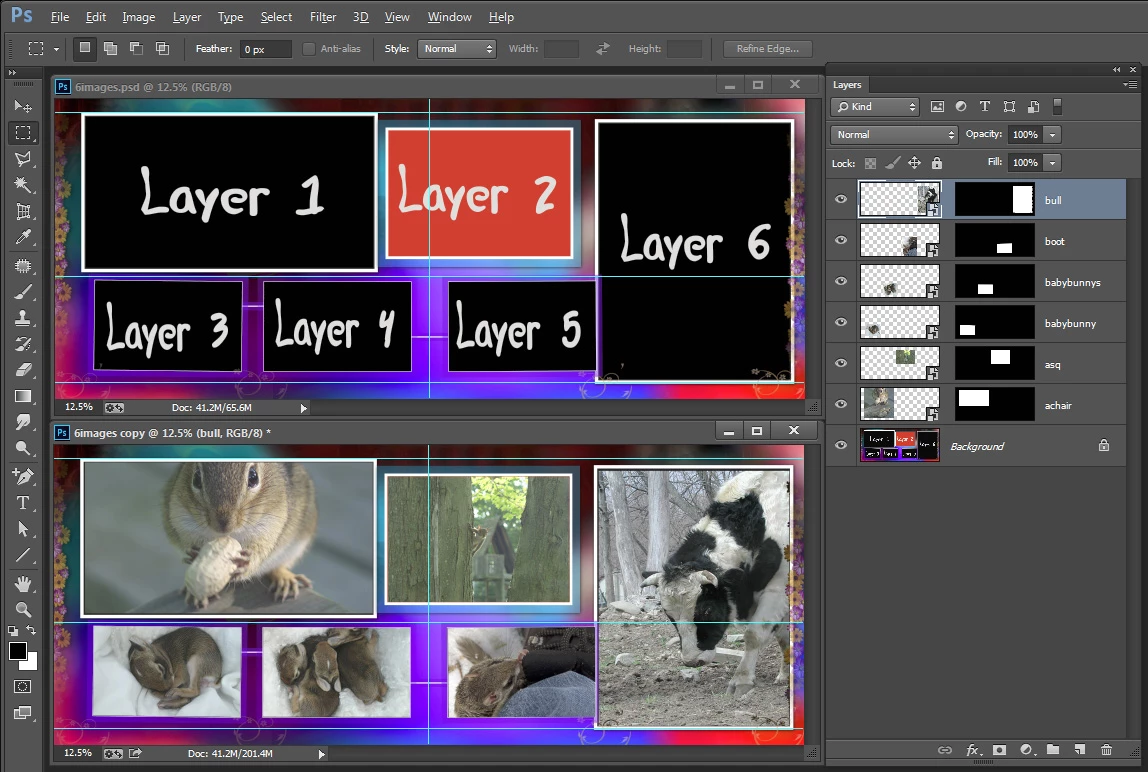
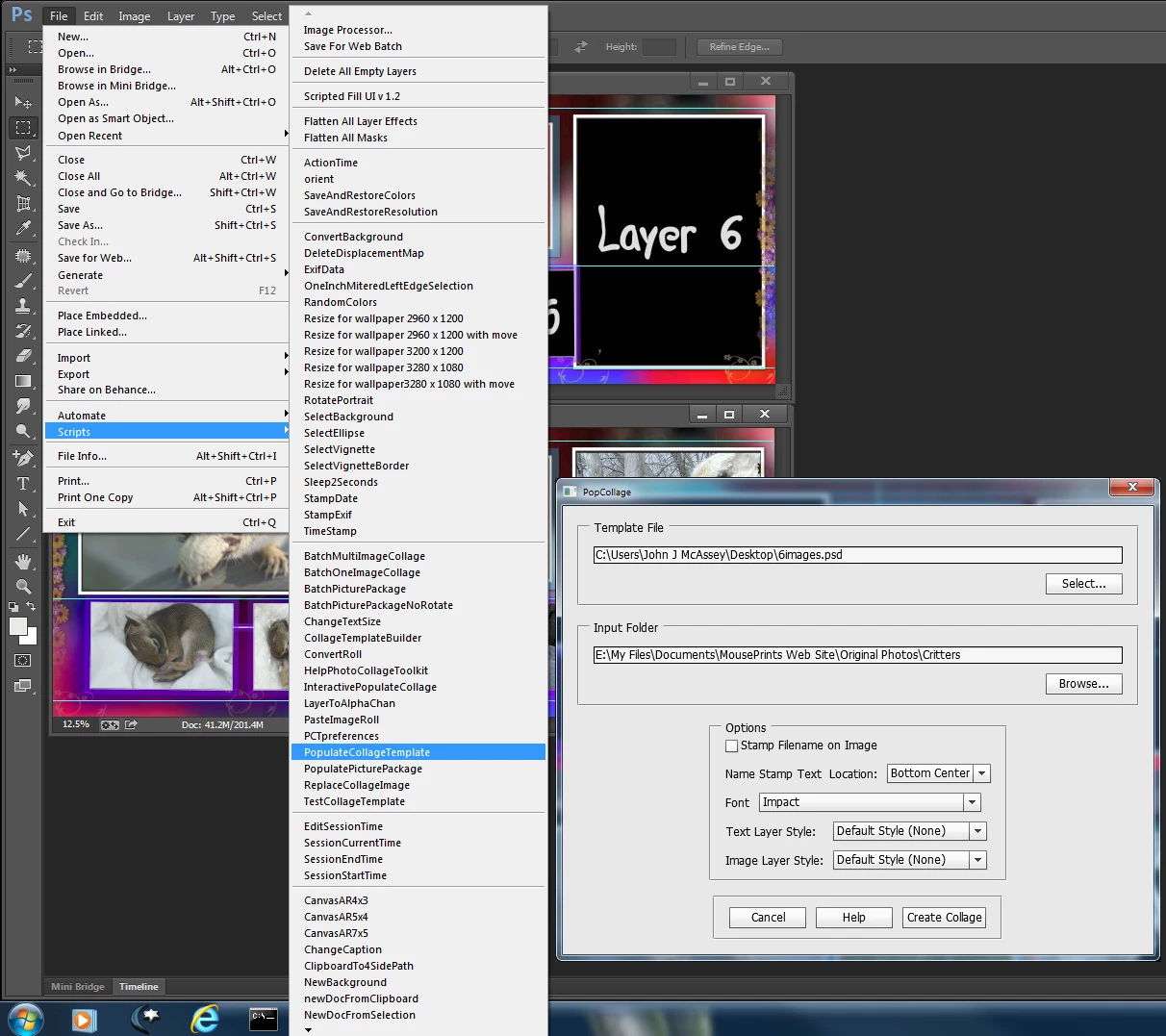
I created a template for you latest example using its size 30" x 12" at 200DPI and the 6 different aspect ratio images. There is still some tilt in image 3 and 5.  You can download the template http://www.mouseprints.net/old/dpr/6images.psd

I only used a Background layer.  I did not add and upper overlay layer however the alpha channel I created for image 6 will let some of the background show through image 6.  Here is a screen capture with the Template in Photoshop and under it a populated version. Also just copy my scripts into Photoshop folder Presets\scripts and use them from Photoshop  menu File>Scripts>My Script Selected. The extendedscript toolkit has problems with some things.
Capture.jpg

Capture.jpg

JJMack
Translate
Report
Community guidelines
Be kind and respectful, give credit to the original source of content, and search for duplicates before posting. Learn more
community guidelines