Participant
July 24, 2018
Answered

CAMERA RAW AND CONVERT TO GREY SCALE

  • July 24, 2018
  • 3 replies
  • 2375 views

my Camera Raw (10.4.0.976) does not have "CONVERT TO GREY SCALE" as a choice within the HSL . is that an installation error or???????

    This topic has been closed for replies.
    Correct answer Chuck Uebele

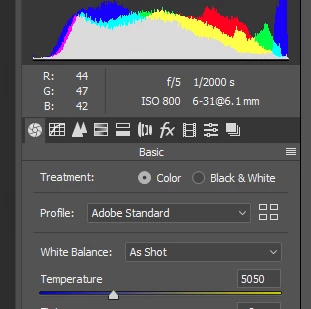
    The grayscale selection is now on the main tab:
    3 replies

    MohamedSaeed18
    Participant
    February 3, 2019

    you mean balck & white Chuck Uebele

    Chuck Uebele
    Community Expert
    Community Expert
    February 3, 2019

    Yes, black and white.

    Derek Cross
    Community Expert
    Community Expert
    July 24, 2018

    You might be better doing the conversion as a black and white adjustment layer within Photoshop.

    Chuck Uebele
    Community Expert
    Chuck UebeleCommunity ExpertCorrect answer
    Community Expert
    July 24, 2018

    The grayscale selection is now on the main tab:

    Participant
    July 24, 2018

    Thank you so much. That was correct. I have been following some tutorials

    that apparently used an older version of Camera Raw and I could not get

    the same functions. Which was convert to grayscale and then apply changes

    to the different coloring. So I now see that if you convert to

    black-and-white and then go over to HSL you would be able to manipulate the

    colors in the same way.

    Thanks for your help

    Steve Christensen

    On Tue, 24 Jul 2018 at 3:59 AM, c.pfaffenbichler <forums_noreply@adobe.com>