
Exit
  • Global community
    • Language:
      • Deutsch
      • English
      • Español
      • Français
      • Português
  • 日本語コミュニティ
  • 한국 커뮤니티
0

Camera raw, color missmatch error

Community Beginner ,
Jun 01, 2020 Jun 01, 2020

Hi


I am cant figure out why my image does not match in color. 


I open the jpg image in Photoshop 2020, then I select Filter->Camera raw filter. As soon as the image opens it looks different, no adjustments are added. And if do make adjustments and Save. The image will not look similar to the camera raw window adjustment I did. There is some missmatch. 


I have tried to all the settings under Preference->Camera Raw and Performance, checked and unchecked with no luck. 


Where else can the problem be? 

Working on Windows 10 with latest Nvidia graphic drivers.
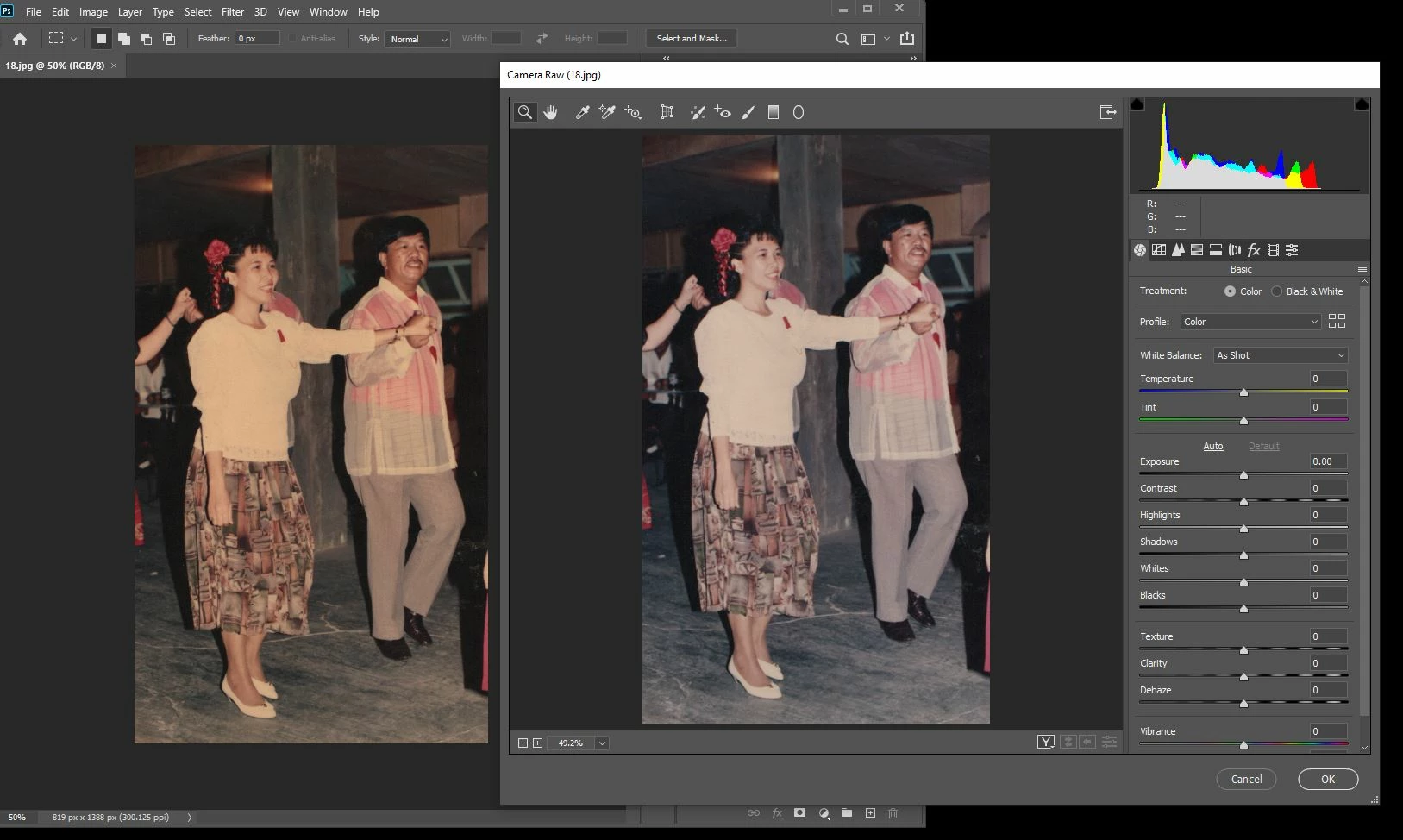
 

yellow tintyellow tint

TOPICS
Windows
2.4K
Translate
Report
Community guidelines
Be kind and respectful, give credit to the original source of content, and search for duplicates before posting. Learn more
community guidelines
Adobe
Community Expert ,
Jun 01, 2020 Jun 01, 2020

Hi 

If you are seeing a sudden change with the camera raw filter on an opened jpeg , as opposed to comparing camera raw files with a jpeg, you may have a broken monitor profile.

The monitor profile is set in your operating system, not Photoshop, but is used by Photoshop and camera Raw.

Go to Windows display settings and try changing the profile to sRGB, If that resolves then you need a new profile for your monitor.

Dave

Translate
Report
Community guidelines
Be kind and respectful, give credit to the original source of content, and search for duplicates before posting. Learn more
community guidelines
LEGEND ,
Jun 01, 2020 Jun 01, 2020

In this case though, davescm, I think there is no RAW file from the camera, only a JPEG. I have no idea why anyone would use the Camera Raw filter in this way, since it doesn't have any of the advantages of RAW shooting, but I know some people do, and it isn't going back to the camera sensors...

Translate
Report
Community guidelines
Be kind and respectful, give credit to the original source of content, and search for duplicates before posting. Learn more
community guidelines
Community Expert ,
Jun 01, 2020 Jun 01, 2020

Hi

I think you read my original reply which referred to raw vs jpeg and I changed immediately when I re-read th OP.  

In this case it points to a monitor ICC profile error.

Dave

Translate
Report
Community guidelines
Be kind and respectful, give credit to the original source of content, and search for duplicates before posting. Learn more
community guidelines
LEGEND ,
Jun 01, 2020 Jun 01, 2020

Yes, you're ahead of me davescm.

Translate
Report
Community guidelines
Be kind and respectful, give credit to the original source of content, and search for duplicates before posting. Learn more
community guidelines
Community Expert ,
Jun 01, 2020 Jun 01, 2020

I do agree with your comment on using the camera raw filter. By not using raw files you don't get the full advantage of camera raw.

However, either way the monitor profile issue needs fixing first.

Dave

Translate
Report
Community guidelines
Be kind and respectful, give credit to the original source of content, and search for duplicates before posting. Learn more
community guidelines
Community Beginner ,
Jun 01, 2020 Jun 01, 2020

That cant not be it because when I open this file in another computer the two images stay the same color. But on this computer the images have different color, in one it has a more yellow tint, the one on the left. 


This missmatch in the two working windows, camera raw and photoshop, is making it very difficult to achieve the correct adjustments. Because when I apply some corrections and save in camera raw the image still becomes more yellowish. 


In short, the camera raw window on the right does not match the Photoshop window on the left even when applying adjuments on the image. 

Translate
Report
Community guidelines
Be kind and respectful, give credit to the original source of content, and search for duplicates before posting. Learn more
community guidelines
Community Expert ,
Jun 01, 2020 Jun 01, 2020

See my revised reply. At first I thought you were comparing jpeg to raw. These are both jpeg and it looks like you have a monitor ICC profile issue.

Dave

Translate
Report
Community guidelines
Be kind and respectful, give credit to the original source of content, and search for duplicates before posting. Learn more
community guidelines
Community Beginner ,
Jun 01, 2020 Jun 01, 2020

It seems like there is an error there yes. I will look into it.

Thank you so much for your help so far 🙂 

Translate
Report
Community guidelines
Be kind and respectful, give credit to the original source of content, and search for duplicates before posting. Learn more
community guidelines
Community Beginner ,
Jun 01, 2020 Jun 01, 2020

Tried to calibrate and also downloaded a profile for the monitor but it did not help that much.


I do find it strange that those two windows shows different colors. If the ICC profile was an issue wouldnt both of them be "wrong".  Or does camera raw use another ICC Profile than Photoshop that's why they are different?

Translate
Report
Community guidelines
Be kind and respectful, give credit to the original source of content, and search for duplicates before posting. Learn more
community guidelines
Community Beginner ,
Jun 01, 2020 Jun 01, 2020

Found it. It was the 'Use Windiws display calibration' check mark that was causing the problem. And to remove that one I had to delete all the profiles. 


Thank you for pointing me in the right direction. 


windows display.JPG

Translate
Report
Community guidelines
Be kind and respectful, give credit to the original source of content, and search for duplicates before posting. Learn more
community guidelines
Community Expert ,
Jun 01, 2020 Jun 01, 2020

No you're not there yet 🙂

Go to the devices tab in that dialogue window. Select you monitor and check the default profile. It should be set to a profile that describes your monitor with its current settings. Unfortunately, Windows updates sometimes update that profile and provide a broken version. You can test by changing the default to sRGB. But that is only temporary until you replace the profile with a good one, preferably made with a hardware calibration device such as the i1 display. The key is that the monitor profile is used by color managed applications, such as Photoshop, to ensure colours are displayed correctly. To do that, it must describe your monitor exactly. A broken or incorrect profile means you are not seeing the colours that others, with correctly set up colour managed displays, will see.

Dave

Translate
Report
Community guidelines
Be kind and respectful, give credit to the original source of content, and search for duplicates before posting. Learn more
community guidelines
New Here ,
Dec 28, 2022 Dec 28, 2022

Can you show me how to fix this?

Translate
Report
Community guidelines
Be kind and respectful, give credit to the original source of content, and search for duplicates before posting. Learn more
community guidelines
Community Expert ,
Dec 28, 2022 Dec 28, 2022
LATEST

@Bắc27725109eflx read through this thread. If you have the same problem the fix is there. Otherwise - start a new thread and describe your issue.

Dave

Translate
Report
Community guidelines
Be kind and respectful, give credit to the original source of content, and search for duplicates before posting. Learn more
community guidelines