
Participant
September 16, 2023
Answered

Camera Raw Filter in Photoshop 24 doesnt open

  • September 16, 2023
  • 16 replies
  • 7444 views

Hi,


when I work in photoshop on RAW files and try to open the Camera Raw plugin, it doesn't open. I only get an error sound when I click somewhere, but no error message. With Alt+F4 I can turn back to Photoshop, which tells me that my computer is somehow trying to open Camera Raw in the background until I press that key combination.


I have all the latest updates and have already tried to delete and re-install the software as well as improving the performance of photoshop.


Version: Photoshop 25.0

Windows 10
 

Correct answer Per Berntsen

There's an easier way to reset the ACR preferences.

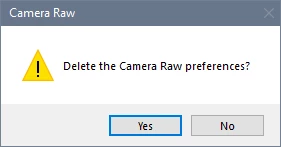
In Photoshop, go to Edit > Preferences > Camera Raw, and click Camera Raw with the Control key pressed, which brings up this dialog.


16 replies

Participant
May 19, 2025

For my case solution was: change back and forth main monitor (RMB click on windows background -> Display Settings -> click on display -> Multiple displays / Make this my main display. Play with this. Wiered application.

Participant
November 20, 2024

Another solution for finding a missing Camera Raw window is using an additional monitor and extending your display in Windows Display Settings, and moving the layout of your screens until you find it. For example, in order to find mine, I had to change my Windows display settings until my extended monitor was underneath my Hero monitor (where Photoshop was open), as Camera Raw had opened quite literally underneath PS. Terrible at explaining things but hopefully this helps someone!

Participant
July 3, 2024

I had the same bug, that the camera raw window seemingly did not open but photoshop behaved, as if it was.
The solution (for windows) is simple. press WIN + SHIFT + ARROW LEFT/RIGHT. That is the Shortcut for switching different screens in Windows. after a few left/right/left wiggles, the window appeared. It seemed to remember a screen config I dont have anymore.

D Fosse
Community Expert
Community Expert
January 4, 2024

Ah, much simpler, yes.

Per Berntsen
Community Expert
Per BerntsenCommunity ExpertCorrect answer
Community Expert
January 4, 2024

There's an easier way to reset the ACR preferences.

In Photoshop, go to Edit > Preferences > Camera Raw, and click Camera Raw with the Control key pressed, which brings up this dialog.


Participant
July 24, 2025

Thank you, this helped me too!

D Fosse
Community Expert
Community Expert
January 4, 2024

@Brian Rope 

Re-reading your first post, this sounds like Bridge problems, not ACR problems.


First of all:

"Displays JPG files in Bridge then opens them in RAW, but doesn't list my lens for lens profile corrections"

This is normal! There won't be any lens profile for a rendered RGB file, it's already baked into the data.

There is also a setting in Camera Raw Preferences for handling of jpeg and TIFF files. The default opens any jpeg in ACR if it already has ACR metadata. If you set this to "disable jpeg support", they will go directly to Photoshop.


Second: If Bridge doesn't show your files, it may have a corrupt cache. There is a setting in Bridge Preferences to clear the cache. Note that it can take some time to rebuild.


In any case: if you already have ACR installed and up to date, multiple reinstalls won't help. What could help is to reset ACR preferences. Corrupt preferences can give weird and unpredictable symptoms. In effect, it returns the application to clean factory state. Press ctrl+alt+shift as you open ACR. You will get a confirmation dialog, if not, you didn't do it right and you need to try again.

Participating Frequently
January 4, 2024

@D FosseThanks for your respnse. I downloaded from Camera Raw plug-in installer (adobe.com). Also, the attached screenshot says PS and Camera Raw are both installed and up-to-date. 

Participating Frequently
January 4, 2024

D Fosse. Thanks for your response but this screenshot says that Camera Raw is installed and up-to-date on my PC, so what do I need to do?


D Fosse
Community Expert
Community Expert
January 4, 2024

@Brian Rope 


I don't know what kind of installer you found or where that came from, but you're going about this the wrong way.


ACR is installed with Photoshop, through the CC desktop app.

Participating Frequently
January 4, 2024

This is the error message I get when trying to instal