
Participant
January 13, 2019
Answered

Camera RAW Glitching

  • January 13, 2019
  • 2 replies
  • 1193 views

Hello, I am having trouble when I first edit my photos in Camera Raw. Whenever I play around with the sliders, the photo will occasionally glitch out in different ways, something like this:
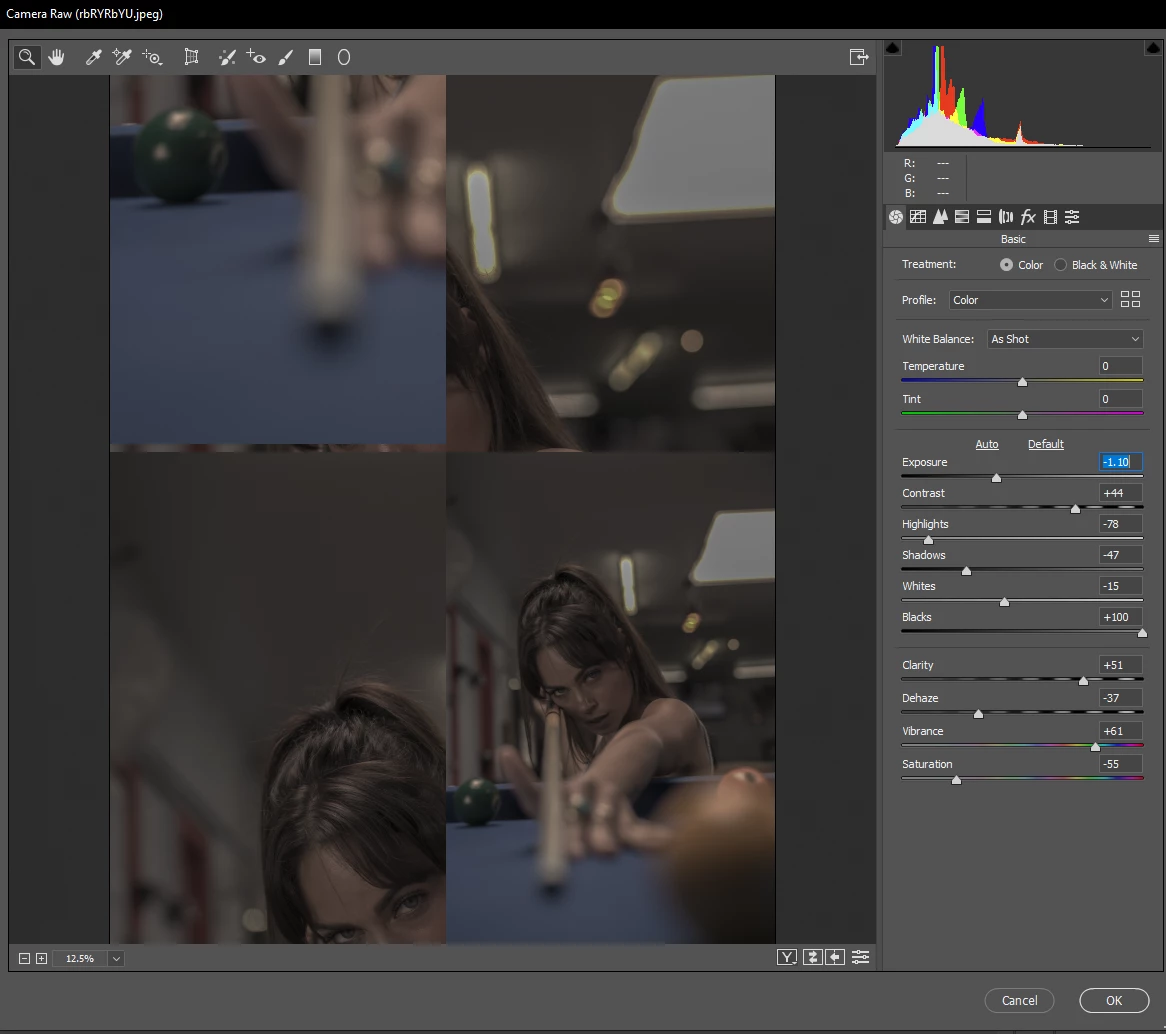
It is getting annoying, for it happens frequently and I really want to fix the problem, but I do not know how.

    This topic has been closed for replies.
    Correct answer Per Berntsen

    Try to disable the GPU.

    In Photoshop, go to Edit > Preferences > Camera Raw, and uncheck Use graphics processor at the bottom.

    On a Mac, go to Photoshop > Preferences > Camera Raw.

    2 replies

    Justin___Author
    Participant
    January 14, 2019

    Thank you, solved my problem.

    Per Berntsen
    Community Expert
    Per BerntsenCommunity ExpertCorrect answer
    Community Expert
    January 13, 2019

    Try to disable the GPU.

    In Photoshop, go to Edit > Preferences > Camera Raw, and uncheck Use graphics processor at the bottom.

    On a Mac, go to Photoshop > Preferences > Camera Raw.