
Participant
December 31, 2024
Answered

Camera Raw Issue

  • December 31, 2024
  • 4 replies
  • 475 views

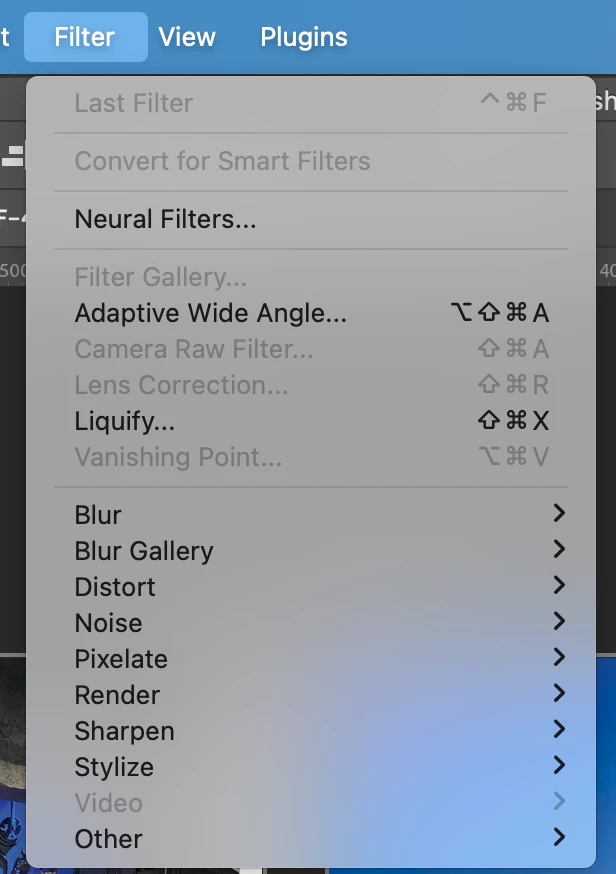
For some reason after I updated both photoshop and camera raw. I am unable to access the camera raw filter feature. It worked perfectly fine before the update but now I can't use it. Does anyone know how to resolve this? I reset the camera raw preferences and it had no effect.
Correct answer Stephen Marsh
quote

Yes, it is in CMYK mode! @Stephen Marsh 

By @Nicholas5DE5


Then you have your correct answer! :]


The Camera Raw Filter expects RGB input, not CMYK.


If you have a grayscale mode file, Photoshop can automatically handle the 1 channel > 3 channels > 1 channel processing behind the scenes.


You'll also notice that Bitmap, Indexed Color and Lab mode are also unsupported. Surprisingly, Multichannel mode is supported, but it's only for the active channel which is treated as grayscale.

4 replies

Stephen Marsh
Community Expert
Stephen MarshCommunity ExpertCorrect answer
Community Expert
January 2, 2025
quote

Yes, it is in CMYK mode! @Stephen Marsh 

By @Nicholas5DE5


Then you have your correct answer! :]


The Camera Raw Filter expects RGB input, not CMYK.


If you have a grayscale mode file, Photoshop can automatically handle the 1 channel > 3 channels > 1 channel processing behind the scenes.


You'll also notice that Bitmap, Indexed Color and Lab mode are also unsupported. Surprisingly, Multichannel mode is supported, but it's only for the active channel which is treated as grayscale.

Participant
January 2, 2025

Yes, it is in CMYK mode! @Stephen Marsh 

Participant
January 1, 2025

I'm also having a sudden camera raw issue but it's a "camera raw graphics acceleration is not supported by your system" when I have an M3 Max chip, lovely.

Stephen Marsh
Community Expert
Community Expert
December 31, 2024

@Nicholas5DE5 – Is your document CMYK mode?