
ChristianMeza
Participating Frequently
June 23, 2020
Question

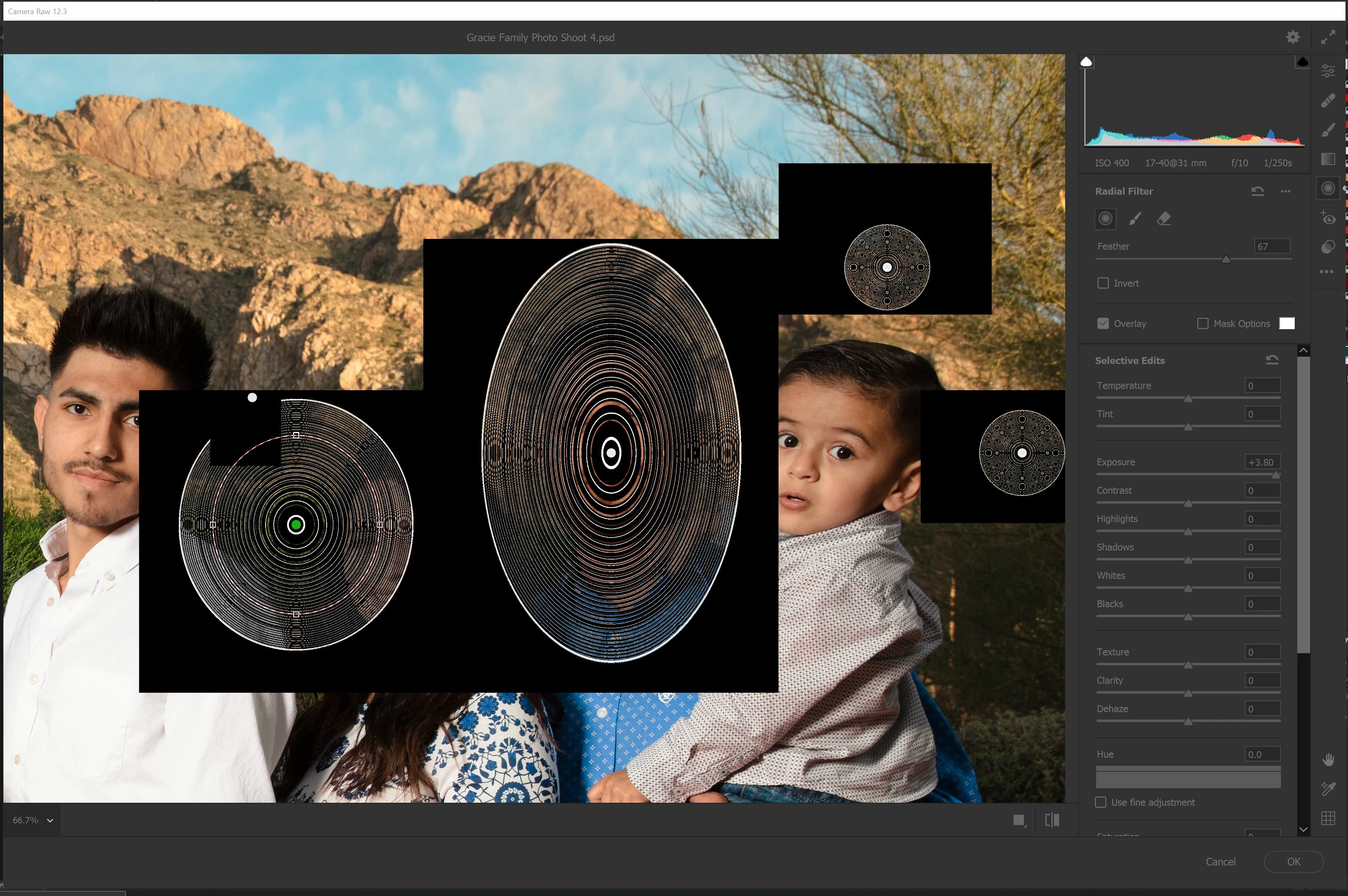
Camera Raw Radial Filter Isn't Behaving

  • June 23, 2020
  • 7 replies
  • 2667 views

Hey everyone!

I am on the newest version of Adobe Photoshop CC 21.2.0, and I conduct most of my photography work in here. I recently just started editing with the new Camera Raw UI and the radial filters are doing something rather unusual all of a sudden. Any ideas?

Thank you all!

Basic Hardware Specs:
CPU: Intel Core i9-9900K @5 GHz (3.60 GHz)

Installed RAM: 64.0 GB
Graphics: RTX 2080 Ti 11GB GDDR6
Windows 10 Professional 64-Bit
This topic has been closed for replies.

7 replies

PECourtejoie
Community Expert
Community Expert
September 10, 2020

HEllo, please post on this thread, and provide the requested info: https://feedback.photoshop.com/photoshop_family/topics/camera-raw-new-update-bug

Participant
September 10, 2020

Hi Folks, I'm having the same problem with the new version of ACR. Very frustrating as it's a mainstay of my workflow.

I've updataed today (10/09/2020) with the latest updates but to no avail. 

Best,

J

Known Participant
September 10, 2020

Hey,


my issue with PS/ACR radial filter glitch was resolved in 21.2.2


I've updated and tested 21.2.3 myself but the version brought back the issue.


removed and reinstalled 21.2.2 but for some reason 21.2.3 temp files remained or something?


the issue transfered back on to reinstalled 21.2.2


rebooted, and the radial filter works fine on my 21.2.2


I saw the only thing they fixed was snapping while resizing which I can totally live without.


So I'm settling for the 21.2.2 for the foreseeable future until they specifically state the issue is fixed.

Participant
July 27, 2020

Yeah, it's still broken for me. @Adobe come on. This needs a fix ASAP. 

Known Participant
July 28, 2020

forgot to mention I'm on Ryzen/Radeon combination.


And since the OP's spec is Intel/Geforce combination, it's clearly not hardware dependent.


I've tried evey possible combinations, including resetting preferences with Alt+Ctrl+Shft, and there's no fixing it.


Edit:

I also have an old 15" MBPr (late 2013) running PS 21.2.1 // Camera Raw 12.3 and guess what.

It's running just fine...

granted, performance is a bit lacking compare to my ryzen2600/radeon570rx but it's working just fine...

Daniel Laan
Participant
July 14, 2020

Here's is a workaround that has been tested on both Quadro and GTX cards:
Go to Preferences under Edit, then point to the Performance tab or menu item.
Increase Cache Levels under History & Cache to 6 and hit OK. Restart Photoshop.
Let us know if this helps you too.

Participant
July 14, 2020

This seems to have worked for me. THANKS!

Metal Maik
Participant
July 4, 2020

I have the same problem, since the last update.

ChristianMeza
Participating Frequently
June 24, 2020

Returning back to the previous version of Photoshop appears to be helping but I don't that that is a palatable solution moving forward.

Participant
July 4, 2020

I am having sooooooo much trouble with this update. How can I revert to the previous version? Thanks


Metal Maik
Participant
July 4, 2020

Open the Creative Cloud Desktop, there you can install an older version via the three points menu (next to the Open button).

ChristianMeza
Participating Frequently
June 24, 2020

Please see the video below for a better understanding of the problem:
https://www.youtube.com/watch?v=qh7WVOGpx4w