
Daleg94
Known Participant
July 9, 2019
Question

Camera Raw showing images over saturated & inaccurate to the working profile

  • July 9, 2019
  • 4 replies
  • 3394 views

Hi,

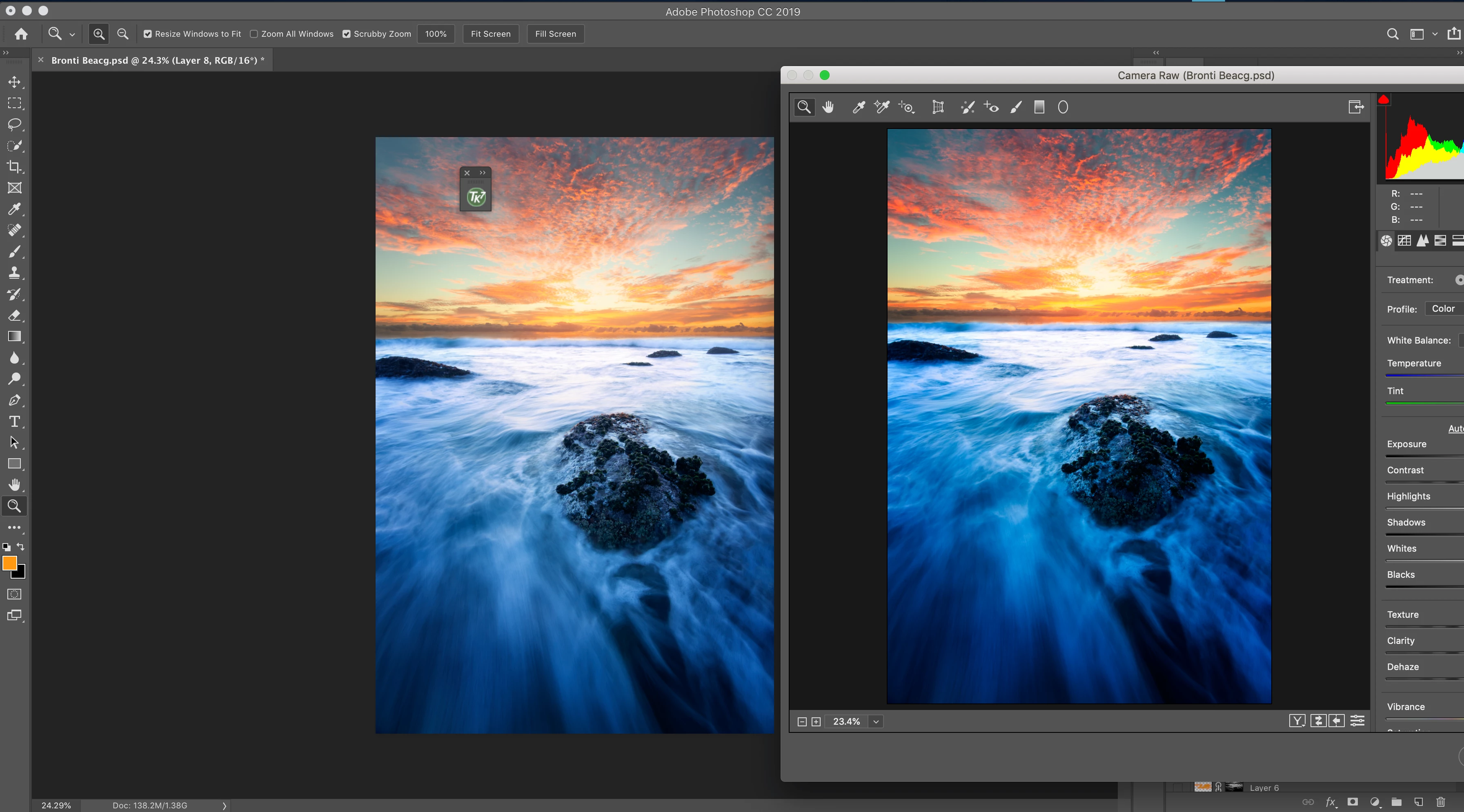
I’ve been having issues with how Camera Raw shows my image on a wide-gamut monitor (oversaturated and inaccurate - see attached image)

Setup: I’ve got a BenQ sw271 calibrated for Adobe RGB via BenQ’s Palette Master Element program with an i1 Display Calibrator.

This is connected to my mid-2014 MacBook Pro

The issue I’m having is that when I edit an image with my calibrated monitor   (with the BenQ calibrated colour profile) in either the generic Adobe 1998 rgb profile or if I select my Benq calibrated colour profile in Camera Raw the colours are oversaturated

Any suggestions on why this could be the case would be much appreciated

note: the colour displays accurately when I've selected Adobe 1998 in the monitor display profile & work with adobe 1998 as my photoshop doc however I'd think (and hope) that it would also work with a calibrated profile

Cheers,

Dale
This topic has been closed for replies.

4 replies

Known Participant
May 22, 2020

see if your LCD vendor has an INF for your panel which will allow windows to better leverage it

you may need to also manually calibrate the color if the LCD does not have a good factory calibration


D Fosse
Community Expert
Community Expert
July 9, 2019

OK. The first thing to do here is test the basic color management chain, ruling out any bad monitor profiles. I need to stress that this has nothing to do with which profile you set in ACR! Leave that at your preferred choice (sRGB, Adobe RGB or ProPhoto). Never set the monitor profile here. The monitor profile is handled at system level.

To do that, set Adobe RGB as monitor profile for that monitor. This won't be entirely right - it's just for diagnostics. But it should be ballpark. Relaunch all applications. Does ACR still display oversaturated?

If it does, ACR is not using the correct monitor profile, instead using the profile for the other screen (the MBP). This is an erratic bug that has been reported from time time, but so far unacknowledged and without a proper solution except switching display assignments in the OS.

What should happen here, is that ACR should convert the data from its internal working color space (linear gamma ProPhoto) and into the monitor profile, and then send those remapped numbers to the display. But if the profile is not the one describing the current display, the application displays incorrectly. If it's a profile for a standard gamut display, you get oversaturation.

If, on the other hand, ACR displays roughly right using Adobe RGB as monitor profile, the problem is the BenQ software and the profiles it makes. This won't be the first time. The BenQ software is notoriously unreliable and there have been many threads about it here and in the Lightroom forum.

It could be the GPU, although I doubt it. Still, turning it off doesn't hurt.

Daleg94
Daleg94Author
Known Participant
July 10, 2019

Hey thanks so much for the reply, thanks for confirming the ARC colour management also

I did the test and no, the ACR displays the correct mirror image not a saturated one when Adobos RGB is set as the monitor profile (via the buttons on the display), colour profile (within display settings of the Mac) & within the working profile of the Photoshop document

So keeping this in mind would you think it’s an issue with the BenQ software profile as you mentioned?

I’ve been dealing with trying to get the BenQ software to work on my monitor/macbook last 5 months waiting for updates & ton of emails…I ended up clean resetting it and that seemed to do the trick with the calibration going through without a hiccup or crash..potentially this ACR issue says that there’s still problems

3615alex
Participating Frequently
May 22, 2020

ACR does its own independent color management. It converts the data from its internal working color space (linear gamma ProPhoto) and into your monitor profile.


Your problem is apparently the same as above: ACR isn't using the correct monitor profile. The only known workaround for this is to make sure ACR is on the primary display, not the secondary.


In addition, there's a wild card here: the BenQ software. This has been demonstrated time and again to be incredibly buggy. There's been a huge number of posts about it here in the forums. The symptoms are just that: the profile isn't correctly loaded by the BenQ software, and so some or more applications don't receive it correctly from the OS.


Hi D_Fosse,

Thanks for your reply. How do to I make sure ACR is on the primary display, not the secondary? Is that a setting somewhere or actually using a workaround such as to use ACR on ly laptop while using Bridge and photoshop on my BenQ monitor?

Another workaround is to set the profile to Adobe RGB. Not perfect but better than having saturated colors.

Regarding the Benq sofware. How come all my other apps work fine (Capture one, Photoshop, Final Cut...)

Thanks

Akash Sharma
Legend
July 9, 2019

Hi Dale,

That isn't a great user experience, we're sorry to hear about this. Let us help make it right.

Try unchecking the GPU support in the Photoshop preferences. That has corrected this problem for some users. If that doesn't work for you, you can always enable that option again: 

You may also refer this article for more info: Adobe Camera Raw graphics processor (GPU) FAQ and troubleshooting

Let us know if that helps.

Thanks,

Akash

Daleg94
Daleg94Author
Known Participant
July 10, 2019

Hi Akash that doesn't seem to fix the issue (unticking GPU support), I also read through the FAQ & troubleshooting page but can't see anything that would help - as far as I'm aware everything is up to date like the graphics processor etc as I recently did a clean reset of my Macbook

D Fosse
Community Expert
Community Expert
July 9, 2019

ACR is apparently not using the correct monitor profile for the display it's on. It could be the OS or the app, but also the BenQ software. It's known to be very buggy. I'm sitting in an airport with my phone, will pick this up later if no one else comes along.