
Camera Raw window not showing up now that I have converted to one screen setup
Hello. Usually I work with 2 screens extended from my laptop. When I launch camera raw, it usually pops up on a different screen (different from the primary screen where Photoshop is open by default)
But when I am working with just the primary screen on laptop (no extra screens) and launch RAW there's no RAW window and I can't do anything in photoshop, getting error sounds only
It's behaving like the RAW is launching on another screen that's not asctually connected, if that make sense
I am using windows 10 which is updated
Using Photoshop on Creative Cloud which is updated
I check the display preferences on my PC and it doesn't seem to be recognising any other displays (which it shouldn't as no other screens are plugged in)
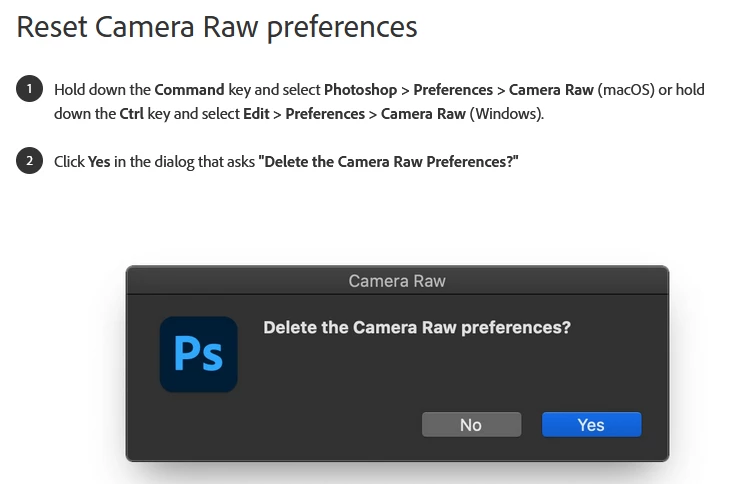
I see that resetting RAW preferences has helped some people, but the selectable dialog box for this doesn't seem to be available in the Camera RAW preferences, this was a very recent fix for some / updated advice on bug fix, maybe the options in camera RAW changed very recently?
Preferences for RAW are Adobe default however I have changed somethings, then changhed it back just to kind of try and reset it but didn't work
I turned Photoshop and my PC off and on again.....
I am out of ideas, can anyone help?
This wasn't an issue for me in the past, and I regularly use Photoshop, switching between laptop primary screen only, and multiple screen set up
Thank you so much
 AdChoices