February 21, 2020
Answered

Camera Raw Won't Stop, Keeps opening TIFFs

  • February 21, 2020
  • 2 replies
  • 4651 views

Hi everybody,


I went through preferences (CC 2018), turned off everything I could find without screwing it up....and it keeps opening up when I click on smart objects that are TIFFs. The worst part is I can't edit the darn thing.


I just want to open the Smart object, not have the dang camera raw color window open up.


Anybody had this happen and a fix? I don't even need it and would delete it if I could.
This topic has been closed for replies.
Correct answer Just Shoot Me

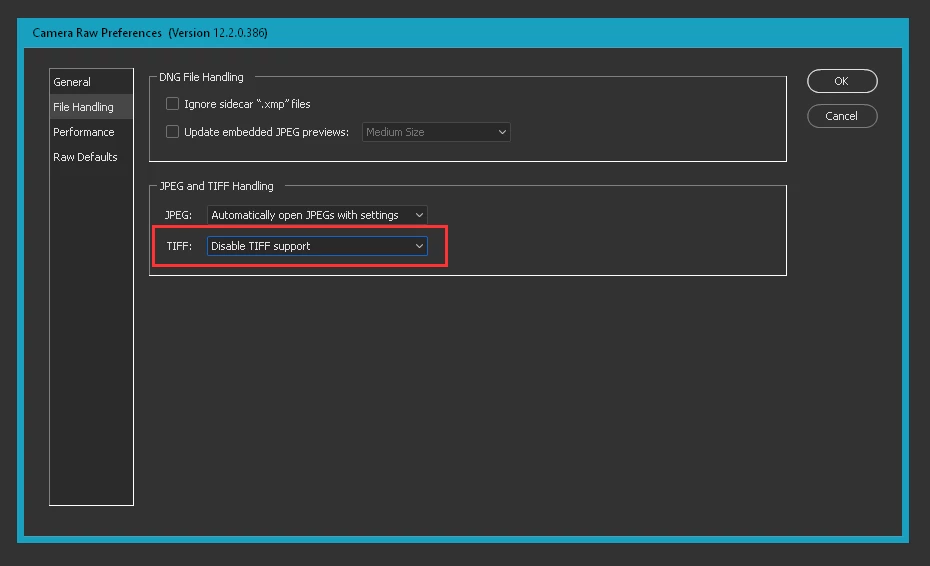
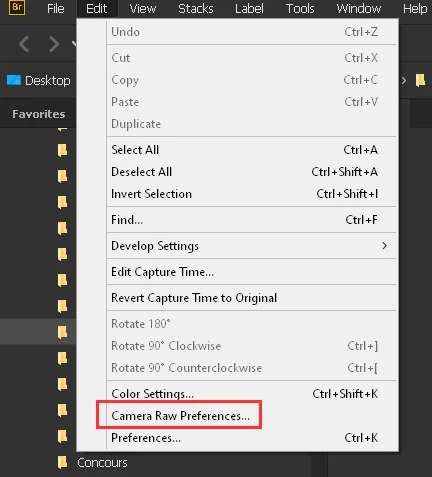
In the ACR Preferences, you can get there through Bridge (Edit menu, Camera RAW Preferences), On the File Handling tab set the JPG and TIFF Handling to "Disable TIFF Support".


2 replies

Just Shoot Me
Just Shoot MeCorrect answer
Legend
February 21, 2020

In the ACR Preferences, you can get there through Bridge (Edit menu, Camera RAW Preferences), On the File Handling tab set the JPG and TIFF Handling to "Disable TIFF Support".


Participant
February 22, 2020

I am having this issue as well. I have a batch of ten files, all of which are tiffs. Peculiarly, two of them will not open directly in Photoshop as Camera Raw opens up immediately. The other eight files open normally in Photoshop. I have tried these two files on about ten computers and ten different accounts.


I have tried saving the file as a psd, then back to tiff. I have tried taking a layered tiff (which saves and re-opens successfully), and deleting a layer, flattening the image, and saving it back as a tiff. I have tried several other workarounds as well, but nothing seems to be working.


I would very much appreciate any help with this urgent issue. Thanks.

Participant
February 22, 2020

After further investigation, I suspect the issue has something to do with the xmp metadata associated with these files. If the file is layered and/or CMYK, the files open fine. The two problematic files that prompt Camera Raw (and strip all of the color data) are flat RGB files. My guess is that Photoshop is not prompting Camera Raw for the CMYK and/or layered files because it knows these cannot be raw files, but for the flat RGB files it thinks they are raw - presumably from the xmp metadata. The xmp metadata seems to be "stuck" with the file - if I take a layered file (which opens fine), flatten the image, resave as RGB tiff, the file will then prompt Camera Raw when opened.


Is this a valid theory, and if so, how do I fix it? 

lambiloon
Community Expert
Community Expert
February 21, 2020

Hi there is new version of Camera Raw now i suggest you to use it hope it gives you any problem....regards

Ali Sajjad / Graphic Design Trainer / Freelancer / Adobe Certified Professional