
Inspiring
May 9, 2019
Question

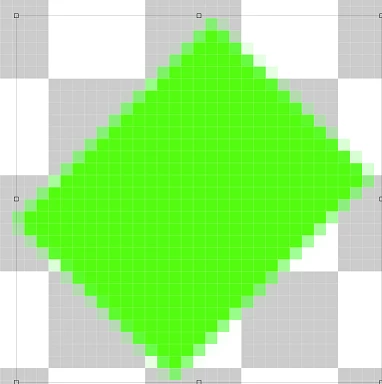
Can a 45 degree angle rectangle have smooth lines?

  • May 9, 2019
  • 5 replies
  • 2093 views

I don't usually do much more than basic techniques so I'm having trouble figuring this out. As in the title, I'm trying to figure out a way to make the rectangle below have clean edges. I've tried a multitude of techniques such as select/feathering and masks etc. I know I'm missing something but I'm not even sure it can be done. I've also watched YT videos but none are specifically for a 45-degree edge but I'm not sure that would even matter either. Can this be done?
    This topic has been closed for replies.

    5 replies

    Inspiring
    May 10, 2019

    Two aspects should be taken into account:

    For simplicity I'm referring to the illustration. The path hits some pixels. These should  be rendered

    neither red nor green but with something between.

    Let the red area of such a pixel (divided by the path into parts) be (a), and the green area be (1-a),

    with (a) in the range 0...1 . This pixel can have only one color – an interpolated color C = a*R + (1-a)*G.

    If the background were transparent instead of colored (green), then the second term would be missing.

    This says: anti aliasing should be executed with respect to an already defined background.

    The interpolation is linear. But image data in 8 or 16 bits-per-channel spaces are gamma encoded.

    The interpolation would be non-physical. The underlying CIE-1931 color model is strictly linear by

    definition, which is correct under certain test conditions. In order to solve this problem (an unnecessary

    nonlinearity), Adobe had introduced the mode Color Settings > Blend RGB colors with Gamma=1,

    which happened some time after furious discussions in the forum. This mode had been applied in

    the illustration.

    Normally the effect is obvious for interpolations between red and green, or magenta and green,

    where the interpolation path 'crosses' the color space almost diametral. For 'normal' images instead

    of artificial constructs the benefit of Blend with Gamma=1 isn't important.

    For special test images the choice of Gamma=1.6 (instead of 1.0 or 2.2) delivers better results.

    Best regards  --Gernot Hoffmann

    Edited: bits-per-channel

    Conrad_C
    Community Expert
    Community Expert
    May 9, 2019

    Digital images are always on a grid, so diagonal and curved lines are never perfectly smooth. When they do look smooth, it's an illusion because the pixels are still there, but they're too small for you to see.

    And that's the key to the answer here. What are the pixel dimensions of the document, and how big will it be displayed?

    For example, if the document is 600 x 400 pixels, and it's shown on a web page (resulting in roughly 96 ppi), the line won't be smooth because you'll be able to see the pixels. But if you say that the document is 2400 x 3000 pixels and will be printed at 8 x 10 inches, the resulting 300 ppi resolution means the pixels will be too small to see, so the line will appear to be smooth.

    So regardless of how unsmooth that line looks on screen at the current magnification level, the question is, are you going to display the image at a final size that will shrink the pixels enough for the edge to look smooth?

    Also, regarding vector shapes: Although you can see a smoother line on the screen if you use a vector shape instead, that line will still be jaggy if the document resolution is too low at the final display size. Because even a perfectly smooth vector line must be resolved to the document resolution at output. The document resolution is still the key here. The advantage of vector shapes in Photoshop is not that the lines will be perfectly smooth; their advantage is that they will always take maximum advantage of the document resolution regardless of how you resize the layer or the dimensions of the document.

    jane-e
    Community Expert
    Community Expert
    May 9, 2019

    skinneyfat  wrote

    I'm trying to figure out a way to make the rectangle below have clean edges.

    If you want clean edges, it has to be vector, not raster. This is from Illustrator.

    And this is from Photoshop with the Rectangle vector shape tool.

    Jane

    davescm
    Community Expert
    Community Expert
    May 9, 2019

    Your right Jane - but even a vector shape in Photoshop will look pixellated at that level of zoom. Photoshop still draws the vector in pixels.

    Dave

    jane-e
    Community Expert
    Community Expert
    May 9, 2019

    davescm  wrote

    Thanks, Dave, I just found another reason to stick with Illustrator for vector!

    davescm
    Community Expert
    Community Expert
    May 9, 2019

    You appear to be zoomed in so far that you can clearly see every pixel as a square. At that level of zoom, nothing is smooth. The smallest unit any pixel editor can draw is one square pixel. It can vary the tone/opacity of edge pixels to simulate smoothness but cannot draw half or quarter pixels.

    Dave

    Legend
    May 9, 2019

    Looks perfect to me. What do you dislike about it/what would you like to see instead?