
BobDotS
Participating Frequently
February 16, 2020
Answered

Can anyone explain the voodoo behaviour of buttons in Photoshop Scripting dialogs?

  • February 16, 2020
  • 2 replies
  • 1056 views

A quick explanation of my problem (well, not a problem really, now that I have found the cause - just a question about why this occurs...). I'm creating a plugin for Photoshop CC to automate several of my processes. I use dialog windows created with JavaScript to interact with the user and these dialogs have buttons. So far all is simple.

I discovered that one dialog converted all the buttons to rounded ends and the cause mystified me for some time. The code that created the problem appears to be straightforward :


dlgPrefs.pnlButtons.btnBack = dlgPrefs.pnlButtons.add ('button', [250, 10, 350, 45], 'Cancel');
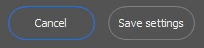


Then quite by accident I retitled the 'Cancel' button as follows :


dlgPrefs.pnlButtons.btnBack = dlgPrefs.pnlButtons.add ('button', [250, 10, 350, 45], 'Back');


and low and behold all the buttons reverted to standard, square ends...
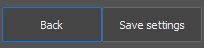


I am guessing that the word 'Cancel' is reserved in Photoshop's implementation of JavaScript, but for the life of me I can't find anything in the Adobe documentation... Has anyone out there seen this behaviour before or can you put me out of my misery with an explananttion?

Thanks in anticipation.

This topic has been closed for replies.
Correct answer Kukurykus

Maybe there's some solution: Round Corner Buttons

2 replies

Chuck Uebele
Community Expert
Community Expert
February 16, 2020

As mentioned several times in the different threads that Kukurykus posted, Cancel and OK are reserve words. When used, they preform some functions like closing the UI without having to write the code to specify it. Davide said it was a bug, which most likely is the case, but it might be more that these are the buttons to either continue your script or to cancel it, so they are shaped to standout.

Kukurykus
Legend
February 16, 2020

Once I could see workaround for this in one thread so rounded buttons were square shaped & viceversa.

BobDotS
BobDotSAuthor
Participating Frequently
February 17, 2020

Thanks for this Kukurykus, my first solution was to rename the button 'Back' which was effective but not very 'satisfying'. I've since come up with a slightly better workaround - I renamed the button ' Cancel ' with a leading and trailing space character. This gets around the problem but still displays the title 'Cancel' to the user centred in the button as expected.

Kukurykus
KukurykusCorrect answer
Legend
February 16, 2020

Maybe there's some solution: Round Corner Buttons

BobDotS
BobDotSAuthor
Participating Frequently
February 17, 2020

Ah, thanks Kukurykus! I just read this whole thread and all my questions have been answered. Even my half baked workaround mentioned below is covered. The sad thing is that I searched for something like this thread on the forum before I posted and couldn't see this post (may have been way down the list of results I got, or some such). Anyway thank you once again to everyone for the quick and helpful responses, it is geatly appreciated.