Known Participant
January 14, 2019
Answered

Can I turn off scrubby zoom?

  • January 14, 2019
  • 3 replies
  • 23365 views

Just upgraded to 2019 and want to reinstate the zoom option where I can use the cursor to click and drag a box, and have that box enlarge to the screen. Can't seem to figure this out. Many thanks.

Correct answer Jeff Arola

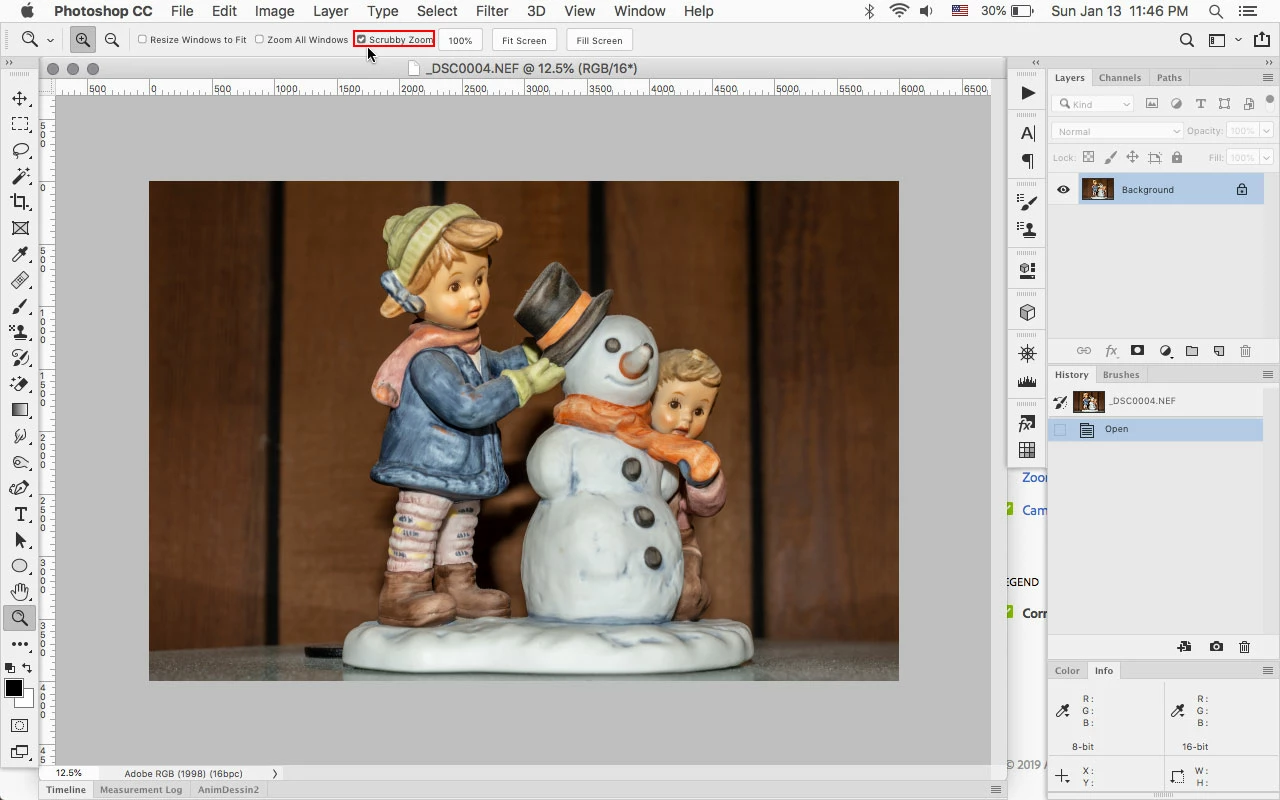
With the Zoom Tool selected, uncheck Scrubby Zoom in the tool options bar.
3 replies

Participant
March 9, 2021

Same with Indesign 16.1. There is no option to change scrubby zoom to marquee zoom?


Scrubby zoom is very frustrating, 20yrs+ using Adobe software and I just want the option as there is in Photoshop and Illustrator.


Have I missed something? 

Participating Frequently
September 22, 2021

Preferences>General>CPU Performance. Uncheck "Animated Zoom".

Macbook Air M1 Sonoma 14.2.1 (23C71) 8GB | All Adobe apps are up to date.
Inspiring
March 25, 2022

Oh bless you! The scrubby zoom was driving me crazy and this solved it - thank you!


content1971
Known Participant
March 2, 2021

Once again after another Adobe update, I've googled how to turn off scrubby zoom and find myself here again. Why my preferences for this option can't remain saved is beyond me. I DETEST the scrubby zoom interface. It makes no sense that it keeps getting turned on with every update. 

Participant
February 25, 2022

You and me both. This is why I decided to stop my subcription and move to Affinity.

Jeff Arola
Community Expert
Jeff ArolaCommunity ExpertCorrect answer
Community Expert
January 14, 2019

With the Zoom Tool selected, uncheck Scrubby Zoom in the tool options bar.

Inspiring
November 18, 2020

I am using AI 2019 and the zoom tool options are grayed out. I cannot change the scrubby tool.  An ideas?

Inspiring
November 18, 2020

After I displayed the Control Panel and double clicked the zoom tool icon, it went back to select zoom. How I fixed it, makes no sense.