Kicomen
Inspiring
September 20, 2019
Question

Can I turn slices into layers?

  • September 20, 2019
  • 5 replies
  • 2526 views

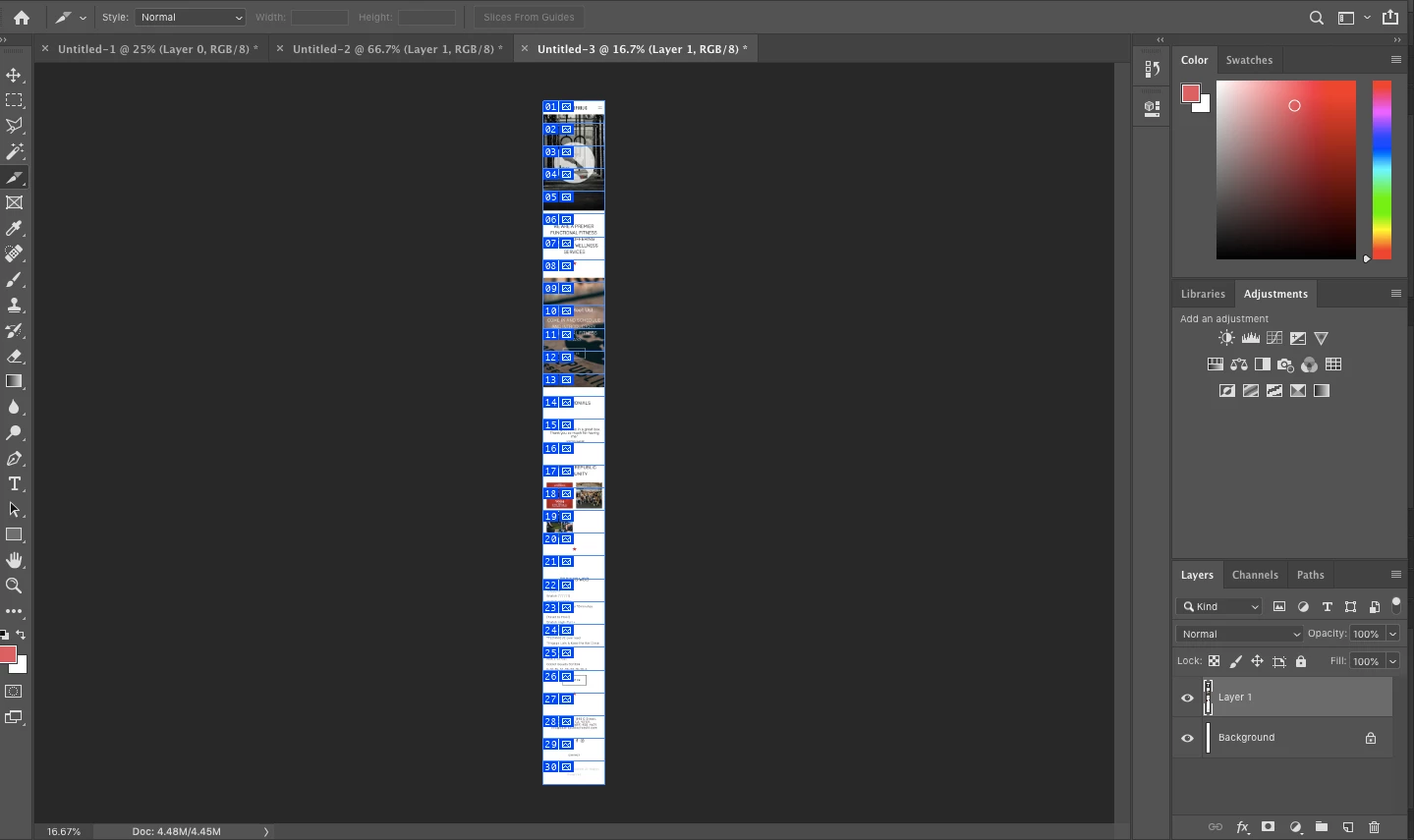
I thought slices would be the answer to dividing up this image into even sections but I can't figure out how to make each slice it's own layer. Can anyone help with this? Thanks!
This topic has been closed for replies.

5 replies

Stephen Marsh
Community Expert
Community Expert
December 1, 2024
Stephen Marsh
Community Expert
Community Expert
September 21, 2019

Try this script by SuperMerlin. You'll need to change the values for the tilesAcross and tilesDown variables:


// Cutting image in parts - by SuperMerlin
// forums.adobe.com/thread/2307015
#target photoshop  
if(documents.length){  
var startRulerUnits = preferences.rulerUnits;  
preferences.rulerUnits = Units.PIXELS;  
doc = app.activeDocument;  
app.displayDialogs = DialogModes.NO;  
doc.flatten();  
var tilesAcross =1;  // How many across the width?
var tilesDown =2;  // How many down the depth?
var tileWidth = parseInt(doc.width/tilesAcross);  
var tileHeight = parseInt(doc.height/tilesDown);  
ProcessFiles(tilesDown,tilesAcross,tileWidth,tileHeight);  
app.preferences.rulerUnits = startRulerUnits;        
}  
function ProcessFiles(Down,Across,offsetX,offsetY){  
    try{  
var newName = activeDocument.name.match(/(.*)\.[^\.]+$/)[1];  
}catch(e){var newName="UntitledChop"}  
TLX = 0;    TLY = 0;    TRX = offsetX;    TRY = 0;  
BRX = offsetX;    BRY = offsetY;    BLX = 0;    BLY = offsetY;  
    for(var a = 0; a < Down; a++){  
        for(var i = 0;i <Across; i++){  
            var NewFileName = newName +"#"+a+"-"+i;  
                activeDocument.selection.select([[TLX,TLY],[TRX,TRY],[BRX,BRY],[BLX,BLY]], SelectionType.REPLACE, 0, false);   
                    executeAction( charIDToTypeID( "CpTL" ), undefined, DialogModes.NO );  
                activeDocument.activeLayer.name = NewFileName;  
                app.activeDocument.selection.deselect();  
                activeDocument.activeLayer = activeDocument.artLayers.getByName("Background");  
TLX = offsetX * (i+1) ;    TRX  = TLX + offsetX;    BRX = TRX;    BLX = TLX;          
        }  
TLX = 0;    TLY = offsetY * (a +1); TRX = offsetX;    TRY = offsetY * (a +1);  
BRX = offsetX;    BRY = TRY + offsetY; BLX = 0;    BLY = (offsetY * (a +1)+offsetY);      
    }  
};  


https://prepression.blogspot.com/2017/11/downloading-and-installing-adobe-scripts.html

Stephen Marsh
Community Expert
Community Expert
December 1, 2024

Here's a quick script interface to help make the script more accessible without having to edit the code:

/* 
ScriptUI interface added to the original script by SuperMerlin
Note: Intended for flattened or single layer files
*/

#target photoshop;

if (documents.length) {
    var dlg = new Window('dialog', 'Tile Image to Layers');
    dlg.alignChildren = 'fill';

    var panel = dlg.add('panel', undefined, '');
    panel.alignChildren = 'fill';

    panel.tileAcrossGrp = panel.add('group');
    panel.tileAcrossGrp.add('statictext', undefined, 'Tiles Across:');
    var tilesAcrossInput = panel.tileAcrossGrp.add('editnumber', undefined, '2');
    tilesAcrossInput.preferredSize.width = 50;

    panel.tileDownGrp = panel.add('group');
    panel.tileDownGrp.add('statictext', undefined, 'Tiles Down:  ');
    var tilesDownInput = panel.tileDownGrp.add('editnumber', undefined, '2');
    tilesDownInput.preferredSize.width = 50;

    var buttonGroup = dlg.add('group');
    buttonGroup.alignment = 'center';

    var cancelBtn = buttonGroup.add('button', undefined, 'Cancel');
    cancelBtn.onClick = function () {
        dlg.close();
    };

    var okBtn = buttonGroup.add('button', undefined, 'OK');
    okBtn.onClick = function () {
        var tilesAcross = parseInt(tilesAcrossInput.text);
        var tilesDown = parseInt(tilesDownInput.text);
        dlg.close();
        runTileScript(tilesAcross, tilesDown);
    };

    dlg.show();
}

function runTileScript(tilesAcross, tilesDown) {
    var startRulerUnits = preferences.rulerUnits;
    preferences.rulerUnits = Units.PIXELS;
    var doc = app.activeDocument;
    app.displayDialogs = DialogModes.NO;
    doc.flatten();
    var tileWidth = parseInt(doc.width / tilesAcross);
    var tileHeight = parseInt(doc.height / tilesDown);
    ProcessFiles(tilesDown, tilesAcross, tileWidth, tileHeight);
    app.preferences.rulerUnits = startRulerUnits;
}

function ProcessFiles(Down, Across, offsetX, offsetY) {
    try {
        var newName = activeDocument.name.match(/(.*)\.[^\.]+$/)[1];
    } catch (e) {
        var newName = "UntitledChop";
    }
    var TLX = 0, TLY = 0, TRX = offsetX, TRY = 0;
    var BRX = offsetX, BRY = offsetY, BLX = 0, BLY = offsetY;
    for (var a = 0; a < Down; a++) {
        for (var i = 0; i < Across; i++) {
            var NewFileName = newName + "#" + a + "-" + i;
            activeDocument.selection.select([[TLX, TLY], [TRX, TRY], [BRX, BRY], [BLX, BLY]], SelectionType.REPLACE, 0, false);
            executeAction(charIDToTypeID("CpTL"), undefined, DialogModes.NO);
            activeDocument.activeLayer.name = NewFileName;
            app.activeDocument.selection.deselect();
            activeDocument.activeLayer = activeDocument.artLayers.getByName("Background");
            TLX = offsetX * (i + 1);
            TRX = TLX + offsetX;
            BRX = TRX;
            BLX = TLX;
        }
        TLX = 0;
        TLY = offsetY * (a + 1);
        TRX = offsetX;
        TRY = offsetY * (a + 1);
        BRX = offsetX;
        BRY = TRY + offsetY;
        BLX = 0;
        BLY = (offsetY * (a + 1) + offsetY);
    }
}
Chuck Uebele
Community Expert
Community Expert
September 20, 2019

If you want to just split up the image to do a timeline animation, I would have just used the marquee tool, the presses shift-ctrl/cmd-J to place the selected part of the base layer on a new layer, and to delete it from the base layer.

Nancy OShea
Community Expert
Community Expert
September 20, 2019

Can I ask what you hope to gain from slicing your image this way?   And what will the final image be used for?

Nancy O'Shea— Product User & Community Expert
Kicomen
KicomenAuthor
Inspiring
September 20, 2019
I wanted to use the separate images in a Timeframe to create a scrolling animation to be used in a mockup.
Olaf Giermann
Community Expert
Community Expert
December 1, 2024

Wouldn't it be easier to just keyframe the animation with a video layer and then export as video or GIF?

---------Adobe Community Expert: "Gewusst wie, spart Energie." 😉
Chuck Uebele
Community Expert
Community Expert
September 20, 2019

Slices are designed to produce separate files that can be place together on a web page, not for separate layers. Only option I can think of is to create those files then import them back into layers. Of course you will have to position them manually.

Kicomen
KicomenAuthor
Inspiring
September 20, 2019
Thanks!