zagarskas
Known Participant
March 4, 2023
Answered

Can not change properties of multiple artboards

  • March 4, 2023
  • 1 reply
  • 311 views

Consider a file that has 100 artboards. All of them need to be exported as PNG files with transparrent BG, when selecting ALL artboards, or any number of artboards above 1 and then clicking into PROPERTIES the panel says "no properties". This is not true. All of those artboards have the same properties, a white BG that needs to be set to TRANSPARRENT.


TO REPRODUCE:

Create any number of artboards and try to select them all and change their BG to transparrent or change any of their properties from the properties panel. The properties panel says "no properties" - this is not true


EXPECTED BEHAVIOR:

When selecting multiple artboards to change their properties the properties panel should allow them ALL to be changed when ALL are selected.


PROBLEM:
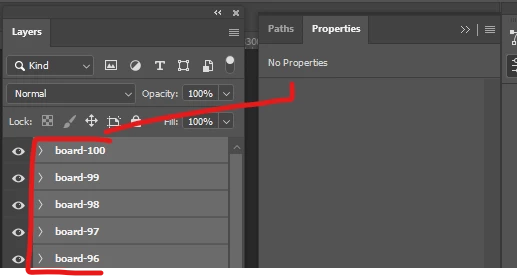
 

EXPECTED
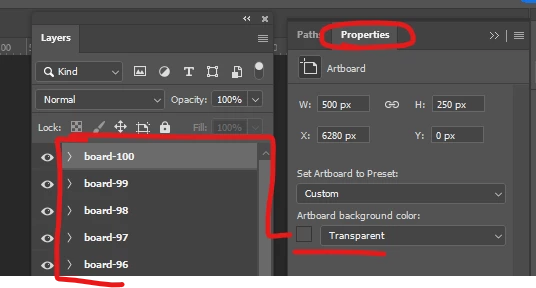


This topic has been closed for replies.
Correct answer BrettN

Just tested this on my end. What I see is that when I have ONLY multiple artboards selected, I get the properties.


The problem is, if those artboards have content of any sort and you use Shift+click to select multiple artboards in the Layers panel, you are selecting the contents of those artboards as well (even when the artboard layer group is collapsed and the contents are not showing). When you have multiple objects selected which do not share the same type of properties, you get the "No Properties" message.


Best solution I can find here is to filter for just the artboards, since Crtl/Cmd+clicking each of 100 artboards would be too tedious. In the top left of Layers you have a drop-down (by default it says "Kind"). Change this to "Name" and type in the name of the artboards (from your screen shots, you should type "board-") into the search field which appears. This will hide and deselect anything which does not have this in the name. Hopefully, that means all non-artboard objects. Once only artboards are selected, then you can group manage the properties.

1 reply

BrettN
Community Manager
BrettNCommunity ManagerCorrect answer
Community Manager
March 8, 2023

Just tested this on my end. What I see is that when I have ONLY multiple artboards selected, I get the properties.


The problem is, if those artboards have content of any sort and you use Shift+click to select multiple artboards in the Layers panel, you are selecting the contents of those artboards as well (even when the artboard layer group is collapsed and the contents are not showing). When you have multiple objects selected which do not share the same type of properties, you get the "No Properties" message.


Best solution I can find here is to filter for just the artboards, since Crtl/Cmd+clicking each of 100 artboards would be too tedious. In the top left of Layers you have a drop-down (by default it says "Kind"). Change this to "Name" and type in the name of the artboards (from your screen shots, you should type "board-") into the search field which appears. This will hide and deselect anything which does not have this in the name. Hopefully, that means all non-artboard objects. Once only artboards are selected, then you can group manage the properties.