
Can not get Patterns Panel to display in Photoshop CC 2019
The problem is:
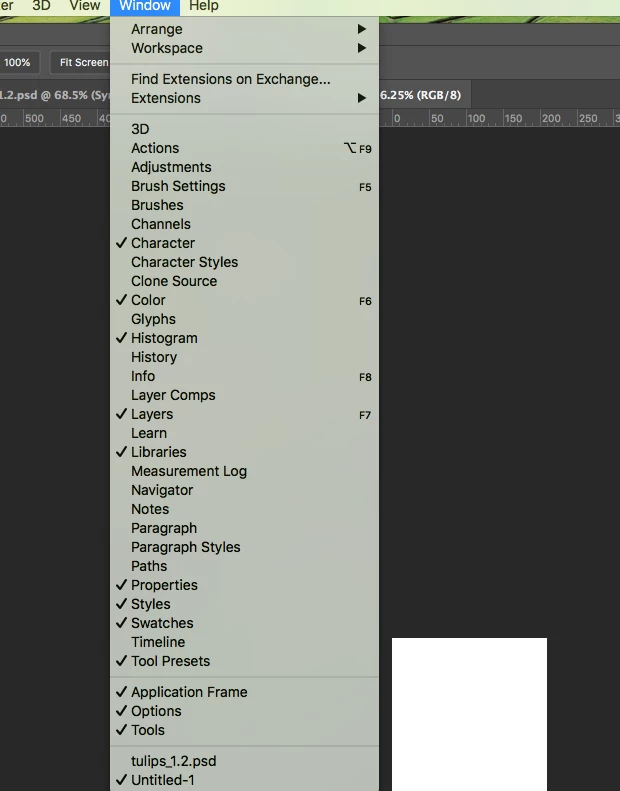
I can not see a Patterns Window option shown in the drop down list from the Windows menu
This set up is:
Mac OS 10.13.6 and Photoshop CC 2019 20.0.9 (using a Symmetry Shop plugin)
I spend most of my graphics time in Illustrator using Symmetry Works and much less in recent versions of Photoshop CC so I am likely to be missing something extremely basic here.
See image below: no option for a Patterns Window
I have been into the Tool Presets to try and get it there.
No joy.
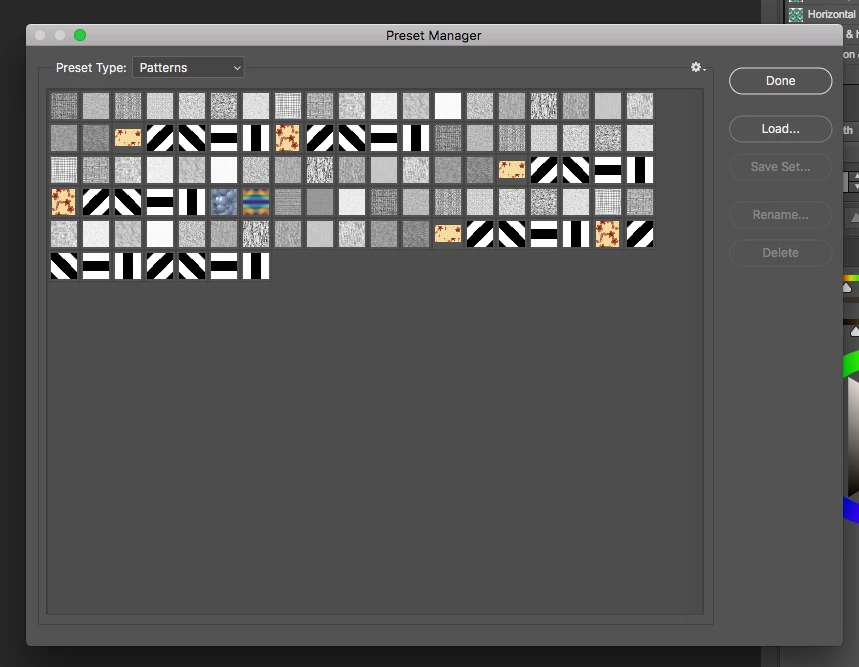
I am able to see Patterns as an option in the Presets Manager (see second image below)
But whatever I click I can not get any Patterns window or options to choose any pattern swatches from my Photoshop workspace after closing this dialogue box.
How do I get these (or any) Patterns into my Photoshop workspace?
I have tried this video
https://helpx.adobe.com/photoshop/using/presets.html
which assumes you have a Patterns window to manage but I don't.
If anyone could please give me any advice I would appreciate it enormously.
Thanks for your assistance.
 AdChoices