
Participating Frequently
December 6, 2020
Answered

Can RAW-File not open in Photoshop

  • December 6, 2020
  • 2 replies
  • 545 views

Yesterday I suddenly couldn't open a RAW file in Photoshop, the following error message appeared: "Could not open 15094.CR2 because there is not enough space to dock it to this monitor. Try to switch off" Open documents as tabs "in the" Preferences / Workspace "panel." I got this error message for the first time. I've been using Photoshop every day for several months and the monitor, an EIZO CS 270, has been in operation for 2 years. Operating system: Windows 10. The PC is 6 months old old and specially built for image processing.

See attached screenshot.

What happened ?
This topic has been closed for replies.
Correct answer D Fosse

That error message makes absolutely no sense. This sounds like corrupt preferences.


First of all, the ACR window doesn't dock, and second, even if it did, there would be ample screen space for it on a 27 inch monitor.


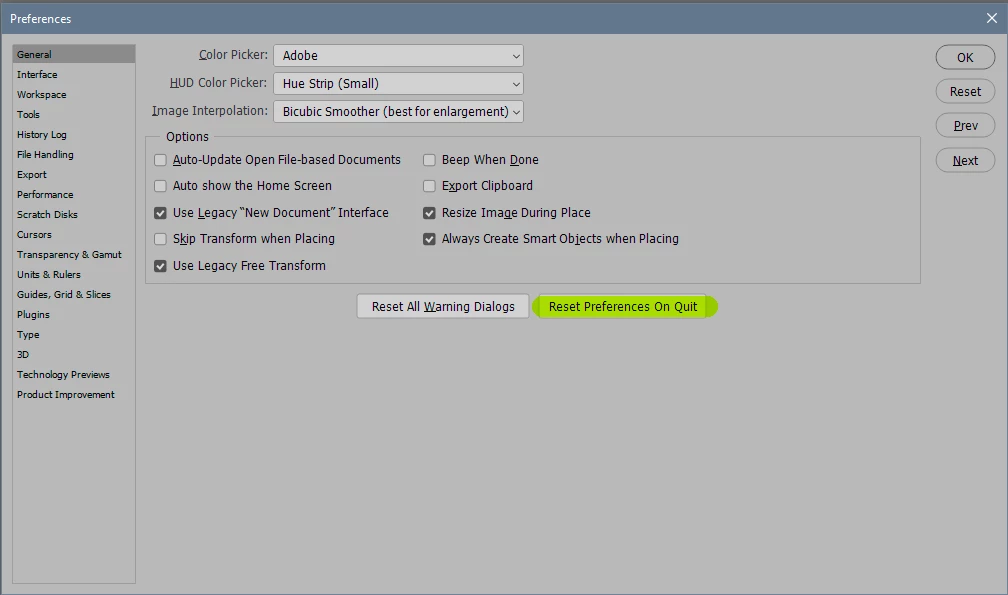
I can't recall where and how you reset ACR preferences, but in Photoshop preferences are reset here. Save out actions, brushes and anything else you will need first!


There's no monitor utility running with Eizo, other than the Colornavigator calibration software, and that doesn't do things like this.

2 replies

D Fosse
Community Expert
D FosseCommunity ExpertCorrect answer
Community Expert
December 6, 2020

That error message makes absolutely no sense. This sounds like corrupt preferences.


First of all, the ACR window doesn't dock, and second, even if it did, there would be ample screen space for it on a 27 inch monitor.


I can't recall where and how you reset ACR preferences, but in Photoshop preferences are reset here. Save out actions, brushes and anything else you will need first!


There's no monitor utility running with Eizo, other than the Colornavigator calibration software, and that doesn't do things like this.

Participating Frequently
December 7, 2020

Thanks for your help !

You´re right ! I also think that by then properly functioning ACR has been damaged and preferences are corrupt.

I had installed presets, downloaded from the Internet the day before, and then the error occured

I think this error message is not from Adobe, the German text is far too bad for that and it wouldn't even be a good Google translation, it's too confused for that.

I've now deleted all the preferences like you wrote and I'm waiting to see if the error occurs again. The other one I have saved, of course. Next days I will try to reinstall one after one of them.
Regards
Just Shoot Me
Legend
December 6, 2020

Your post was moved over from the "Using the Community" forum, which is for getting help using this forum system, to a better forum.


In the future, So people don't have to download the image you have attached, please use the Insert Photos icon found in the Tool Bar of the Post and Reply text entry dialog window as pictured below.
Since you Can't Edit your original post to remove the Attached screen shot Please include the screen shot you attached to a new reply to this conversation by clicking the Blue Reply button under your original post and use the Insert Photos icon in the tool bar.
The Insert Photos icon is this one in the Tool Bar.


Thank you.


I have no idea what that error is or means. Never heard of it before. I guess it could be some type of Monitor utility running on your screen.


As to the base of your question Photoshop Can NOT open RAW files. RAW files first had to be opened and converted in a RAW file Converter program like Adobe Camera RAW.

Maybe your install of ACR got corrupted somehow and that is what is causing the error you are seeing. Don't really know for sure.
I hope this helps. Best of luck to you.

Participating Frequently
December 7, 2020
Thanks.
Yes, my mistake, I wrote Photoshop but I meant Adobe Camera RAW, I open all my RAW-files with it.
I also think that by then properly functioning ACR has been damaged.
 
I had installed presets, downloaded from the Internet the day before, and then the error occured
I think this error message is not from Adobe, the German text is far too bad for that and it wouldn't even be a good Google translation, it's too confused for that.
 
I've now deleted the presets and I'm waiting to see if the error occurs again.
Regards