Participating Frequently
December 7, 2019
Answered

Can't access Kyle's brushes

  • December 7, 2019
  • 20 replies
  • 16447 views

I have a CC subscription, today I wanted some new brushes, clicked on the "get more brushes" link in Photoshop, that landed me to a page where I was required to sign in. 

I signed in, but then the page kept refreshing asking me to sign in even though I'm already signed in and my payments are on time.

Can't seem to get past this page. 

How do I get to the brushes? 

Correct answer Trevor.Dennis

HI Trevor - I am signed in to my work account, can see my avatar and generative credits.  I also had a personal account and thinking that might have been the issue, I've just deleted the personal account - hence this post may be signed by a different name.  I'm hoping this may change the problem, that I keep being asked to sign in, and when I get to the "get more brushes" page, no brushes are offered, just offers to sign up and buy Photoshop which I already have in my work CC account. 

Last night my files weren't syncing to CC but today they are there so maybe it just takes hours to sync?  (just 2 PS fileds).  i appreciate you responding very much.  I'll let you know if the deletion of my personal account helps. 


Goodness.  Are people still having problems with this.  If you still can't find the brush links after scrolling down, then I wonder if it is a cache issue.  Use Ctrl F5 to force a hard refresh and see if that sorts you out.


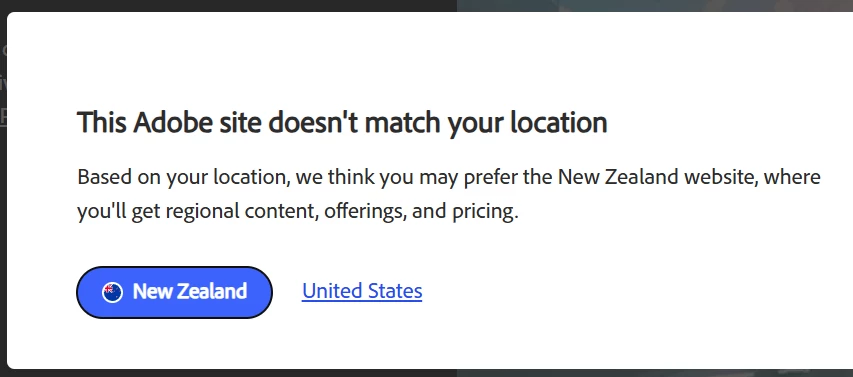
It might also be a country code thing.  I see this when first logging on, and I usually choose America.


Here you go.  Direct links to all of the downloads.  These will download the .abr files to your downloads folder.  I went through and counted, and all told, there are a thousand zillion trillion presets!  There really are close to 700 pressets just in the Mega Pack.  Remember, if you double click the file it will install directly to the main Photoshop brushes panel, but will not be saved to the right click list (clicking on the little cog icon top right corner).  So, much better to place the .abr files directly in the presets folder, or in a Documents/Finder folder and place a shortcut in the preset folder.


https://download.adobe.com/pub/adobe/photoshop/brushes/art_markers.abr

https://download.adobe.com/pub/adobe/photoshop/brushes/Charcoal.abr

https://download.adobe.com/pub/adobe/photoshop/brushes/concept.abr

https://download.adobe.com/pub/adobe/photoshop/brushes/copier.abr

https://download.adobe.com/pub/adobe/photoshop/brushes/crosshatch.abr

https://download.adobe.com/pub/adobe/photoshop/brushes/dry_media.abr

https://download.adobe.com/pub/adobe/photoshop/brushes/gouache.abr

https://download.adobe.com/pub/adobe/photoshop/brushes/halftones_and_screentones.abr

https://download.adobe.com/pub/adobe/photoshop/brushes/impressionist.abr

https://download.adobe.com/pub/adobe/photoshop/brushes/letterers.abr

https://download.adobe.com/pub/adobe/photoshop/brushes/manga.abr

https://download.adobe.com/pub/adobe/photoshop/brushes/rakes.abr

https://download.adobe.com/pub/adobe/photoshop/brushes/runny_inkers.abr

https://download.adobe.com/pub/adobe/photoshop/brushes/spatter_brushes.abr

https://download.adobe.com/pub/adobe/photoshop/brushes/watercolor.abr

https://download.adobe.com/pub/adobe/photoshop/brushes/megapack.abr   *******

https://download.adobe.com/pub/adobe/photoshop/brushes/summer-brushes-2018.abr

https://download.adobe.com/pub/adobe/photoshop/brushes/adobe-winter-brushes-2019.zip

https://download.adobe.com/pub/adobe/photoshop/brushes/summer-brushes-2019.zip

https://download.adobe.com/pub/adobe/photoshop/brushes/spring-2020-update.abr

https://download.adobe.com/pub/adobe/photoshop/brushes/summer-2020-update.abr

https://download.adobe.com/pub/adobe/photoshop/brushes/winter-2020.abr

https://download.adobe.com/pub/adobe/photoshop/brushes/spring-brushes-2021.abr

https://download.adobe.com/pub/adobe/photoshop/brushes/Summer2021.abr

https://download.adobe.com/pub/adobe/photoshop/brushes/Fall-2021.abr

https://download.adobe.com/pub/adobe/photoshop/brushes/Winter-2022.abr

https://download.adobe.com/pub/adobe/photoshop/brushes/Spring-2022.abr

https://download.adobe.com/pub/adobe/photoshop/brushes/Summer-2022.abr

https://download.adobe.com/pub/adobe/photoshop/brushes/Fall-2022.abr

https://download.adobe.com/pub/adobe/photoshop/brushes/Winter-2023.abr

https://download.adobe.com/pub/adobe/photoshop/brushes/Spring-2023-Brushes.abr

https://download.adobe.com/pub/adobe/photoshop/brushes/Summer-Brushes-2023.abr

https://download.adobe.com/pub/adobe/photoshop/brushes/Fall-Brushes-2023.abr

https://download.adobe.com/pub/adobe/photoshop/brushes/Winter-Brushes-2024.abr

https://download.adobe.com/pub/adobe/photoshop/brushes/Spring-Brushes-2024.abr

https://download.adobe.com/pub/adobe/photoshop/brushes/summer-brushes-2024.abr


This is a serious liost of brushes.  You can rename the abr files to make them appear in a more sensible order.  If you want to rename individual presets for the same reason, then you have to export the presets again.  Make sure you have the Search bar enabled, and use that to look for specific presets.  This will only search groups that are open in the main panel, and not the .abr files accessed via the dropdown (little cog).


Way better to cherry pick your favourite presets to a new group, and export it to a new abr file...  and one day I might get around to doing that myself 😞



20 replies

nickyDD
Participant
September 6, 2021

Has anyone been able to fix this?
I am a paid monthly CC user. I'm logged in and unable to view/download any of the brushes. All of the links that have been provided in the thread take me to the same page with the same problem. Chrome & Safari both give me the same problem. 

J E L
Community Expert
Community Expert
September 6, 2021

Just to weigh in, I'm not having any problems accessing or downloading and installing the Kyle brushes using Edge (Windows 10). 

Adobe Photoshop | Download exclusive brushes from Kyle T. Webster


jane-e
Community Expert
Community Expert
September 3, 2021

Tagging @Pete.Green and @J453 

danielleinga
Participating Frequently
July 12, 2021

I have been working with this problme all morning long. I was with adobe support in the contact window. The tecknition, his crue, and manager tried all the could having access to my computer tweeking it changing setting all sorts of stuff, the could not fix the problme. they accessed an account (on my computer) got into Kyle's brushes and I downlowed them from there account. There conclusion; 'Creative Cloud' accounts do not have access https://www.adobe.com/products/photoshop/brushes.html#!&from_ims=true&old_hash=&api=authorize

And that makes sence. When I had just the lightroom + Photoshop account I had no problem accessing Klye's Brushes page.

Participant
September 3, 2021

If this is true, did support have any intention of fixing it? This has been an infuriating process.

jane-e
Community Expert
Community Expert
September 3, 2021


@danielleinga wrote

"There conclusion; 'Creative Cloud' accounts do not have access"


@defaultnpot6pn79c3x wrote:

If this is true, did support have any intention of fixing it? This has been an infuriating process.


It is not true that Creative Cloud accounts do not have access to Kyle's brushes. You do have to have a paid account, not the limited free version.


~ Jane

Participant
February 18, 2021

Hi, I'm also in the loop, sign in etc. Did anyone came across with this?


Participant
May 15, 2021

Yes, me, too! Sign [removed by moderator] Loop. Please fix it Adobe. Please.


Thanks

Chratric

Participant
February 12, 2021

Hi,

I'm having this issue too and I've tried Firefox, Chrome (regular and incognito), and Safari. Nothing works and it just sends me right back to the sign in page after I sign in. I attached a screenshot of the page that it keeps going back to.

Participant
February 4, 2021

Yes, me, too!  I can't get to where I can see the megapacks to download.  Am on a Windows laptop...with Creative Cloud 2021...  

Participant
January 15, 2021

This still doesn't work for me 😕😕

Participant
January 16, 2021

Hi to all,


I have PS 2020 OS 10.13 High Sierra.

I can download some brushes but the one that's most important, Watercolors, won't dowload.
Do I need 64 bits instead of 8 or the newest system like Catalina to download these?

Participant
January 16, 2021

I just resolved the problem by using Safari instead of Chrome...

maybe this tip will help others.

Participant
October 31, 2020

Does not work.. Still having the same problem

Participant
December 21, 2020

December 21, and the problem still exists. Did anyone get an answer to how to download the brushes? 


jane-e
Community Expert
Community Expert
December 21, 2020

Hi @Kaz0D44 

Follow these steps:

https://helpx.adobe.com/mobile-apps/how-to/kyles-brushes-in-sketch.html

If you have an issue, we need details and screen shots so we can better assist.

~ Jane

Angelic_Rocket0D4C
Participating Frequently
September 1, 2020

I've tried everything; it won't work. Fairly unfortunate because I really need these for a project today. Why does it just constantly loop me around to the "Sign In" page regardless of what I do?

Participant
October 14, 2020

What did you do? I'm trying and I get the same error

Participant
August 28, 2020

I tried and it is not working for me either

Participating Frequently
December 7, 2019

p.s. I'm using Google Chrome and I also tried this in incognito mode, same thing happened.

This page just refreshes and doesn't let me do anything else even though I am clearly signed in. Here is the screenshot:


silk-m
Community Expert
Community Expert
December 7, 2019
--Susumu Iwasaki
Participating Frequently
December 7, 2019

Oh my, it worked! Thank you very much!!