HI Trevor - I am signed in to my work account, can see my avatar and generative credits. I also had a personal account and thinking that might have been the issue, I've just deleted the personal account - hence this post may be signed by a different name. I'm hoping this may change the problem, that I keep being asked to sign in, and when I get to the "get more brushes" page, no brushes are offered, just offers to sign up and buy Photoshop which I already have in my work CC account.
Last night my files weren't syncing to CC but today they are there so maybe it just takes hours to sync? (just 2 PS fileds). i appreciate you responding very much. I'll let you know if the deletion of my personal account helps.
Goodness. Are people still having problems with this. If you still can't find the brush links after scrolling down, then I wonder if it is a cache issue. Use Ctrl F5 to force a hard refresh and see if that sorts you out.
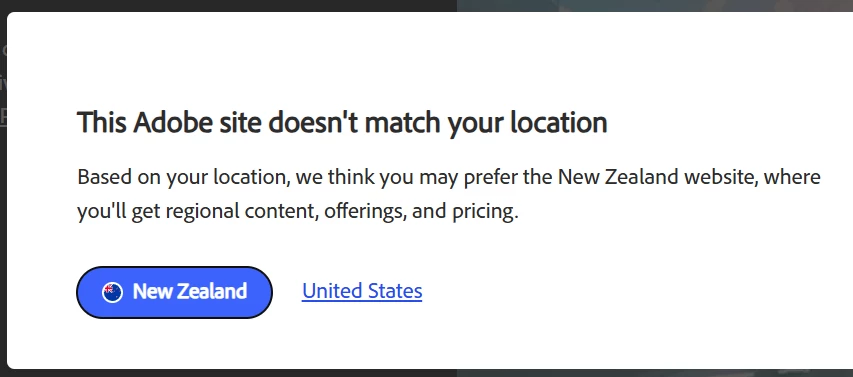
It might also be a country code thing. I see this when first logging on, and I usually choose America.
Here you go. Direct links to all of the downloads. These will download the .abr files to your downloads folder. I went through and counted, and all told, there are a thousand zillion trillion presets! There really are close to 700 pressets just in the Mega Pack. Remember, if you double click the file it will install directly to the main Photoshop brushes panel, but will not be saved to the right click list (clicking on the little cog icon top right corner). So, much better to place the .abr files directly in the presets folder, or in a Documents/Finder folder and place a shortcut in the preset folder.
https://download.adobe.com/pub/adobe/photoshop/brushes/art_markers.abr
https://download.adobe.com/pub/adobe/photoshop/brushes/Charcoal.abr
https://download.adobe.com/pub/adobe/photoshop/brushes/concept.abr
https://download.adobe.com/pub/adobe/photoshop/brushes/copier.abr
https://download.adobe.com/pub/adobe/photoshop/brushes/crosshatch.abr
https://download.adobe.com/pub/adobe/photoshop/brushes/dry_media.abr
https://download.adobe.com/pub/adobe/photoshop/brushes/gouache.abr
https://download.adobe.com/pub/adobe/photoshop/brushes/halftones_and_screentones.abr
https://download.adobe.com/pub/adobe/photoshop/brushes/impressionist.abr
https://download.adobe.com/pub/adobe/photoshop/brushes/letterers.abr
https://download.adobe.com/pub/adobe/photoshop/brushes/manga.abr
https://download.adobe.com/pub/adobe/photoshop/brushes/rakes.abr
https://download.adobe.com/pub/adobe/photoshop/brushes/runny_inkers.abr
https://download.adobe.com/pub/adobe/photoshop/brushes/spatter_brushes.abr
https://download.adobe.com/pub/adobe/photoshop/brushes/watercolor.abr
https://download.adobe.com/pub/adobe/photoshop/brushes/megapack.abr *******
https://download.adobe.com/pub/adobe/photoshop/brushes/summer-brushes-2018.abr
https://download.adobe.com/pub/adobe/photoshop/brushes/adobe-winter-brushes-2019.zip
https://download.adobe.com/pub/adobe/photoshop/brushes/summer-brushes-2019.zip
https://download.adobe.com/pub/adobe/photoshop/brushes/spring-2020-update.abr
https://download.adobe.com/pub/adobe/photoshop/brushes/summer-2020-update.abr
https://download.adobe.com/pub/adobe/photoshop/brushes/winter-2020.abr
https://download.adobe.com/pub/adobe/photoshop/brushes/spring-brushes-2021.abr
https://download.adobe.com/pub/adobe/photoshop/brushes/Summer2021.abr
https://download.adobe.com/pub/adobe/photoshop/brushes/Fall-2021.abr
https://download.adobe.com/pub/adobe/photoshop/brushes/Winter-2022.abr
https://download.adobe.com/pub/adobe/photoshop/brushes/Spring-2022.abr
https://download.adobe.com/pub/adobe/photoshop/brushes/Summer-2022.abr
https://download.adobe.com/pub/adobe/photoshop/brushes/Fall-2022.abr
https://download.adobe.com/pub/adobe/photoshop/brushes/Winter-2023.abr
https://download.adobe.com/pub/adobe/photoshop/brushes/Spring-2023-Brushes.abr
https://download.adobe.com/pub/adobe/photoshop/brushes/Summer-Brushes-2023.abr
https://download.adobe.com/pub/adobe/photoshop/brushes/Fall-Brushes-2023.abr
https://download.adobe.com/pub/adobe/photoshop/brushes/Winter-Brushes-2024.abr
https://download.adobe.com/pub/adobe/photoshop/brushes/Spring-Brushes-2024.abr
https://download.adobe.com/pub/adobe/photoshop/brushes/summer-brushes-2024.abr
This is a serious liost of brushes. You can rename the abr files to make them appear in a more sensible order. If you want to rename individual presets for the same reason, then you have to export the presets again. Make sure you have the Search bar enabled, and use that to look for specific presets. This will only search groups that are open in the main panel, and not the .abr files accessed via the dropdown (little cog).
Way better to cherry pick your favourite presets to a new group, and export it to a new abr file... and one day I might get around to doing that myself 😞

 AdChoices