regmikewall
Inspiring
September 19, 2023
Answered

Can't add an element to My Library in PSCC 2024 on my iMac

  • September 19, 2023
  • 1 reply
  • 1300 views

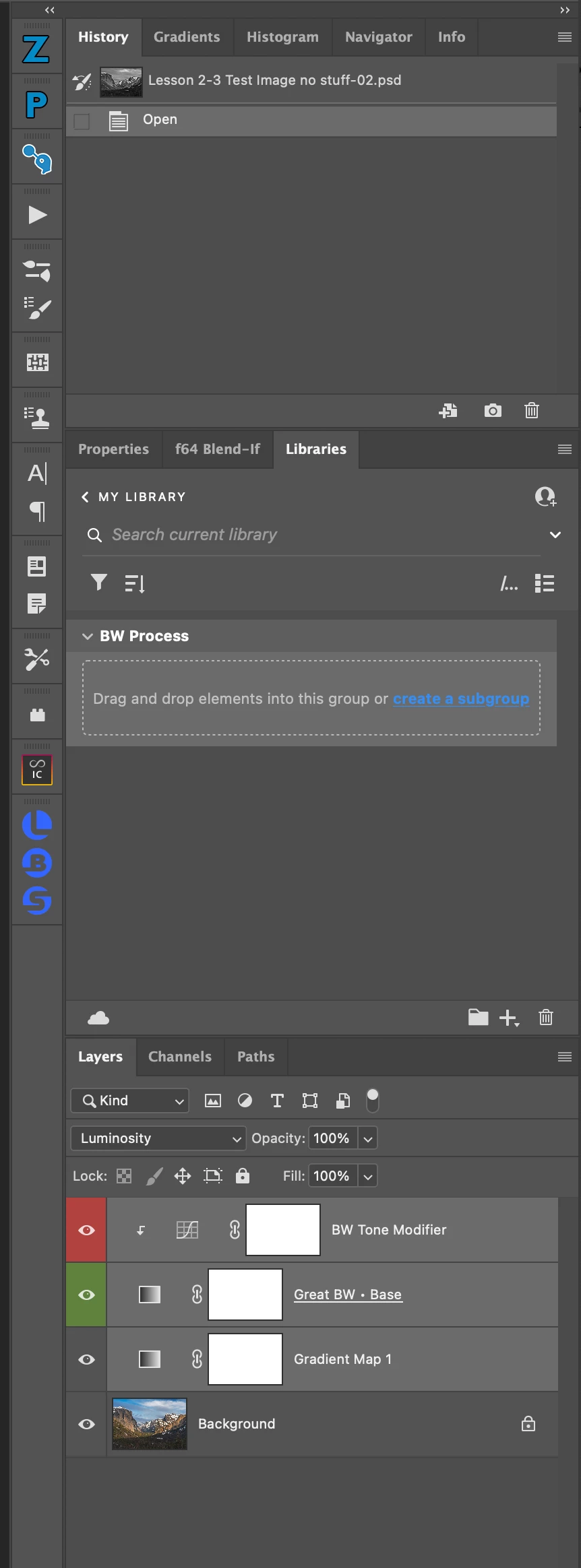
I have an iMac with an M1 Chip running OS 13.5.2 with PSCC 2024.  I created a folder in My Library called BW process, tried to add an element to that new folder, the window with dotted lines around it said to drag and drop.... I tried that and the window does not turn blue like I saw on a video. see attached image.


I have shut down the computer, restarted it several time, no change.


Any Ideas?


Thanks in advance for your help


Michael 

This topic has been closed for replies.
Correct answer Kevin Stohlmeyer

Ok, when I did drag and drop the "BW tone Modifier" element (did not include the "Black Forground element(think that is right) to the picture I got the blue outline of a rectangle with a blue X in the middle on top of my color image. I guess I am being very dense today, how do I get the smart object to apply to the color image.  When I double click the white layer about the color image in the layers palette, I get a cloud symbol in the lower right corner, when i then double click the white square I get the three layes I make into BW Tone Modifier.  I am so confused, thank you for being so patient with me,,,,


Hi @regmikewall here are the steps in specific order:

1. Select the layers you want to add to your library (in this example I have Levels and Color Balance adjustment layers)
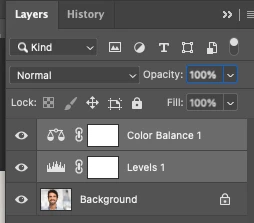
2. Click the + icon in the library and choose Add All as your option.
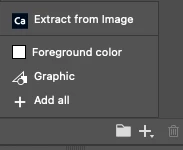
3. You should see a new object added - it auto names whatever the top layer is (color balance 1).

4. Go to your new image. Drag the object from the library onto your image and hit return/enter. This should add the object into the layers panel:
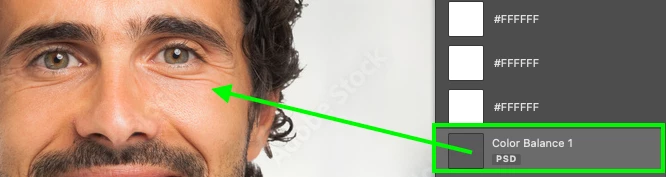

At this stage it wont do anything.

5. Right click the new Library object layer and Convert to Layers.
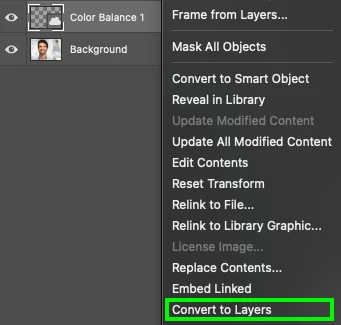
This "Expands" the object giving you your original two adjustment layers in order:
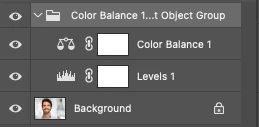
You can rearrange them as you wish at this point.
1 reply

Kevin Stohlmeyer
Community Expert
Community Expert
September 19, 2023

Hi @regmikewall this is a known issue with PS and Library Panels - drag and drop is not currently functional. Click the plus sign at the bottom to add the element.

regmikewall
Inspiring
September 19, 2023

Kevin, thank you for your response,


When I click on the + which of the selections do I use?


Kevin Stohlmeyer
Community Expert
Community Expert
September 19, 2023

Kevin, sorry to be so dense, have never worked with libraries before and when I clicked on all I get the attached image 01, when I double click on the BW Tone Modifier I get image 02, when I click on the smart object I get image 03.  The "BW tone Modifier" is not being applied to the the color image.  I have tried dragging and dropping the BW Tone Modifier to the color image and I get he blue square with diagnols which indicate a smart object, I know I am missing something  What am I doing wrong, 


Hi @regmikewall you dont double click in the library - that opens the orignal source which is of no help.

You should be dragging that item on to a new image to add to the layers and then expand to apply.