
Participant
November 21, 2022
Answered

Can't apply exposure adjustment

  • November 21, 2022
  • 3 replies
  • 7214 views

Good afternoon or evening!
There is such a problem, I can not apply exposure adjustment to the layer.
Any other adjustment is applied, but exposure is not.
It just pops up the properties window.
I'll add more.
Photoshop cc23 default display mode settings
RGB mode


For convenience, I will record a video and attach a link to it.

Demonstration of the problem - CLICKABLE
This topic has been closed for replies.
Correct answer Kirill27245287qn2v

I found a solution to the problem!
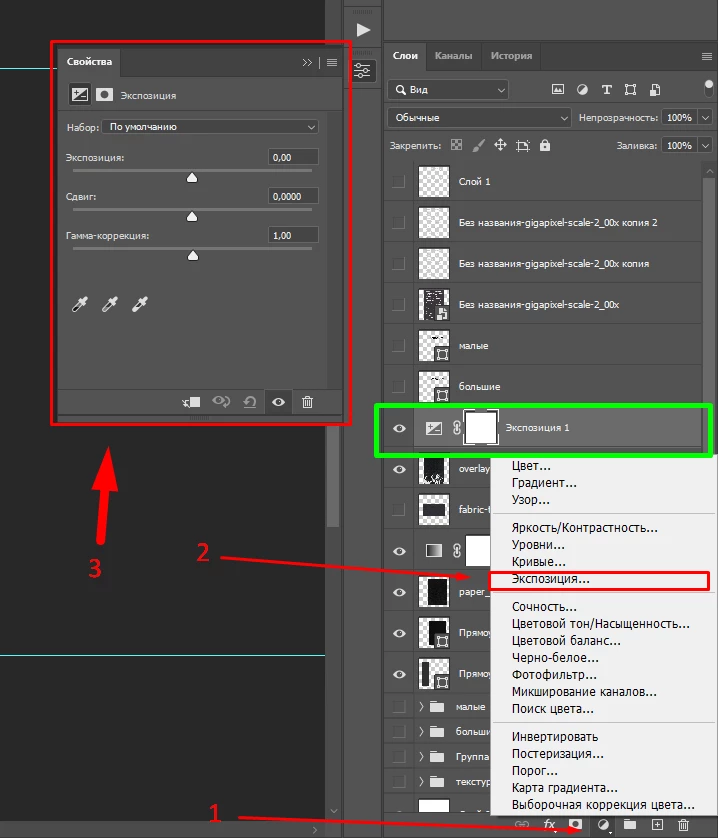
You need to select "Exposure" from the bottom bar, not the top one.
Then the layer with exposure adjustment will be displayed correctly

3 replies

Kirill27245287qn2vAuthorCorrect answer
Participant
November 21, 2022

I found a solution to the problem!
You need to select "Exposure" from the bottom bar, not the top one.
Then the layer with exposure adjustment will be displayed correctly

Participant
May 29, 2024

Nope, still not working for me...

Participant
November 21, 2022

through the tab Image>Correction>Exposure
works, but then it will not be possible to change the exposure

Participant
November 21, 2022

I attach the second video with the project settings.

CLICKABLE