
Participating Frequently
April 27, 2011
Answered

Can't edit a text layer

  • April 27, 2011
  • 2 replies
  • 106481 views

Running CS4. I have a text layer that I am trying to edit but whenever I click on the text (I also have the layer selected) it creates a new layer!

I ran into this before in CS3 and remember making the selection process not automatic or something like that.

Thanks!
This topic has been closed for replies.
Correct answer the_wine_snob

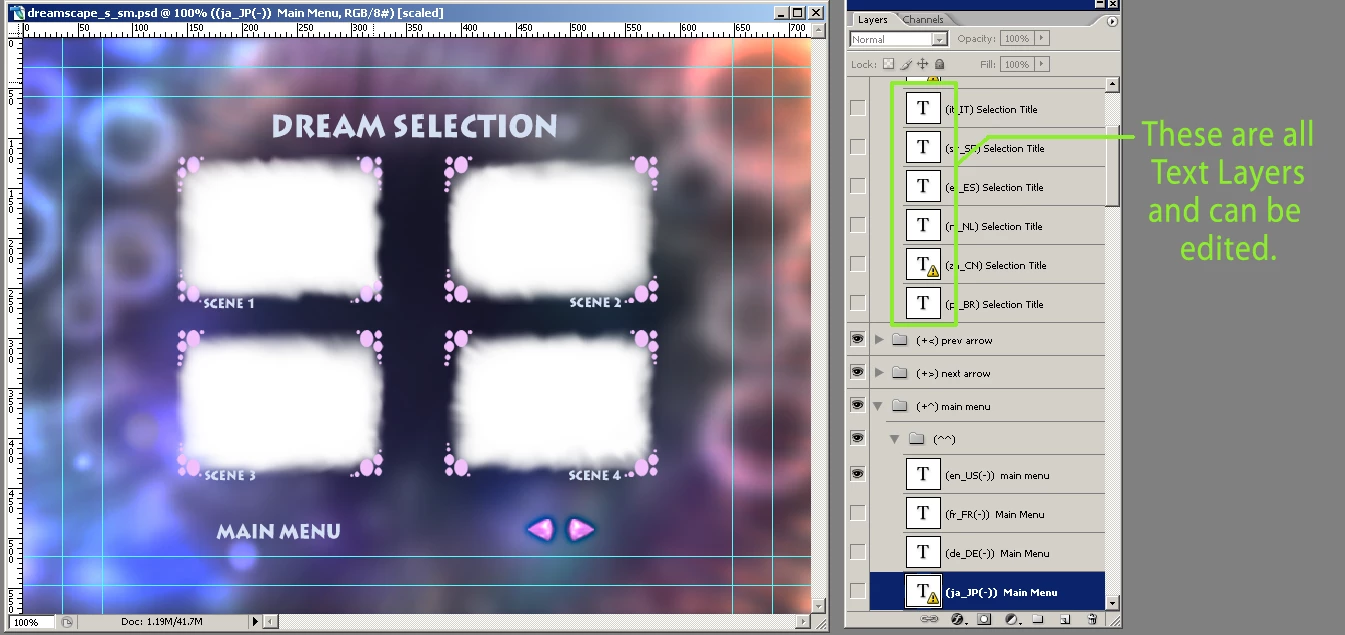
Here is what you should be looking for and at, with regards to Text Layers:

Good luck,

Hunt

2 replies

Participant
August 24, 2020

I have Photoshop CS4 on an iMac and suddenly my saved text layers were no longer editable. Exploring, I determined that there were being rasterized and I found the culprit. Go to Edit > Convert to Profile and make sure "Flatten Image to Preserve Appearance" is off. Save and restart and all shou ld be fine.

Participant
March 6, 2022

I did this and it just deleted all my layers.


jane-e
Community Expert
Community Expert
March 6, 2022


@Kristen2346099793im wrote:

I did this and it just deleted all my layers.


"Flatten Image to Preserve Appearance" is in the Convert to Profile dialog. When enabled, it will flatten your image when you convert to another profile.


Choose Undo or Revert and see if this thread is more useful for you:

https://community.adobe.com/t5/photoshop-ecosystem-discussions/fixed-can-t-edit-text-type-tool-problems-with-photoshop-22-0/m-p/11580086


Jane


the_wine_snob
Inspiring
April 28, 2011

Is there a T inside of a square at the far-left of that Layer?

What happens if you Dbl-click on that T, if there is one?

To the left of the T, are there any "lock" icons?

Perhaps post a screen-shot of your GUI with the Layers Palette open.

Good luck,

Hunt

talbotAuthor
Participating Frequently
April 28, 2011

There are no icons.

the_wine_snob
Inspiring
April 28, 2011

OK, there are no Text Layers, only graphics Layers, with Rasterized text - big difference. Other than with Tools like Clone Stamp, Brush, Eraser, etc, there is no direct editing to those - sorry.

Good luck,

Hunt