Participant
November 22, 2021
Question

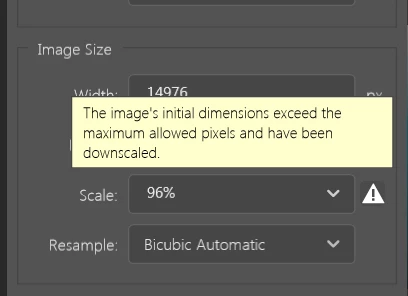
Can't export a 15600x9000 pixels image

  • November 22, 2021
  • 3 replies
  • 1890 views

Photoshop help says "Photoshop supports a maximum pixel dimension of 300,000 by 300,000 pixels per image."  

However when I try to export my image of 15600 x 9000 pixels it scales to 96% and won't allow me to change it stating that the inital dimension were too large.

Version is 5.5.11 

Edition Windows 10 Home
Version 20H2
Installed on ‎13/‎03/‎2021
OS build 19042.1348


This topic has been closed for replies.

3 replies

Legend
November 22, 2021

Exactly what @Per Berntsen said.

Not all file formats support 300k on a side. Photoshop supports 300k on a side, and can save files this size to the Large Photoshop Document format (PSB) but not all file formats support that size.


Export As support 15000px on a side.


Save for Web has a limit of 8192px on a side.


Save a Copy can save a JPEG up to the max JPEG resolition of 65535px on a side. https://en.wikipedia.org/wiki/JPEG 

mmd765Author
Participant
November 22, 2021

OK thanks. I'll give that a try.

Per Berntsen
Community Expert
Community Expert
November 22, 2021

Export (which is primarily designed for creating images for screen viewing) has its own limitations on pixel dimensions, which you have exceeded.

Use Save As instead.