Participant
August 5, 2022
Question

Can't Find Reset Brush Option in Brush Setting Photoshop CC 2019

  • August 5, 2022
  • 4 replies
  • 2104 views

Hi Their I am Using Photoshop cc 2019 i want to reset my brush but i can't find that option
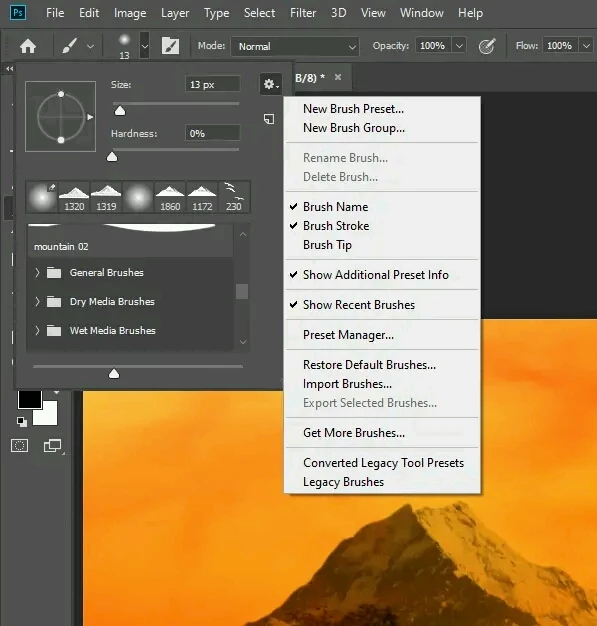
This are options are available in my brush setting. Can anyone help me?

This topic has been closed for replies.

4 replies

Participating Frequently
October 29, 2022

Hope your issue gets resolved. Is the 2019 version better than 2022? guide me regarding this bro. Thanks in advance.

Bojan Živković11378569
Community Expert
Community Expert
August 6, 2022

Perhaps you can drag brushes to trash can and reload them? If I can understand what you want? Maybe you deleted some brush from set and you want it back?

Participant
August 6, 2022

No sir i have created a lots of custom brushes now its lengthy to delete those brushes remove one by one. I just want to delete all custom brushes and want all default brushes.

Trevor.Dennis
Community Expert
Community Expert
August 6, 2022

Select the brush tool and right click inside the document window

Select all the brush groups. Right click and Delete Groups

That will leave the panel empty.

Right click again if you need to reopen the brush panel.

Click on the little cog icon, and chose Legacy Brushes.

Just to be sure, are these the default brushes you are looking for?


Jeff Arola
Community Expert
Community Expert
August 5, 2022

Did you try Restore Default Brushes?


Participant
August 6, 2022

Yes still didnt worked

Jeff Arola
Community Expert
Community Expert
August 5, 2022

Right click on the Brush icon on the left side of the tool options bar.


Participant
August 5, 2022

Didn’t work man i tried, i just want to reset to my default brush

I dont see this options in my setting