
Participant
November 20, 2022
Answered

can't find speech bubble

  • November 20, 2022
  • 1 reply
  • 1428 views

In Photoshop 23.4.1 I'm having trouble accessing shapes to insert in my images. Specifically, I need a speech bubble, but the shapes pull down menu only has wild animals, leafs, boats, flowers. How do I get the the other shapes, specifically the speech bubble? Thank you.
This topic has been closed for replies.
Correct answer Ged_Traynor

Hi

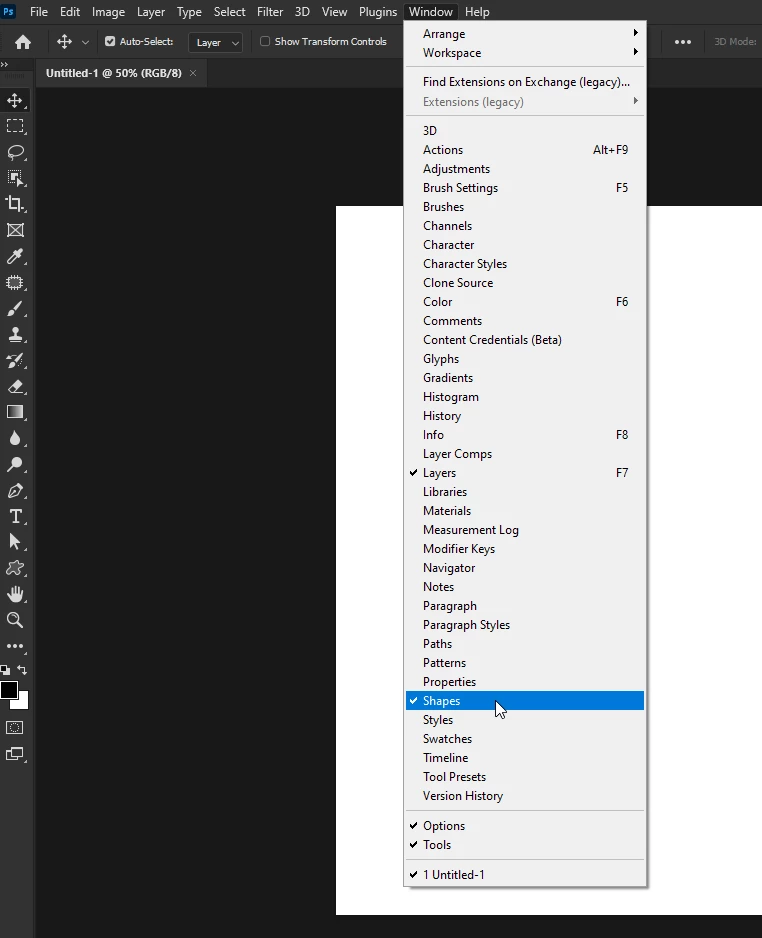
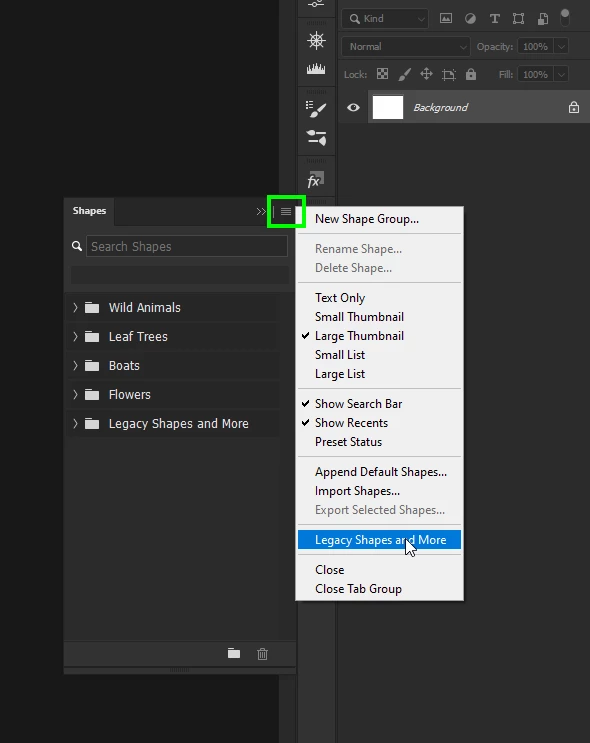
Go to Window > Shapes and from the flyout menu select Legacy Shapes and More


1 reply

Ged_Traynor
Community Expert
Ged_TraynorCommunity ExpertCorrect answer
Community Expert
November 20, 2022

Hi

Go to Window > Shapes and from the flyout menu select Legacy Shapes and More


nakin2353Author
Participant
November 20, 2022
Thank you so much.

*Nancy Akin*
Ged_Traynor
Community Expert
Community Expert
November 20, 2022

You're welcome 🙂