susanb95514217
Participant
March 30, 2016
Answered

can't find the "Make Frames From Layers." in the menu

  • March 30, 2016
  • 6 replies
  • 120655 views

I am working in Photoshop cc trying to make a frame animation, but when I go to the menu in the top right corner of the Timeline there is no option for "make frames from layers". Does anyone know where to find this? I am in Motion workspace.

Correct answer senorita_senor

The problem I had (and that I imagine everyone else is having here) is that when you open the timeline you see a drop down menu:

The interaction pattern that the rest of the Photoshop application has set is that when you select an option in a drop down, that is the final trigger (and if it is not the next action is very explicit) So as a user, I see the drop down, select "Create Frame Animation" (even though it was selected by default), and assume making that selection is the trigger:
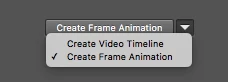
But the pattern here is different. "Create Frame Animation" is actually also a button that I now have to click, even though it looks like its just a drop down menu because that is how I interacted with it.
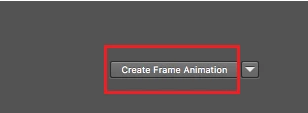
Basically, its just a terrible and confusing user experience that adobe should address and even the help is not helpful. Its shown in the Adobe help that simply selecting the drop down should trigger the creation.
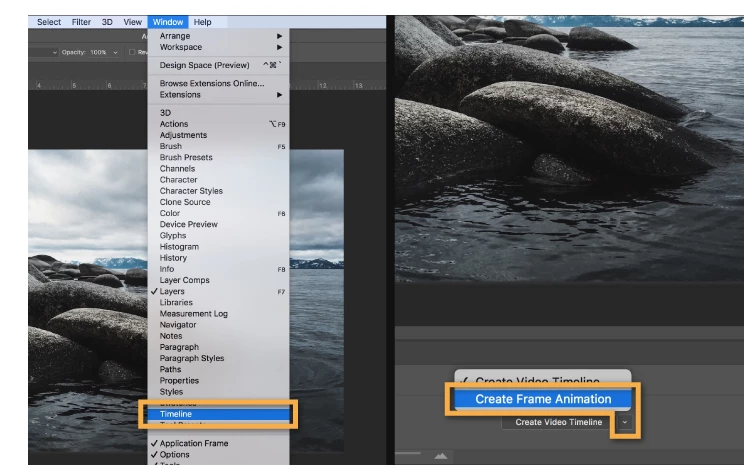

6 replies

Participant
September 16, 2018

I don't want to make an animated .gif, I just want to be able to do what I used to do:  Use an "Action" to make a frame from a picture, background or whatever I had in the layer.  How do I do this?  I feel so stupid, but I just can't do it.  Please give me a step by step instruction or tell me where my old "Action" friend went to???!!!

keerthanar50101685
Participant
November 10, 2017

thanks for the response,

still i am not clear. actually create frame animation(scroll bar) tool is not there after selecting window->timeline.

JJMack
Community Expert
Community Expert
November 10, 2017

I see it in you screen capture. You only have one frame and one layer. You can not step through frames when you only have one frame.  All you need do is create other layers and and the as frames to the animation.   I create  8 layers from you layer each 12.5% the width of your original layer and positions the all to the left.   I the cropped the  image to 12.5% the width of the canvas I the use many frames from layers to add frames to the timeline.   There are many tutorials on the web for creating Frame Animations you should look at some.

https://www.google.com/search?num=50&newwindow=1&biw=1188&bih=837&ei=or8FWqW9IYna0gKLtZ6gDA&q=Photoshop+tutorial+Frame+a…

JJMack
Participant
September 29, 2024

Thank you so much.  That was exactly it; that flow was very unintuitive.  I had to do a bit of searching before coming upon your post.  This question came up quite a bit but replies seemed confused about what was being asked.  I've not seen so much confusion over a step that should have been so simple.

keerthanar50101685
Participant
November 8, 2017

i too facing same issue. create animation frame scroll bar not there in ps c6

please help me out.

JJMack
Community Expert
Community Expert
November 8, 2017

You have one frame made from one layer  the frame has a character  in eight poses.  You want to brake up that layer into eight layers the character in one position and create eight frames.

JJMack
Participant
July 1, 2016

An item that is needed is to point out that you have to have images loaded into the layers before hitting the Create frame animation button to trigger the menu changing so that "Make Frames from Layers" becomes an option. This is very important as it baffled me when I hit the button to change it from video to frame animation and THEN loaded the pictures. The make frames option would not appear at that point, the frame animation button must be hit AFTER loading some images.

Thanks everyone, all the data contributed to me now fully understanding the sequence.

Trevor.Dennis
Community Expert
Community Expert
March 31, 2016

It tends to be there but greyed out without the right criteria.  Now I don't know if this the only way it works, but it is one way.

Have a layer selected, and Create Frame animation

Create your layers.

Free Transform Copy & Repeat is a good way to test this:

Make a shape in the first layer.

Copy the layer, and go Free Transform > Give it a wee rotation and down size it a bit, and OK it

Go Shift Ctrl Alt t which will keep making layers every time you hit it, applying the transformation each time

Select all the layers.

Select the first frame in the Timeline

Make frames from layers should now be usable.

susanb95514217
Participant
March 31, 2016

Thanks for the reply. I guess my first problem is that the layers are not showing up in the Timeline.

Participant
December 18, 2018

Hello susan, i found this problem!! very Easy just double click "Create Frame Animation" in the Timeline and you can see tool bar "Make Frames From Layers" please check video, Hope this help! thanks https://www.youtube.com/watch?v=W_ZDkBW2L7o

JJMack
Community Expert
Community Expert
March 30, 2016

It is in the Timline frame animation panel Fly-out menu.

JJMack
susanb95514217
Participant
March 31, 2016

My layers are not showing in the Timeline and the menu looks nothing like your menu.

JJMack
Community Expert
Community Expert
March 31, 2016

It should. There should be one frame created when you click Create Frame animation in the Timeline panel. Then when you click make frame from layer the other frames will be created.

JJMack