


- Startseite
- Photoshop ecosystem
- Diskussionen
- Can't Import Brushes Photoshop CC 2020
- Can't Import Brushes Photoshop CC 2020

Link in Zwischenablage kopieren
Kopiert
I understand in Photoshop CC 2020 you no longer use the Preset Manager to import brushes. I know that there is now an IMPORT BRUSHES... choice when you look at the menu attached to one's already loaded brushes. But, when I select that and go to my brushes folder, I see no abr files at all.
Am I doing this incorrectly?



 1 richtige Antwort

Just spent hours trying to load new brushes using CC2020. How frustrating. Watched all of the You Tube videos, read all of the Adobe Community Support References. Grrrrrr!!!!
Anyway. It is piss easy. Download the brush set from the internet, then open your File manager/Finder, navigate to your Downloads folder - and - wait for it - double click on the .abr file. It goes straight into your Photoshop CC2020 brushes.


Entdecken Sie verwandte Tutorials und Artikel
 46
Antworten
46
46
Antworten
46


Link in Zwischenablage kopieren
Kopiert

Link in Zwischenablage kopieren
Kopiert
just double click the brush file

Link in Zwischenablage kopieren
Kopiert
I tried double-clicking but it is not in PS when I go to the brush picker. This is beyond annoying.

Link in Zwischenablage kopieren
Kopiert
I thought I was having the same problem. Then I disocvered at the bottom of the brushes panel there's a folder with my new brushes in it.
Link in Zwischenablage kopieren
Kopiert
did you extract the brush file?

Link in Zwischenablage kopieren
Kopiert
Are you kidding?!?!?!? Just that?!?!?! Ugh I really hate Photoshop sometimes....

Link in Zwischenablage kopieren
Kopiert
I wished it was that simple for me. All my brushes are DNG files, therefore, will not convert. I'm waiting on a response from Kelvin Designs now to see what they can do for me.

Link in Zwischenablage kopieren
Kopiert
For those who are still struggling with the brushes not working in the latest 2021 version, I recently just went from 2020 and had no issues. But now, I had to do extra steps. I had to click the Import option for the first time. So if you're still struggling try the Import option.

Link in Zwischenablage kopieren
Kopiert
Could you please help me?

Link in Zwischenablage kopieren
Kopiert
This isn't' even an option in 22.0.0 Photoshop.
Link in Zwischenablage kopieren
Kopiert
Can someone please help me. I try to download a custom "torn paper" brush, but it's compressed, I've spent a total of 13 hours trying to decompress, how do I do that & some files I've managed to accomplish that but they won't transfer to photoshop, please help me. I've watched 44 different videos of the course of 13 hours.

Link in Zwischenablage kopieren
Kopiert
I was having this exact problem. Turns out if you drag the .abr file onto the PS logo in your dock (Mac)*, the brushes are automatically imported.
*I don't know what the PC equivalent would be, sorry!

Link in Zwischenablage kopieren
Kopiert
Bro no way. This did it. Oh my lord I spent forever and thought this thing was crazy. That was so easy. Thank you and I wish wealth upon you and your family

Link in Zwischenablage kopieren
Kopiert
GUYS NOTEEE
SO MANY GUYS ARE DOING THIS MISTAKESS
IAM ALSO DOING THIS MISTAKE
PLEASE EXTRACT BRUSHES THEN YOU EASILY OPENE VIA PHOTOSHOP
EXTRACT HERE OPTION THEN YOU OPEN PS
Link in Zwischenablage kopieren
Kopiert
What do you mean by "Extract"?


Link in Zwischenablage kopieren
Kopiert
Extract from a ZIP file, maybe?
Link in Zwischenablage kopieren
Kopiert
Ah thanks, mine come automatically extracted. For some resason they no longer add themsleves when I click the extracted .abr. The new Monterey is making a lot of other fk-ups on my Mac too.

Link in Zwischenablage kopieren
Kopiert
If anybody still has an issue that Photoshop doesn't recognize brushes in 2022 - I just tried to add brushes to Photoshop and it didn't work (didn't recognize the files), neither is there a Photoshop folder with a brush folder on your PC anymore where you can copy the brushes into.
GUYS - you need to download Adobe Bridge. That solved my problem. You're welcome 🙂

Link in Zwischenablage kopieren
Kopiert
Windows > Brushes
Select New Brush Group from the fly-out menu and name it.
Choose, as required: Append / Import / Get More Brushes

Link in Zwischenablage kopieren
Kopiert
Since I was searching for ages and didn't find the solution online — I thought I might leave it here:
If you have a TPL you have to go a different way that is called " Load Tool Preset " (see in the image attached)
All credit goes to Retro Supply Co. (their brushes are amazing!)
I hope that helps everyone that went astray like I did.
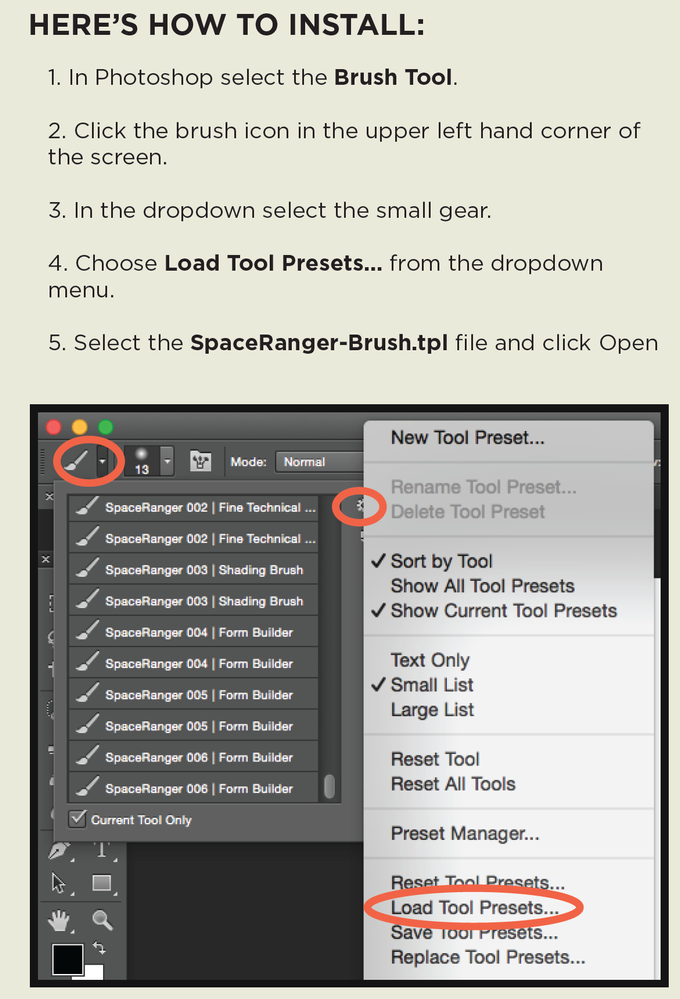

Link in Zwischenablage kopieren
Kopiert
So I'm having an issue similar to this which is related to brushes but not to the way you get the brushes. I have found a pack of brushes for a separate application, and want to import them all into photoshop but theres 600+ of them and can't spend the time opening each one to add them to the brushes folder. I recently wrote an 'app' which allows me to convert as many images as I want to another extension but im unsure what image properties the abr file has to have. The script I am using is imagemagick, found here, and I'm currently using the convert, strip and grayscale tools to accomplish this, although it's still not working. Every time I open the .abr file in photoshop or open it on my desktop it says that the file is not compatible with this version of photoshop. I cant seem to find any brushes on my computer from photoshop that I can compare the output from my app to and was wondering whether anyone had any insight or knew what the properties of the file have to be to launch in photoshop 2020? Thanks!
Link in Zwischenablage kopieren
Kopiert
You need to extract the brush if its a zip, try to open the file inside the zip (i may be wrong).

-
- 1
- 2

Weitere Inspirationen, Events und Ressourcen finden Sie in der neuen Adobe Community
Jetzt ansehen
 AdChoices