
Known Participant
March 16, 2018
Answered

Can't import custom workspace into PS CC 2018

  • March 16, 2018
  • 1 reply
  • 7450 views

I just got off the phone with a very friendly guy from the Adobe Help Desk who spent two hours remotely accessing my laptop to get my Photoshop up and running again after it refused to start up after the latest update.

Everything works again, but I've lost my workspace.

I have a bootable backup drive, so I searched for the .psw file and found it.

I then directly copied this file into my Workspaces folder, hoping that after restarting PS I would be able to select it there. But alas.

Are there any other options for this .psw file?

My workspace file has a ton of custom settings, so I'd rather not start from scratch trying to re-create it.

Your help is greatly appreciated.

O, and I work on a MacBook Pro.

Thanks!

Marsel
This topic has been closed for replies.
Correct answer gener7

I did that (even though the screen dump does not show it), but the preset doesn't show up in my workspaces. And like I said, when I try to import it again, PS tells me that I have already imported it - which is correct. I just don't know why it doesn't show up, or where PS has put it.

Marsel


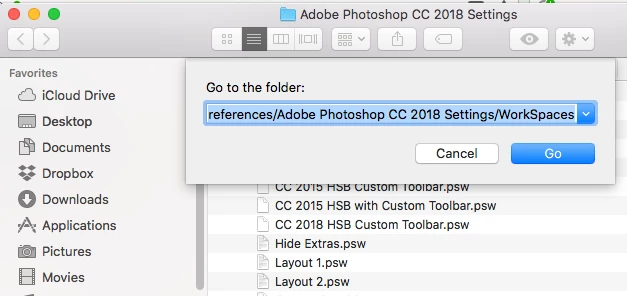
It's in this folder, or should be: ~/Library/Preferences/Adobe Photoshop CC 2018 Settings/WorkSpaces

From the Finder menu: Go > Go to Folder and paste the above path in the dialog.

1 reply

Legend
March 16, 2018

Marsel,

I use Windows and know nothing about Macs. But in Windows the workspace is available when put in the right folder.

Are you sure you found the correct folder?

Known Participant
March 17, 2018

Ronald,

Well, I thought I had found the right folder, and I'm pretty sure it is, but it doesn't work. The folder is called 'workspaces' and is in the Photoshop CC 2018 preferences folder. In there, there's another workspace called 'essentials' and 'photography', and they also have the .psw extension.

I can't find any information on this issue on the internet, so I thought I'd try here.

Thanks.

Marsel

gener7
Community Expert
gener7Community ExpertCorrect answer
Community Expert
March 17, 2018

I did that (even though the screen dump does not show it), but the preset doesn't show up in my workspaces. And like I said, when I try to import it again, PS tells me that I have already imported it - which is correct. I just don't know why it doesn't show up, or where PS has put it.

Marsel


It's in this folder, or should be: ~/Library/Preferences/Adobe Photoshop CC 2018 Settings/WorkSpaces

From the Finder menu: Go > Go to Folder and paste the above path in the dialog.