Participant
August 25, 2020
Question

Can't open DNG file
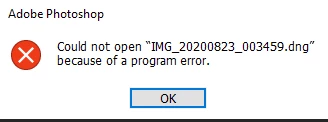
Hi,
I am facing an issue where I can't open a DNG file, it even gives me an error when I try to run it through Adobe DNG Converter. How can i fix this?

Ce sujet a été fermé aux réponses.

2 commentaires

davescm
Community Expert
Community Expert
August 25, 2020

Is this an issue on a single file, which could be corrupt, or on multiple files?

Dave

Boris0101Auteur
Participant
August 25, 2020

Multiple files.
I forgot to mention that I am trying to open RAW photos that have been taken with a phone, I don't know if that makes a difference.

Boris0101Auteur
Participant
August 27, 2020

This is the list for ACR supported cameras which I should have looked at first. I don't see the OnePlus 7 Pro listed.


https://helpx.adobe.com/camera-raw/kb/camera-raw-plug-supported-cameras.html


True, but there are Pixel devices on the list, and I am basically using the same camera as the Pixel devices use, so it should work...
I tried opening a RAW image from the stock camera app, and it somehow works... 

gener7
Community Expert
Community Expert
August 25, 2020

What is your Photoshop version, ACR version and DNG converter version?


Boris0101Auteur
Participant
August 25, 2020

PS version: 21.1.3, ACR version: 12.2.1 and DNG converter version: 12.4